

By Edy Werder, a tech blogger with 20 years of experience in IT infrastructure
Choosing the best RAID for NAS can be a game-changer for home users and small offices looking to maximize data storage efficiency and reliability. With various RAID configurations available, understanding the pros and cons of each option is crucial to making an informed decision.
In this article, I will explore the top RAID technology for NAS systems, providing a clear comparison to help you select the ideal setup for your needs. Whether you prioritize speed, redundancy, or data protection, I have covered you with the latest insights and recommendations.
Network-attached storage (NAS) systems are a godsend for managing and sharing data securely and efficiently. But where does RAID fit in? Think of RAID as your data’s safety net. It’s a method of configuring multiple disk drives in a NAS system to protect and optimize data. By spreading out blocks of each file across different drives, RAID can increase your system’s fault tolerance and performance.
Selecting the right RAID level for your NAS system isn’t just about boosting performance, it’s also about ensuring that your most precious data is protected. The right RAID setup can mean the difference between speedy data recovery after a disk failure and a disastrous loss of key information. Consider your needs: If uptime is critical, if you work with hefty files regularly, or if you can’t risk losing data, choosing an appropriately tailored RAID level is crucial.
Remember, the best RAID for you balances performance, fault tolerance, and cost.
RAID 0:
RAID 1:
RAID 5:
RAID 6:
RAID 10:
| RAID Level | Rebuild Time | Rebuild Complexity | Data Availability During Rebuild | Number of Disk Failures Tolerated | Minimum Disks Required |
|---|---|---|---|---|---|
| RAID 0 | N/A (no redundancy) | N/A | N/A | None | 2 |
| RAID 1 | Quick (mirrored data) | Simple (copy data) | Yes (from mirror) | 1 | 2 |
| RAID 5 | Moderate (parity calculations) | Moderate (parity reconstruction) | Yes (from parity) | 1 | 3 |
| RAID 6 | Long (double parity calculations) | High (complex parity reconstruction) | Yes (from double parity) | 2 | 4 |
| RAID 10 | Quick (mirrored data) | Simple (copy data) | Yes (from mirror) | Multiple (as long as no mirrored pair fails) | 4 |
When setting up a RAID disk array for a NAS (Network Attached Storage), you have several options regarding the types of disks you can use. The choice of disks can significantly impact your NAS’s performance, reliability, and capacity. Here are some considerations:
The Reddit community is an excellent source for getting insight tips from users about which NAS disk to choose. You can find my community here
Expert Insight: According to an article by OWC, “NAS-specific drives like the Western Digital Red or Seagate IronWolf are optimized for the constant operation typical in NAS environments and offer better vibration resistance and reliability” (OWC). Similarly, Petri highlights that “using SSDs in a NAS can significantly improve read/write performance, especially useful in high-demand applications like virtualization or heavy database usage” (Petri IT Knowledgebase).
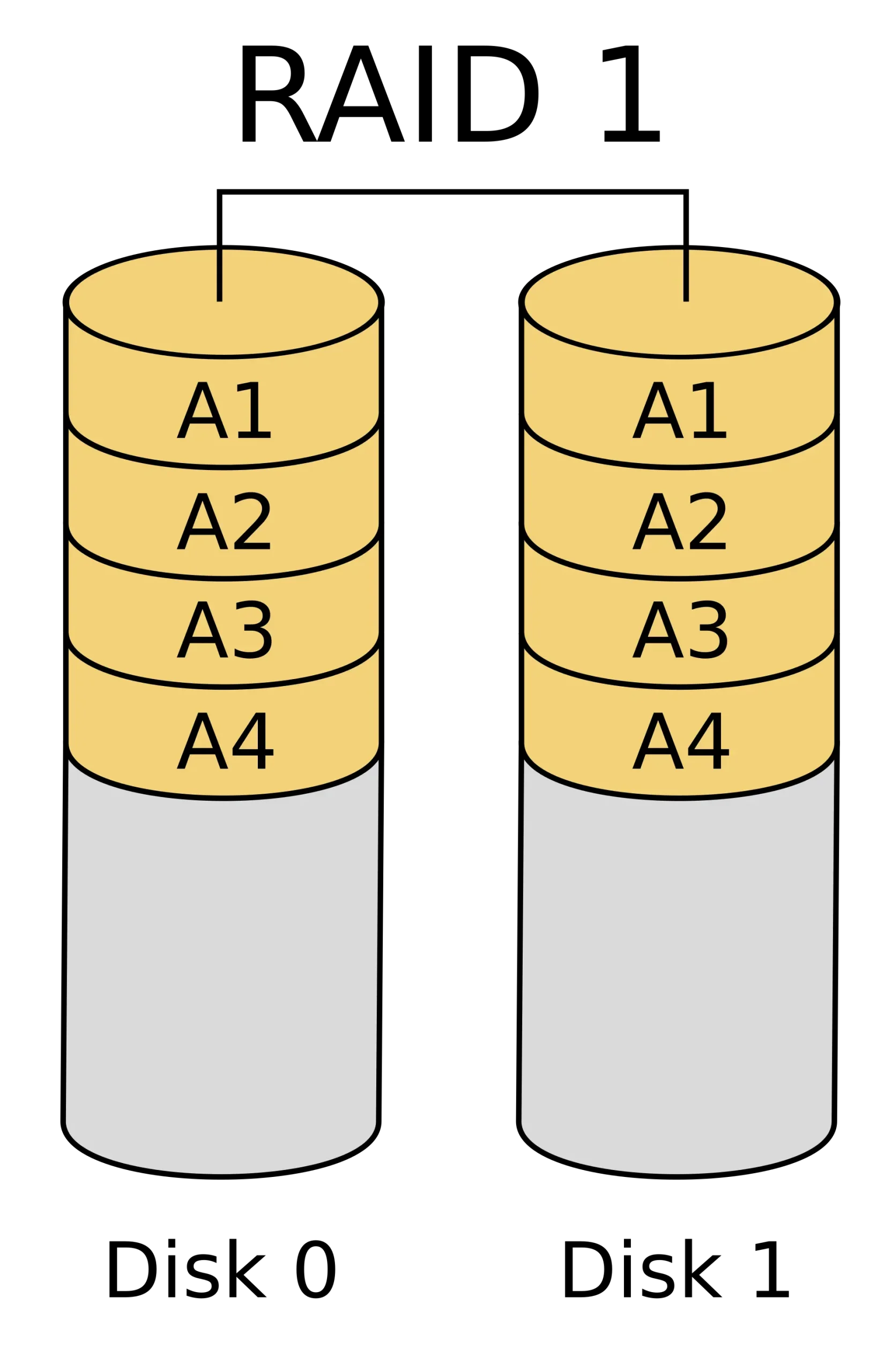
When juggling work documents, personal photos, and digital memories at home, RAID 1 has your back, complementing data recovery software. It’s like having a clone of your data; whatever you save, your NAS saves twice. Imagine having twin disks, where one mirrors the other perfectly. That’s RAID 1 for you – simple, dependable redundancy.
It requires a hardware setup with two hard disks.
Top 5 Features:
Benefits:
Cons:
Best For: Home NAS users who prioritize data safety above all else and are okay with trading off extra storage space to ensure a mirrored backup.
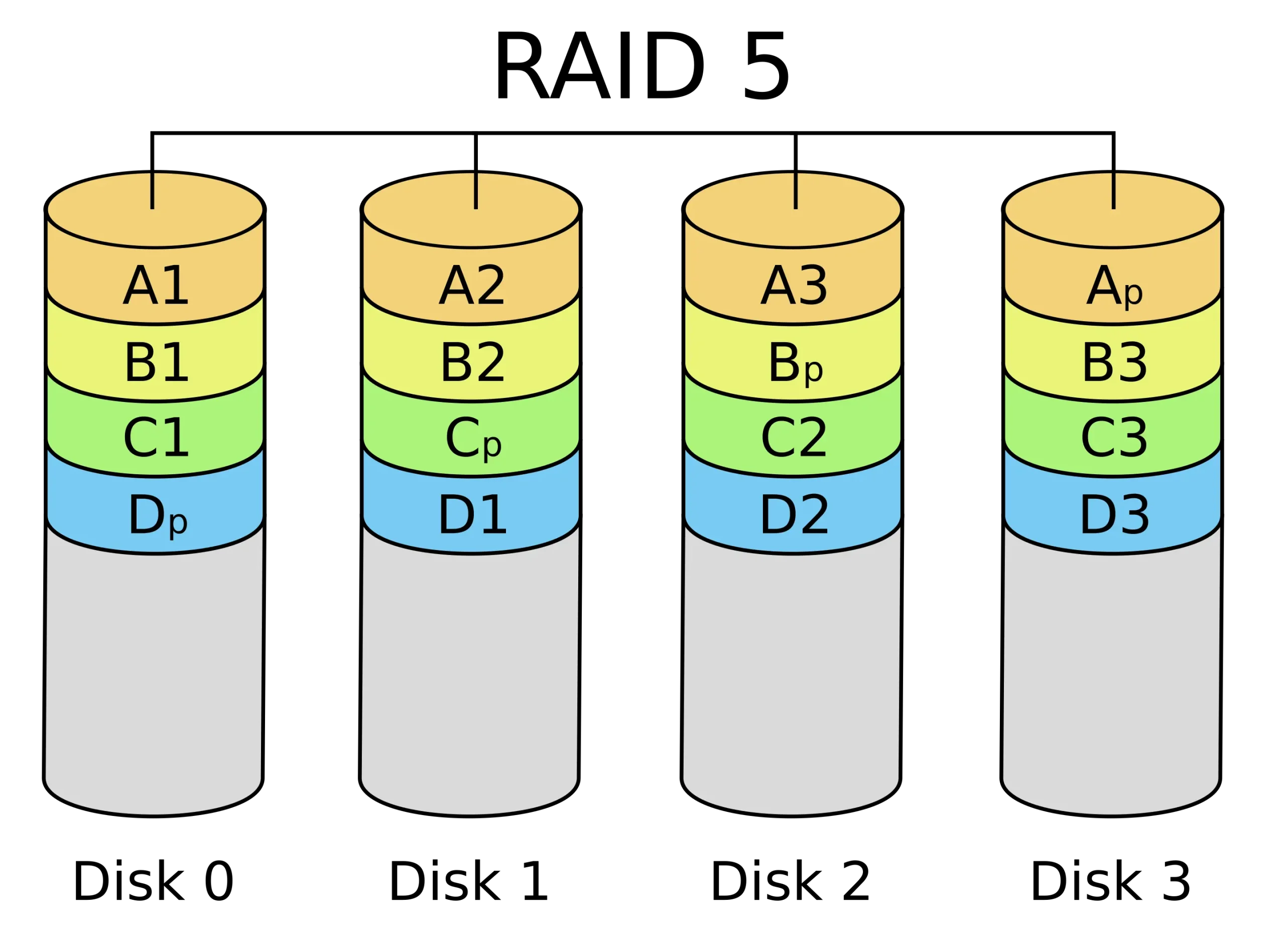
You’ve outgrown the basic backups of RAID 1, and now you’re ready for RAID 5 – the middle ground where performance meets robust protection. With RAID 5, your NAS isn’t just guarding your data against a single drive’s demise; it’s also giving you a boost in read speeds without hogging all your storage space.
It requires a hardware setup with at least three hard disks.
Top 5 Features:
Benefits:
Cons:
Best For: Small office NAS setups and prosumers looking for a blend of redundancy, improved read operations, and efficient storage allocation.
Choosing between RAID 1 and RAID 5 for your NAS system is a common dilemma for home users and small offices. Each RAID level offers unique advantages and has its own trade-offs. RAID 1 is renowned for its simplicity and high data redundancy, making it an excellent choice for those who prioritize straightforward data protection. On the other hand, RAID 5 balances storage efficiency with fault tolerance, offering better overall storage utilization without compromising data safety.

RAID 10, also known as RAID 1+0, combines the features of RAID 1 (mirroring) and RAID 0 (striping). This configuration offers both high performance and data redundancy.
How it Works:
Disks Needed:
Pros:
Cons:
Recommendation:
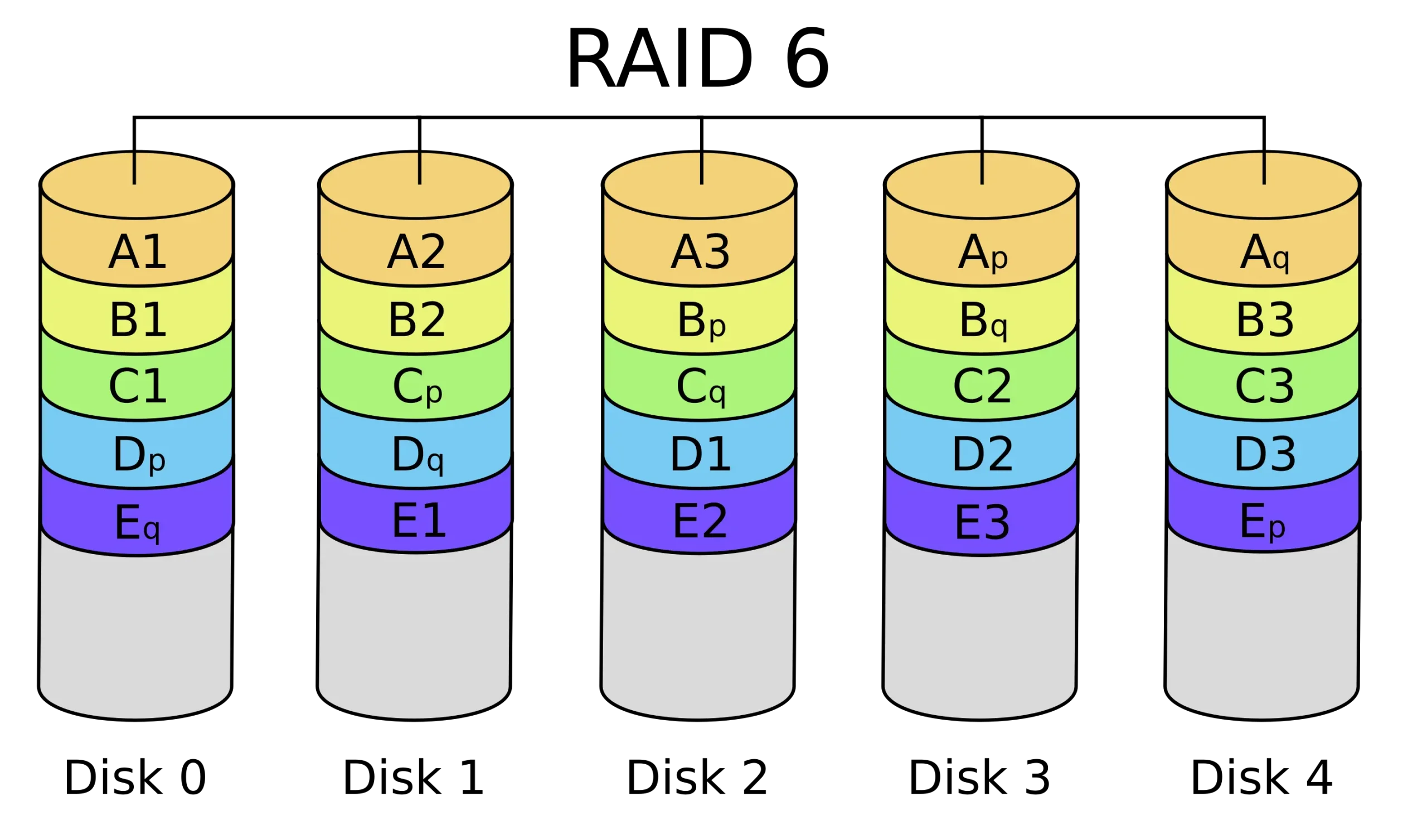
RAID 6 enhances data safety by using double parity, allowing two drives to fail without data loss. It’s similar to RAID 5 but with an additional layer of fault tolerance.
How it Works:
Disks Needed:
Pros:
Cons:
Recommendation:
By understanding the strengths and limitations of RAID 10 and RAID 6, you can choose the most suitable RAID configuration for your office NAS setup, balancing performance, cost, and data protection according to your needs.
When seeking the shining star of RAID configurations for your NAS, the “best” option is often a blend of your specific needs. Generally speaking, RAID 5 frequently takes the crown, especially for NAS devices. It finds the sweet spot by offering redundancy and making the most of your storage space, allowing you to lose one drive without waving goodbye to your data.
RAID 6: Extra Layer of Assurance For those needing an extra layer of assurance, RAID 6 adds another safety net, though it chew up more of your precious storage capacity.
RAID 1: Simple and Reliable Meanwhile, RAID 1 remains the steadfast choice for straightforward mirroring, particularly favored in home NAS setups.
Making the right call involves some soul-searching:
Nail down your answers, and you’ll find your RAID match. Just remember, RAID is not a backup solution, so ensure your data is backed up elsewhere, too.
As IT expert insights emphasize, RAID configurations must be chosen based on specific needs and use cases. RAID 5 offers a balance of speed and data protection, making it a popular choice for general storage applications, while RAID 6 provides enhanced fault tolerance for critical data
Upgrading your existing NAS to a better RAID option is possible and can significantly improve your data redundancy, performance, and storage efficiency. However, the process and feasibility depend on your current setup, your number of disks, and the RAID controller’s capabilities.
If you currently have a NAS with only two disks, your options for RAID configurations are pretty limited:
With 4 to 5 disks, you have more flexibility and can consider more advanced RAID configurations:
Synology Hybrid RAID (SHR) is a custom RAID management system designed to provide flexibility and ease of use, especially beneficial for maximizing storage capacity while maintaining data protection. Here are the key features:
Synology SHR is a user-friendly, flexible, and efficient RAID solution, making it a compelling choice for novice and experienced users looking to optimize their NAS systems.
If RAID 1’s mirror-like protection speaks to your soul and you’re ready to shop for a NAS, let’s discuss the top picks. You’re looking for a system that integrates seamlessly with RAID 1’s simplicity and reliability.
Best Picks for RAID 1 NAS Devices:


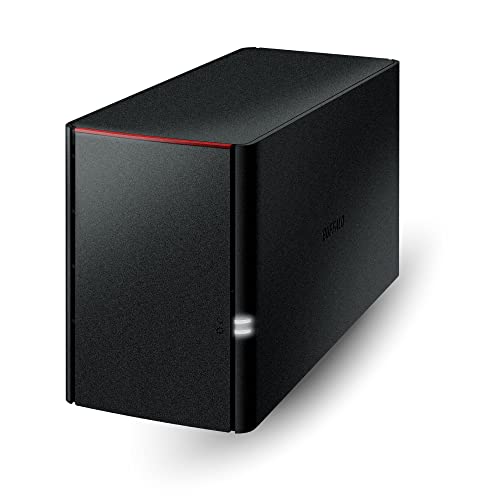
Why They Made the Best List:
For the data protection warriors with an eye on optimized storage, RAID 5 is your battlefield of choice. But the quest for the best NAS for RAID 5? Here’s where the search ends. The ideal candidates marry sleek performance with impenetrable data safeguards.
Ultimate NAS Systems for Running RAID 5:


Why They Made the Best List:
Overall, I recommend a Synology NAS with two bays for RAID 1 or four bays for RAID 5, depending on your budget and needs.
This setup balances performance, storage efficiency, and data protection, effectively catering to the needs of both home and small offices.
I’d love to hear from you. Was this article helpful? Share your thoughts in the comments below. If you prefer, you can also reach me by email or connect with me on Reddit at Navigatetech.
Before you go, if you’re interested in finding the perfect RAID setup for your NAS, you might also want to check out my guide on which Synology NAS is right for you. This article delves into the different models and their features, helping you make an informed decision tailored to your specific needs. It’s a great follow-up read to ensure you’re maximizing your NAS setup’s potential. Happy reading!
Hi, I'm Edy Werder. I write hands-on guides about servers, virtualization, NAS and WordPress, based on setups I run in my own homelab. Real configs and real results, no fluff.
Enjoying the content?

