
By Edy Werder, a tech blogger with 20 years of experience in IT infrastructure
Editor’s Note (May 2025):
Elementor Hosting is now called Elementor Host, and it comes with significant updates. All hosting plans now include Cloudflare Enterprise, staging environments, and improved global performance via Google Cloud. Plans are now unbundled — starting at $8.99/month, they include the Elementor Free plugin, while Elementor Pro is no longer bundled by default. This gives users more flexibility and better pricing. While this review still refers to the former name and structure, the core insights remain relevant. A full update is planned soon.
Welcome to my in-depth review of Elementor Hosting, where I share my firsthand experience hosting my website, edywerder.net. As a seasoned WordPress user, I understand the challenges of finding a reliable, all-in-one solution for designing and hosting WordPress sites. That’s why I turned to Elementor Hosting, a service that merges the robust design capabilities of Elementor Pro with decent hosting features.
In 2023, Elementor significantly enhanced its hosting services, transitioning from what was initially branded as ‘Elementor Cloud’ to the more comprehensive ‘Elementor Hosting.’
These updates aim to streamline the web design process and improve site performance, making Elementor Hosting an intriguing option for WordPress enthusiasts like us. Let’s explore what makes Elementor Hosting stand out and why it might be a good solution for your needs.
Why choose Elementor Hosting for your WordPress site? It offers an all-inclusive platform, meaning you get all the tools to manage your site in one integrated package. With Elementor Hosting, you benefit from top-tier performance, as verified by independent measurements like Google’s CrUX report, ensuring your site runs smoothly and quickly.
Additionally, it includes built-in premium features such as CloudFlare Enterprise CDN, premium SSL, and regular backups, enhancing both speed and security.
Unlike shared hosting, which can sometimes run out of resources, Elementor Hosting provides dedicated resources, ensuring your website always has what it needs to operate efficiently.
Free WordPress website migrations are offered for those looking to switch, complete with support from specialist technicians.
Elementor hosting solution leverages a tech stack designed to maximize the performance and aesthetics of your Elementor-built site.
Plus, you’ll enjoy enterprise-grade security with features like multi-factor authentication (MFA), proactive monitoring, web application firewall (WAF), and comprehensive DDoS protection.
Pros:
Cons:
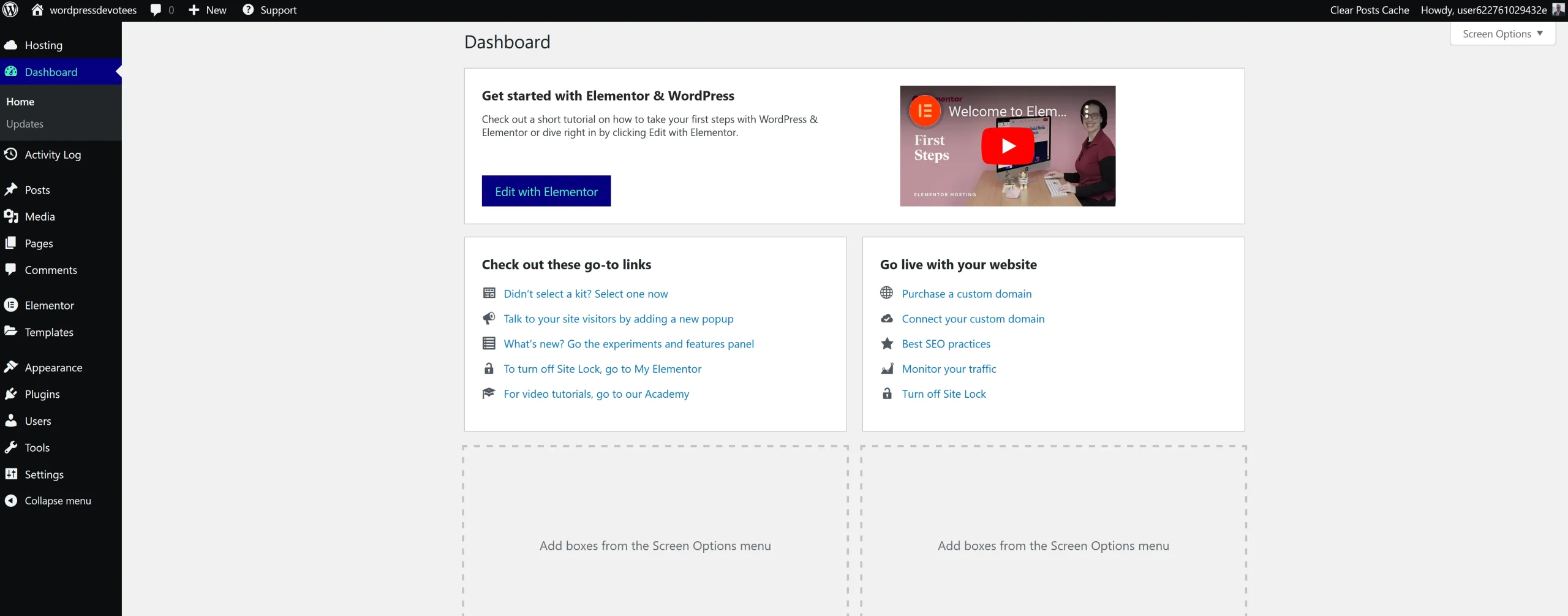
Let’s have a closer look at the features you get.
The package includes the award-winning WordPress page builder plugin, which saves you the hassle of purchasing an extra license and provides a powerful and intuitive tool for effortlessly creating stunning web pages for your website.
Please read my full Elementor review, “Elementor Pro Review 2024: Is Elementor Pro the Best WordPress Website Builder?“
Comprehensive security measures include integrated DDoS protection and a robust web application firewall, providing a solid defense against malicious cyber attacks.
Experience peace of mind with the comprehensive backup solution. Take advantage of daily auto-backups, providing reliable data protection for up to 14 days. In addition, you can initiate on-demand restoration whenever you need it. For those who prefer a more hands-on approach, the system also offers the option for manual backups, allowing you to have full control over your data security.
SSL certificates are crucial for ensuring secure communication and safeguarding sensitive information through robust encryption.
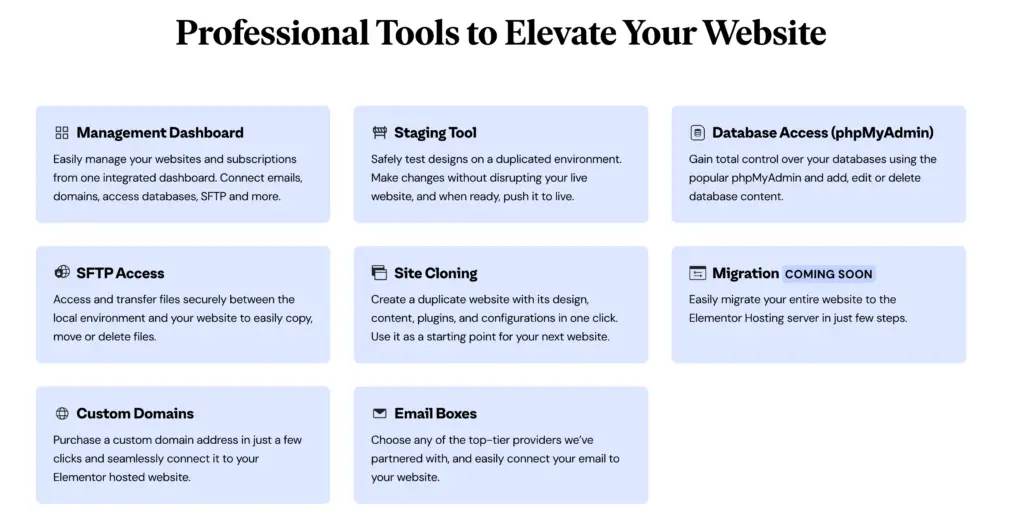
Develop your website with complete freedom, working on it behind the scenes until it’s perfected. Unlock its potential whenever you feel ready to unveil it to the world.
Ensure designs are securely tested in a duplicated environment. Modify your live website without interruption; seamlessly deploy to the live version once it’s ready.
Experience complete control of your databases with the widely used phpMyAdmin. Seamlessly manage your database content by adding, editing, or deleting data.
Effortlessly replicate a website with its design, content, plugins, and configurations in just one click. Utilize it as a launchpad for your upcoming website, giving you a head start in the creation process.
Effortlessly manage files with utmost security by seamlessly accessing and transferring them between your local environment and website. Easily copy, move, or delete files conveniently and safely.
Elementor hosting has a 4-tier pricing plan for their service.
The four tiers are Lite, Basic, Business, and Grow.
The pricing tiers are designed to help users select the plan that best meets their needs, allowing them to pay for only what they require.
The plans differ between website, storage, bandwidth, and monthly visits. Furthermore, all plans include backup, SSL, CDN, and premium support.
Of course, each tier includes the award-winning Elementor Pro page builder.
Elementor Hosting now includes a staging environment, which allows users to create and test pages without affecting the live website.
Each package is backed with the standard Elementor 30-day money-back guarantee.

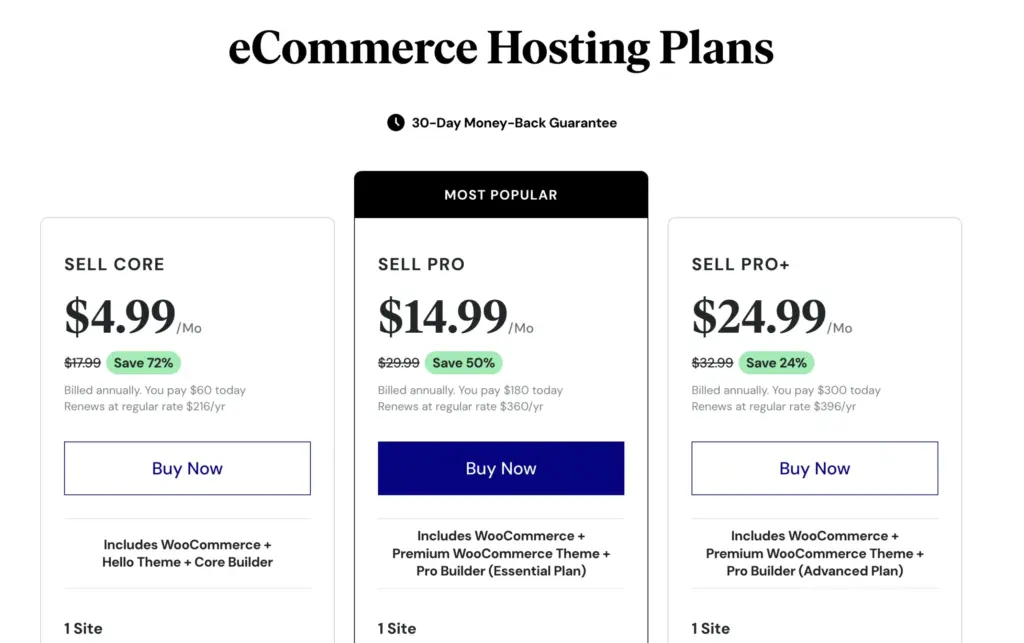
In addition to WordPress hosting, Elementor extended the hosting offer to eCommerce hosting (new in June 2024). You can choose between three pricing plans (Sell Core, Sell Pro, and Sell Pro+).
You get a ready-made package with Elementor Pro and Woocommerce pre-installed, and in the higher plans, the e-commerce theme Shoptimizer.
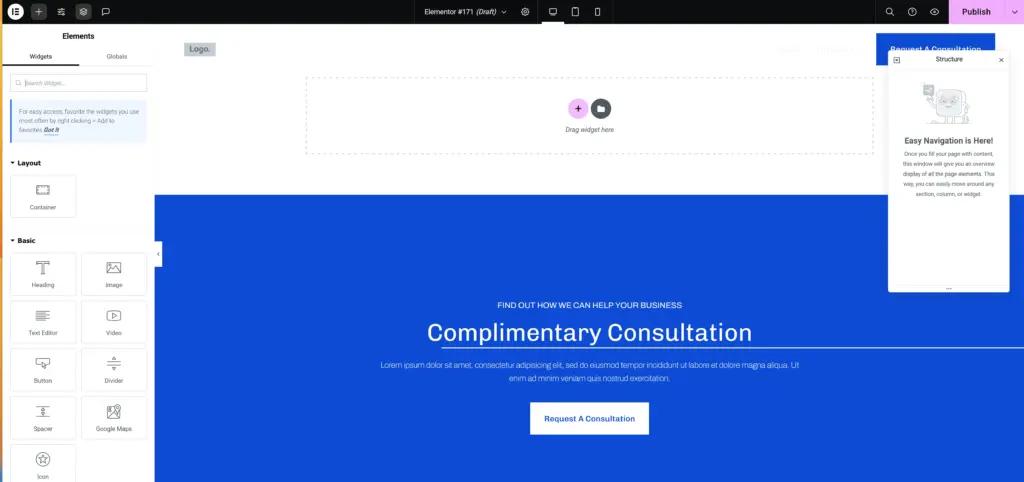
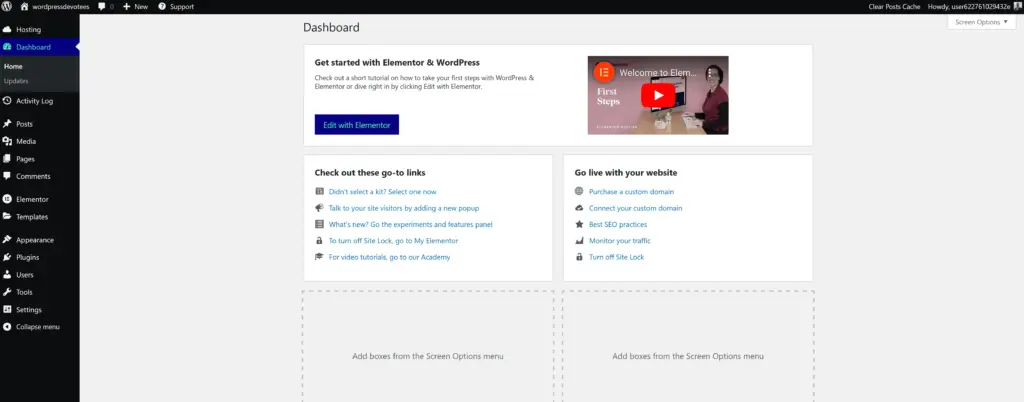
I recommend watching this video from Elementor. It shows how to set up and create a WordPress website with Elementor hosting.

It is built on the Google Cloud Platform. And all the top-notch websites use it for its high reliability and security.
They’re hosted on servers in Belgium. The Elementor Cloud handles all server maintenance, so you can concentrate on developing websites.
Experience exclusive, Enjoy-the-clock premium support with convenient chat or email options that ensure round-the-clock assistance. Whether you have queries, need guidance, or require technical assistance, you can access Elementor chat support directly from the hosting dashboard. Simplify your experience with prompt and reliable support whenever you need it!
From my personal experience, I have found that Elementor chat is quite responsive and usually responds within a few hours. However, it is important to note that the initial response is typically a standard, first-level support answer that aims to gather some basic information. It may refer you to relevant knowledge base articles for further assistance.
Nonetheless, if you reply to the initial email, you can request second-level support, wherein a dedicated support analyst will address your queries. This additional level of support ensures a more thorough resolution to any issues you may face.
All in all, I would say that Elementor’s support is generally quite good. However, achieving complete satisfaction may sometimes require engaging in a second round of support interactions to address all concerns.
Not! The fixed subscription must be paid annually, offering a comprehensive range of bundles within their plan.
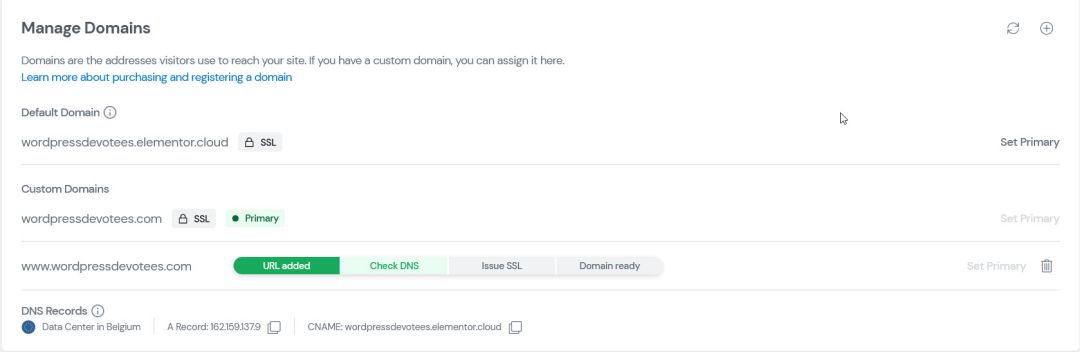
You can quickly add a custom domain connection for your cloud website under the My Elementor dashboard. Here’s how.
Furthermore, you’ll get an SSL certificate for your website. Elementor Cloud will automatically assign it to your domain name.
In the end, when your custom domain is ready, you’ll receive an email.
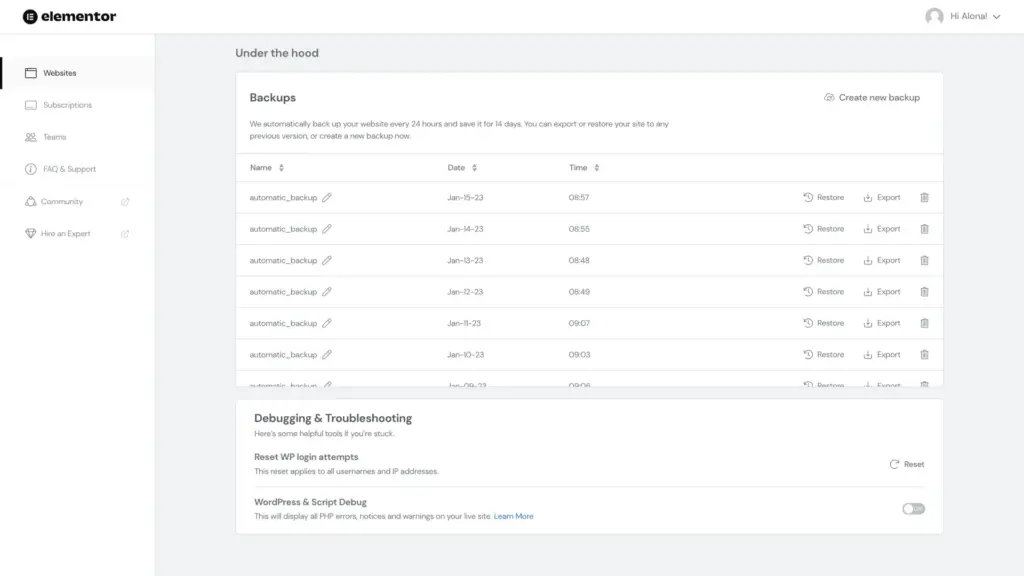
Yes, you can back up your website. Follow these steps, and you’ll be good to go.
Also, Elementor will automatically back up your site every 24 hours. The automatic backups are listed.
Elementor offers import and export tools so you can migrate your website quickly. And here is how you can do it.
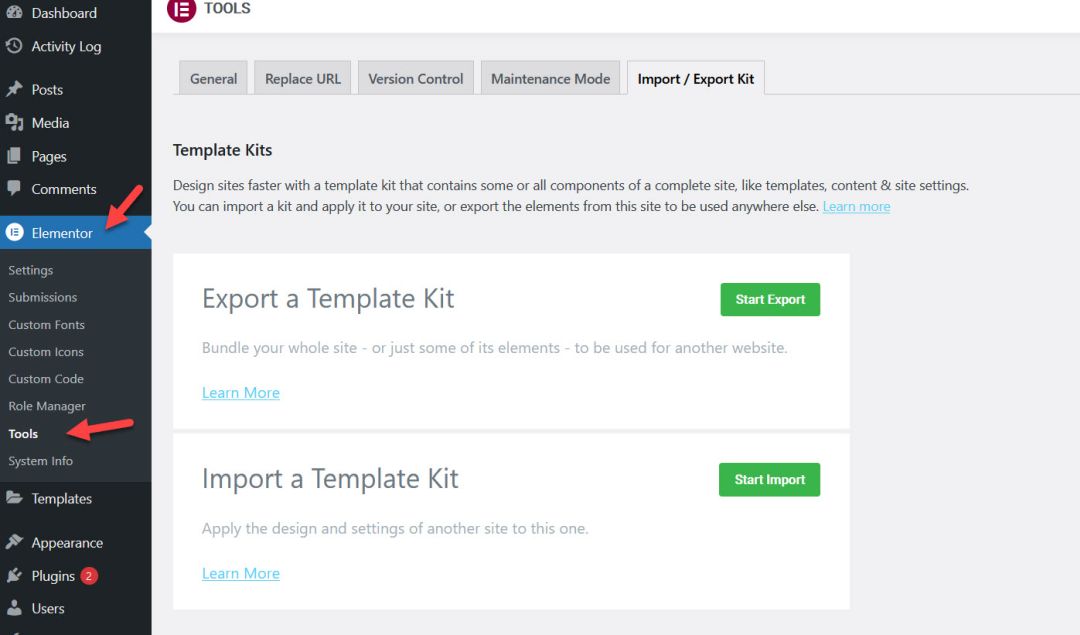
So, you will now need to switch to the new hosted account.
When it’s all done, it directs you to your website dashboard. That’s it; you’ve just migrated your Elementor website to the Elementor cloud.
An Elementor hosting website, on the other hand, provides a comprehensive solution that combines all the features of Elementor Pro with WordPress installation and hosting. With this integrated package, you can set up your website effortlessly, saving valuable time and effort.
In contrast, an Elementor plugin only grants access to its exceptional features and requires separate WordPress hosting and installation. While it offers flexibility, it does not include the seamless setup convenience of the Elementor hosting website.
When choosing Elementor Hosting, you benefit from the preinstalled Hello Theme from Elementor, which is designed to deliver a clean, lean, fast website, optimize SEO, and enhance user experiences. This out-of-the-box theme can be customized to suit your desired aesthetic, ensuring maximum design freedom.
However, if you prefer to use Elementor Pro with other themes, I highly recommend considering the Kadence, Blocksy, or Astra themes. These options provide excellent compatibility and offer diverse features to elevate your website’s performance.
The Kadence theme, paired with Elementor Pro, offers an exceptional solution for those seeking advanced blocks and functionalities to enrich their website. Additionally, Blocksy and Astra’s themes are worth considering as alternative options, each providing unique benefits and customization possibilities.
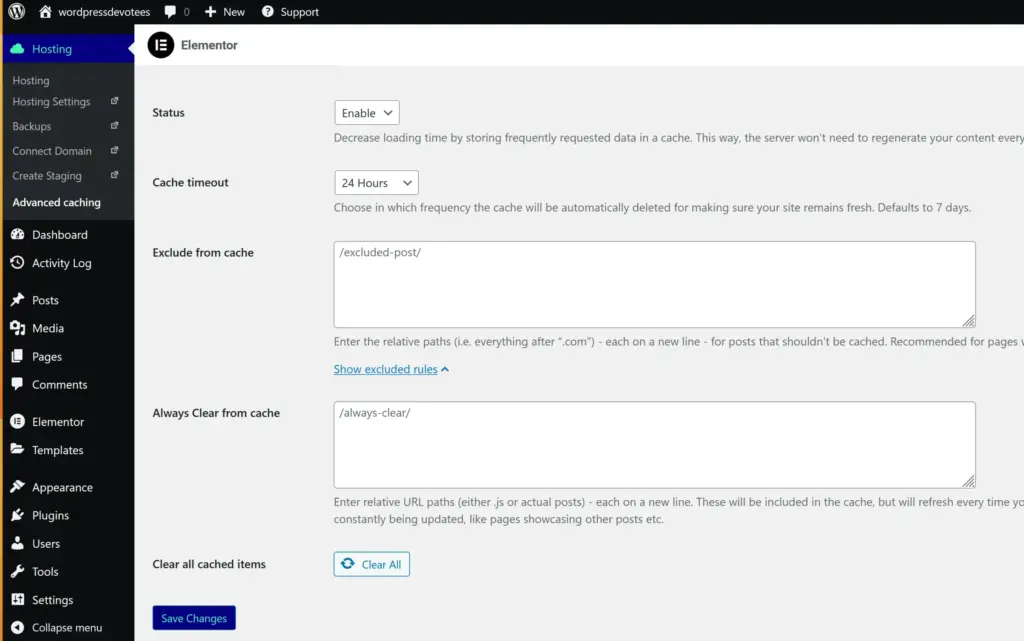
Elementor offers new advanced caching features, which allow you to improve user experience and search ranking with lightning-fast loading times.
Advanced Caching enabled, the latest HTML content and static files (JS, CSS, images, and videos) can be cached and delivered from Cloudflare’s 285+ worldwide locations. In addition, you have complete control over which pages should or should not be cached. For instance, if you want the homepage and product pages to load faster but don’t need blog posts, those pages can be excluded from caching.
This feature is easily managed through Elementor users’ WordPress dashboard under Hosting > Advanced caching, where all cache settings can be enabled/ disabled or modified. So what are you waiting for? Get ready to boost your website performance with Advanced Caching!
Elementor Cloud is a fantastic alternative for web agencies that want to concentrate on creating a superior site for their clients. Once you’ve determined your options, selecting a hosting provider for the website is easier. It also makes it much easier for the customer to take possession of the project after it’s finished.
Elementor Hosting will allow Elementor to expand its user base with this comprehensive solution. It will aid in strengthening its market position, mainly because
WordPress is adding more and more Gutenberg Blocks with Full-Site Editing (FSE). FSE can potentially replace page builders like Elementor and Div in the future. It seems like Elementor’s clever way of staying ahead of the curve is by integrating CMS tools, popups, and design functions.
I think it is Elementor’s way of staying ahead of the curve.

Elementor Hosting is an exciting development, and I am curious how it will evolve.
It can potentially become a one-stop solution for website creation, including hosting, domain registration, email, and more.
Elementor has a list of plugins that do not work with Elementor Cloud. Here is a list of a few of them.
Visit this page to see the complete and updated list.
Elementor confirmed these features at a webinar for the product launch to developers in the coming months.
Yes, Elementor Cloud hosting is an excellent deal. You get all the Elementor Pro features, hosting, security, backups, and updates in one place. Plus, it’s built on the reliable and secure Google Cloud Platform with CDN (Content Delivery Network) from Cloudflare.
While the price may appear high, consider this perspective: if you were to purchase Elementor Pro, the license alone would cost $59 per year. And that’s without factoring in expenses for web hosting or a domain name.
I recommend Elementor hosting for beginners who want to built their first website. It’s not that perfect package in terms of speed
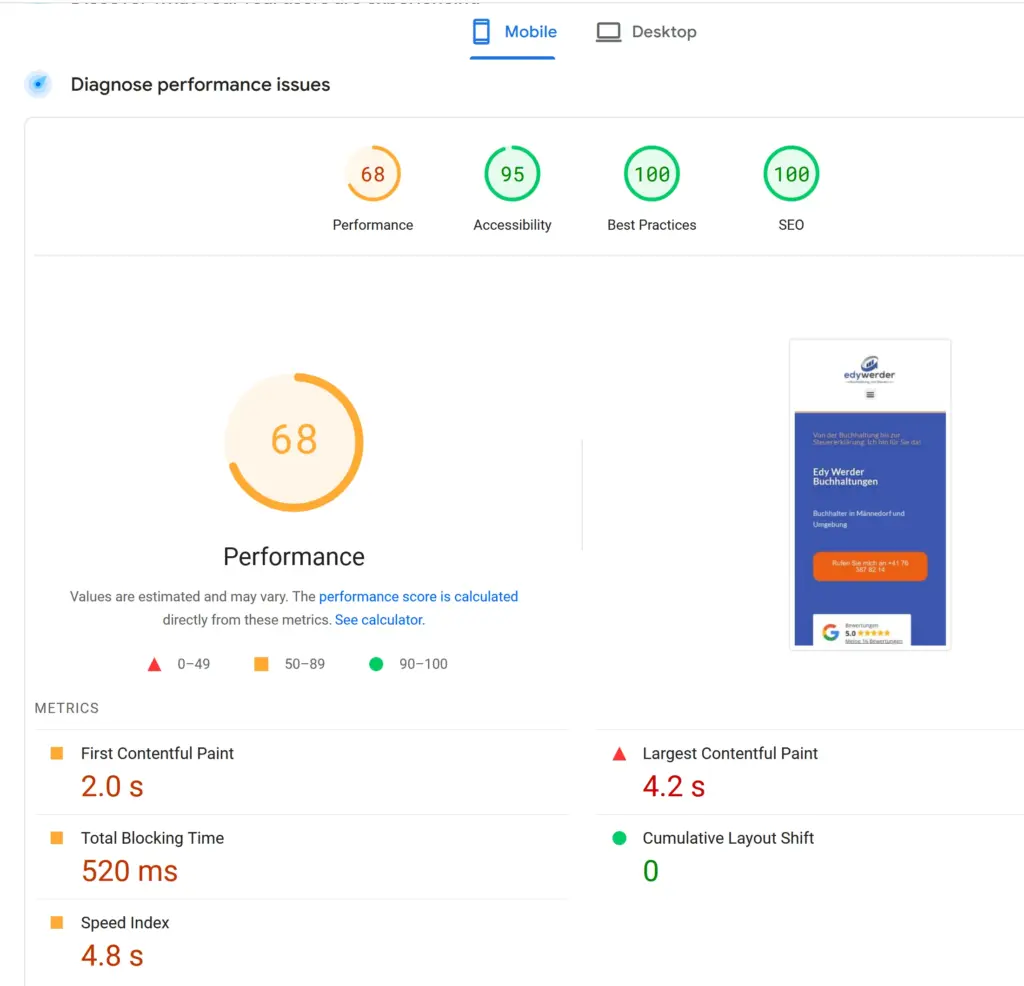
Here is my test result for the Google page speed score mobile. The website I tested is my personal site https://edywerder.net
The speed index of 4.8s is relatively weak.
I installed the WP Rocket cache plugin and tweaked it. The results are a lot better. The speed index of 2.3s is good. However, the overall score is not that great.
For both tests with and without the WP Rockets plugin, I have enabled the Elementor caching.
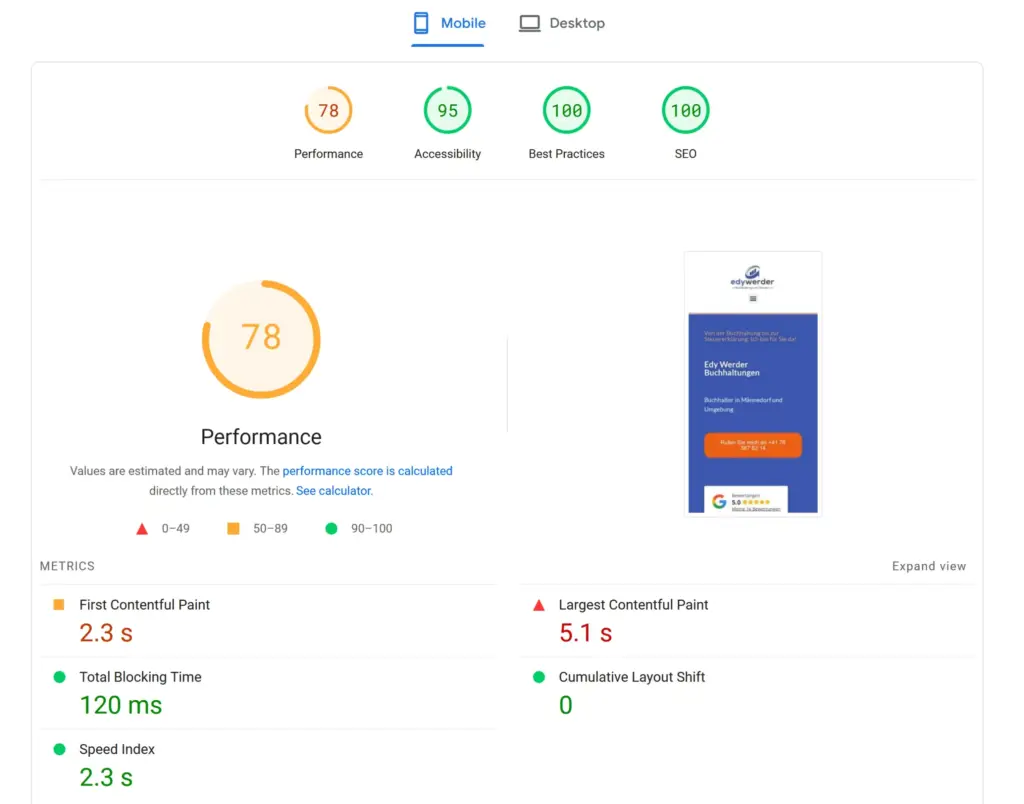
Of course, the results may vary depending on how the website was built. I’m using Elementor containers and tried to avoid child (nested) containers.
Based on my experience with WordPress hosting, I doubt that Elementor’s eCommerce hosting performs better. I would test it thoroughly, which is possible with the 30-day money-back guarantee.
I would love to get your feedback. Was this article helpful? Please share your opinion with me in the comment section below. Or, if you prefer a more personal touch, feel free to email me directly at info@edywerder.ch. Your thoughts and insights are always appreciated.
Hi, I'm Edy Werder. I write hands-on guides about servers, virtualization, NAS and WordPress, based on setups I run in my own homelab. Real configs and real results, no fluff.
Enjoying the content?