

By Edy Werder, a tech blogger with 20 years of experience in IT infrastructure
Editor’s Note: Updated on 14 June 2026: Added internal links to related Proxmox guides, refreshed the VirtIO driver version notes, and reviewed the QEMU Guest Agent installation steps for the latest Proxmox VE release.
What is the equivalent of VMware Tools in Proxmox?
If you’ve just migrated from VMware to Proxmox, you might be wondering what to install instead of VMware Tools. In VMware ESXi, this package is essential because it includes both drivers and a guest agent that improve performance and integration. While you cannot directly install VMware Tools in Proxmox, you can achieve similar functionality by installing VirtIO drivers and the QEMU Guest Agent, which together provide the features you get when you install VMware Tools on a VMware guest OS.
So the short answer: Proxmox doesn’t use VMware Tools. Instead, you need to install two components:
Together, these provide the functionality you’re used to in VMware. In this guide, I’ll show you exactly how to install them on Windows and Linux.
VMware Tools in Proxmox enhance the performance of guest operating systems in virtual machines.
VMware Tools is a bundle of two things:
In Proxmox, this is split into separate components:
If you’re in the process fron moving from VMware ESXi host, make sure VirtIO drivers are installed before migration for better performance. I highly recommend it. I cover in detail in my VMware to Proxmox migration guide.
Here’s a quick side-by-side look:
Feature | VMware Tools | Proxmox Equivalent |
|---|---|---|
Storage Drivers | ✔ PVSCSI | VirtIO Block/SCSI |
Network Drivers | ✔ VMXNET3 | VirtIO NIC |
Guest Agent (shutdown, time sync, freeze/thaw) | ✔ | QEMU Guest Agent |
Memory Ballooning | ✔ | VirtIO Balloon Driver |
Graphics / Mouse Integration | ✔ | Limited (basic drivers) |
If you just installed or migrated a Windows VM, you’ll likely need to install both VirtIO drivers and the QEMU agent. You will find the both tools on the same ISO file
If you are starting from scratch, I also wrote a step-by-step guide to installing Windows Server on Proxmox with VirtIO drivers.
See the picture below of the VirtiO ISO file
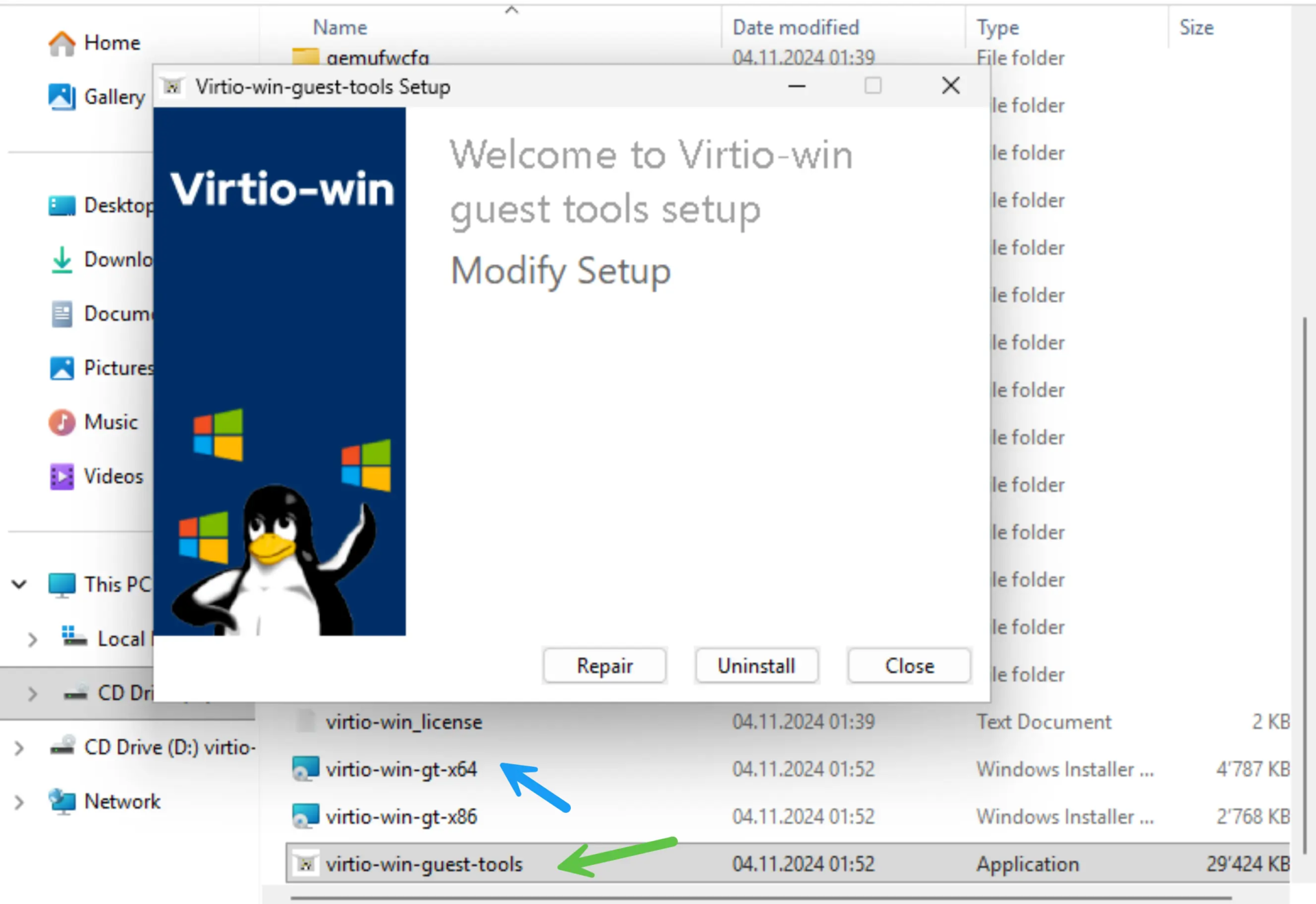
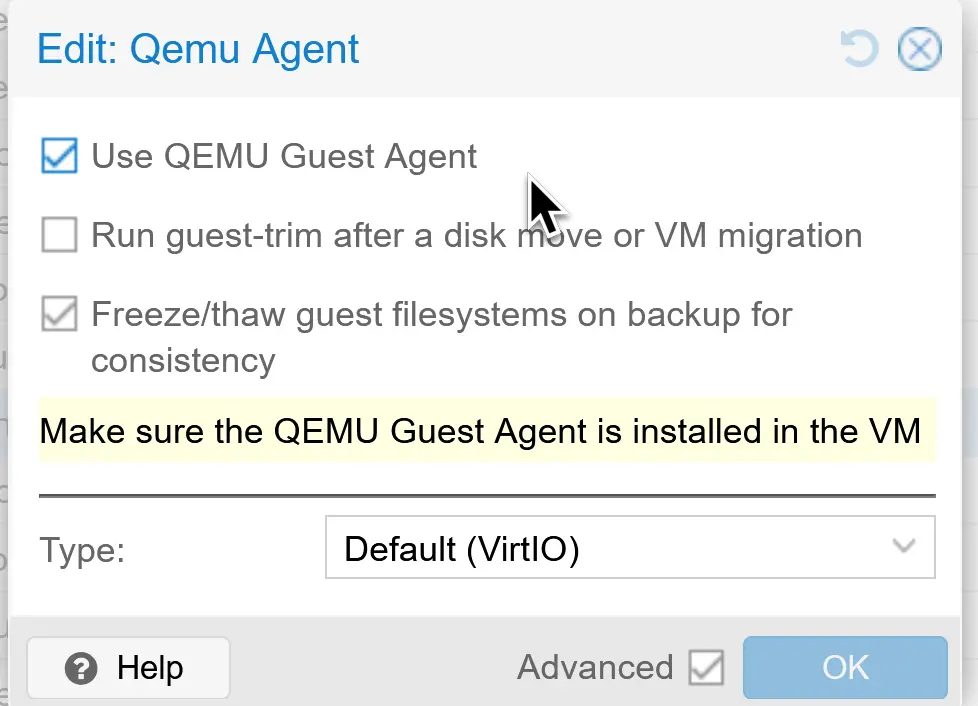

After installing Open VM Tools, the guest operating system may require a restart to apply changes.
If VirtIO drivers do not behave as expected, it can also help to check the current Proxmox GitHub issue tracker for known Windows driver problems and recent fixes. That is especially useful if you suspect a driver-specific issue rather than a Proxmox configuration problem. Based on my experience, the latest VirtiO drivers are not always the best.
Linux makes this much easier, since VirtIO drivers are built-in. You only need the QEMU Guest Agent. For Linux it is important that you enable the QEMU Agent first – see above Step 1 – before installing it on Linux Debian / Ubuntu
sudo apt update
sudo apt install qemu-guest-agent -y
systemctl is-enabled qemu-guest-agent
systemctl status qemu-guest-agent
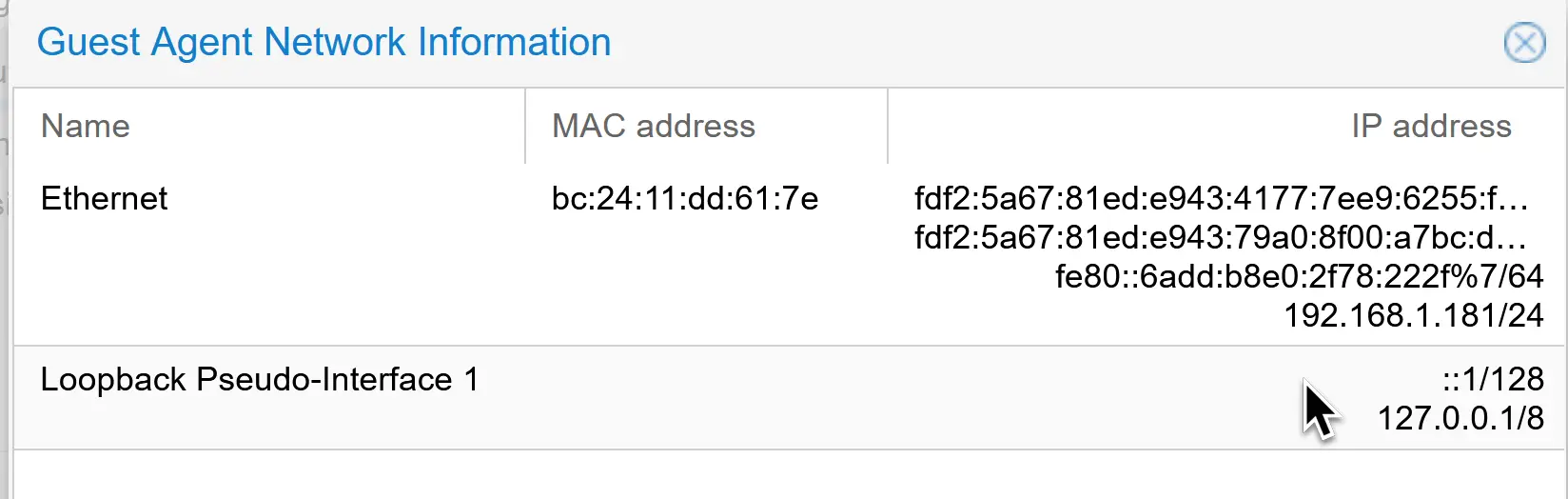
Then in Proxmox, check the Summary tab for the guest IP.
Once installed, you can test the agent directly:
qm agent <VMID> ping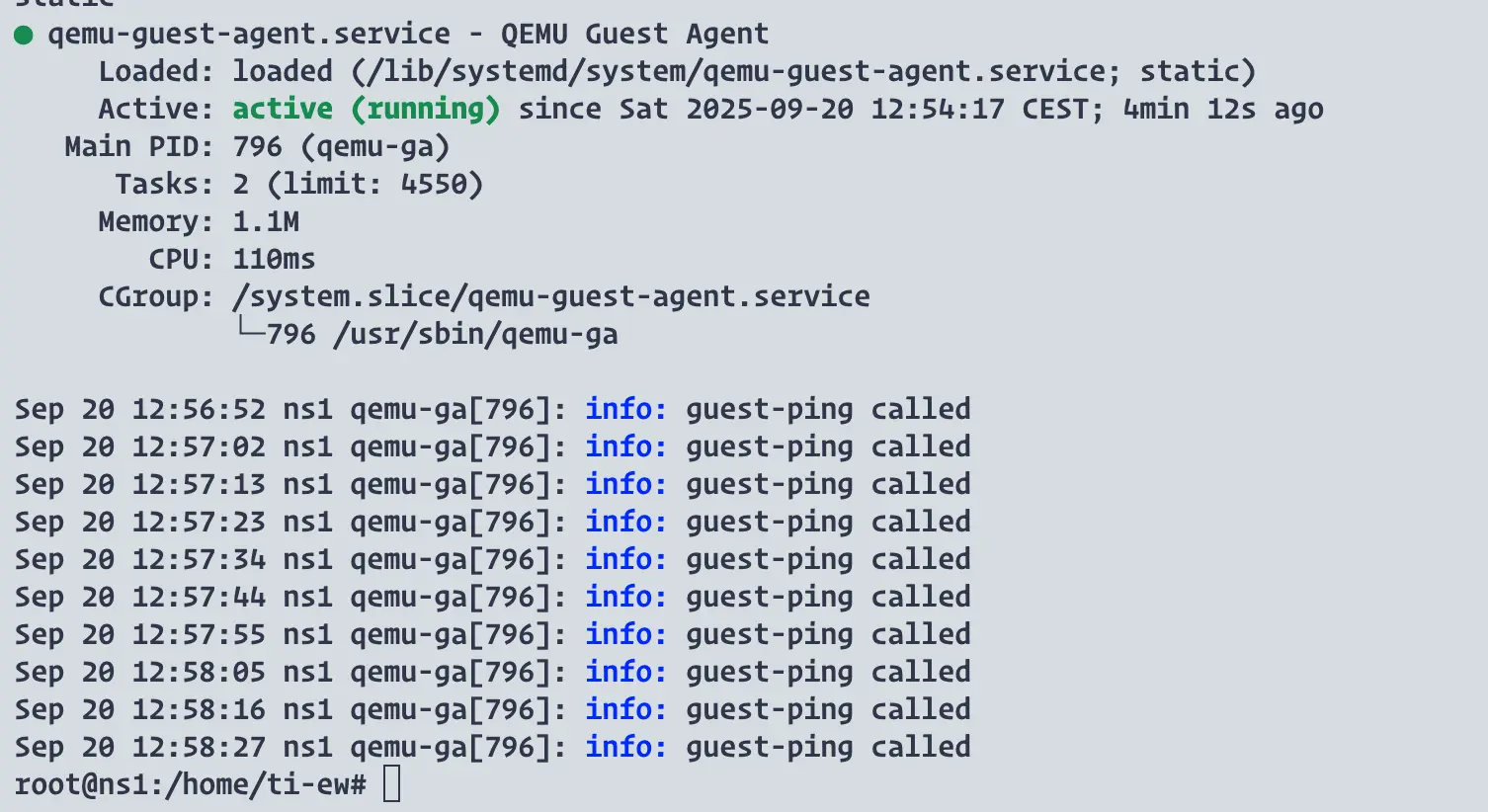
Other ways to confirm:
If you’re setting up Proxmox in a homelab, a mini-PC like the Minisforum MS-01 is a solid choice.
Best Mini-PC to run Proxmox
Even though installing the QEMU Guest Agent and VirtIO drivers is usually straightforward, there are a few common problems you might run into:
1. No IP address showing in Proxmox
2. QEMU Guest Agent not running
3. Driver signing issues on Windows
Backups failing or not consistent
5. Service won’t enable on Linux
By double-checking these points, you’ll avoid the most common pitfalls and ensure your VM integrates properly with Proxmox.
| Product Name | View on Amazon |
|---|---|
| Dell PowerEdge Dell R630 Server | 2X E5-2690 v4 = 28 Cores | 128GB RAM | 2X 1TB SSD (Renewed) | View on Amazon |
| Dell PowerEdge R730 Server 2X E5-2680v4 2.40Ghz 28-Core 128GB 8X 4TB 12G H730P (Renewed) | View on Amazon |
| ProLiant MicroServer Gen11 Tower Server w/one Intel Xeon E-2434, 3.4GHz 4-core 1P 32GB-U VROC 4LFF‑NHP 4TB HDD iLO KIT 180W External PS (HPE Smart Choice P74440-005) | View on Amazon |
| HPE ProLiant DL20 Gen11 Rack Server w/one Intel Xeon E-2436 Processor, 2.9GHz 6‑core 1P 32GB‑DR MR408i‑o 4SFF 2x500W RPS | View on Amazon |
| Dell PowerEdge R830 Server 2.20Ghz 56-Core 128GB 16x 300GB 15K H730P Rails (Renewed) | View on Amazon |
| Dell PowerEdge R440 Server 2X Gold 6126 2.60Ghz 24-Core 96GB 960GB SSD + 3.6TB (Renewed) | View on Amazon |
| HPE ProLiant DL380 Gen9 2U RackMount 64-bit Server + 2×8-Core E5-2640v3 Xeon 2.6GHz CPUs + 64GB PC4-2133P RAM + 8×600GB 10K SAS SFF HDD, P440ar RAID, 4×GigaBit NIC, 2×Power Supplies, NO OS | View on Amazon |
| HPE Proliant DL380 Gen10 8B SFF 2U Server, 2X Intel Xeon Gold 6126 2.6Ghz (24-cores Total), 192GB DDR4 RAM, 8X 1.2TB 2.5” 10K SAS 12Gbps, P408i-a SR 2GB RAID, No Operating System | View on Amazon |
If you’re searching for “Proxmox VMware Tools”, the answer is simple: For a deeper understanding of the QEMU Guest Agent, the official documentation is available here.
Install both after migrating to Proxmox, and your VMs will behave just like they did with VMware Tools — sometimes even faster.
Haven’t migrated yet? Check out my article to install Proxmox virtual environment and how to migrate from VMWare.
I want to draw your attention to another insightful blog post of mine. If you found the information on Proxmox VMVware Tools helpful, you might also be interested in a comparison I made between Proxmox and ESXi.
This post delves into their respective features, performance, and overall efficiency. Whether you’re trying to decide between the two for your homelab or looking for a more environment-friendly option, this blog post provides a comprehensive analysis that could help you make an informed decision.
Hi, I'm Edy Werder. I write hands-on guides about servers, virtualization, NAS and WordPress, based on setups I run in my own homelab. Real configs and real results, no fluff.
Enjoying the content?


