

By Edy Werder, a tech blogger with 20 years of experience in IT infrastructure
Are you wondering if Kadence Theme is still a smart choice for a new WordPress site in 2026?
I’ve been using Kadence on my own projects and client sites for a while now, alongside themes like Astra and Blocksy. Kadence stands out for being lightweight, Gutenberg-first, and for its free version being already very capable, while Pro adds advanced design controls, conditional headers, and extra WooCommerce options.
For me, yes – with a small asterisk.
Kadence is one of the few multipurpose themes that takes accessibility seriously. It’s marketed as “accessibility ready” and has a good reputation for meeting WCAG guidelines out of the box, which is important to me when I build sites for real users and not just demo pages.
Since 2021, Kadence WP has also been part of the StellarWP family (under Liquid Web), which means it sits alongside products like LearnDash, GiveWP, and SolidWP and benefits from a bigger team and shared resources behind the scenes.
A testimonial from the Kadence Website

I’d personally rate Kadence around 4.5/5: strong performance, a very generous free version, and a Pro upgrade that actually adds useful features rather than bloat. The only thing I’m watching closely is the leadership change: recently, there’s been community discussion that Ben Ritner, the original founder of Kadence, has stepped back from his role as Director of Product at StellarWP. That kind of change can influence a product’s long-term direction, so I see it as a small red flag to keep an eye on rather than a reason to avoid Kadence altogether.
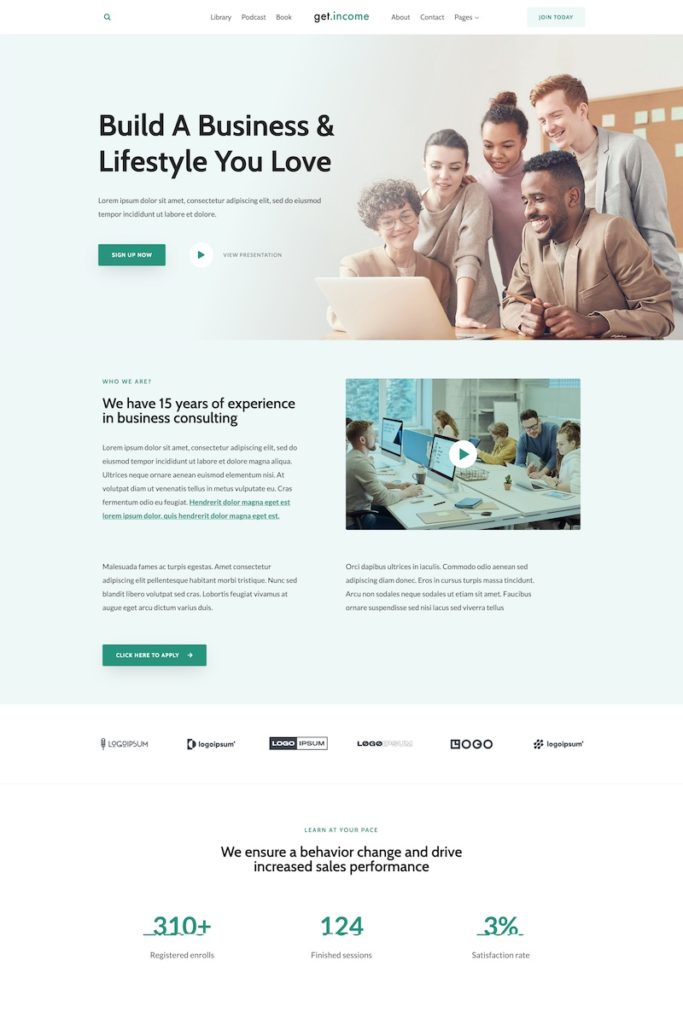
Kadence WP is also available on WordPress.org and can be downloaded free from your WordPress backend under plugins. The Kadence theme is listed under the most popular themes. It stands out with five stars out of 5 from over 300K plus downloads (February 2025).
Kadence is a good fit if you:
Kadence might not be for you if you:
In my experience, the setup is very straightforward. You install Kadence from Appearance → Themes → Add New, activate it, and you’re ready to go. The customizer (or Site Editor, if you’re using FSE) gives you clear controls for layout, colors, and typography, plus the drag-and-drop header and footer builder, so you don’t have to touch code for the basics.
Most of the time, no. Kadence lets you change global colors, fonts, button styles, and layout options directly in the customizer. I rarely need a child theme anymore, unless I want very custom PHP changes. For most sites, I can keep everything inside Kadence and Kadence Blocks and still have full control.
If you hate starting from a blank page, the free Kadence Starter Templates plugin plus Kadence AI is a big time-saver. You pick a starter site, answer a few questions about your business, and Kadence AI fills the pages with draft text and stock-free images. The nice part: templates are built on global colors and fonts, so when you change your palette, the whole site updates consistently.
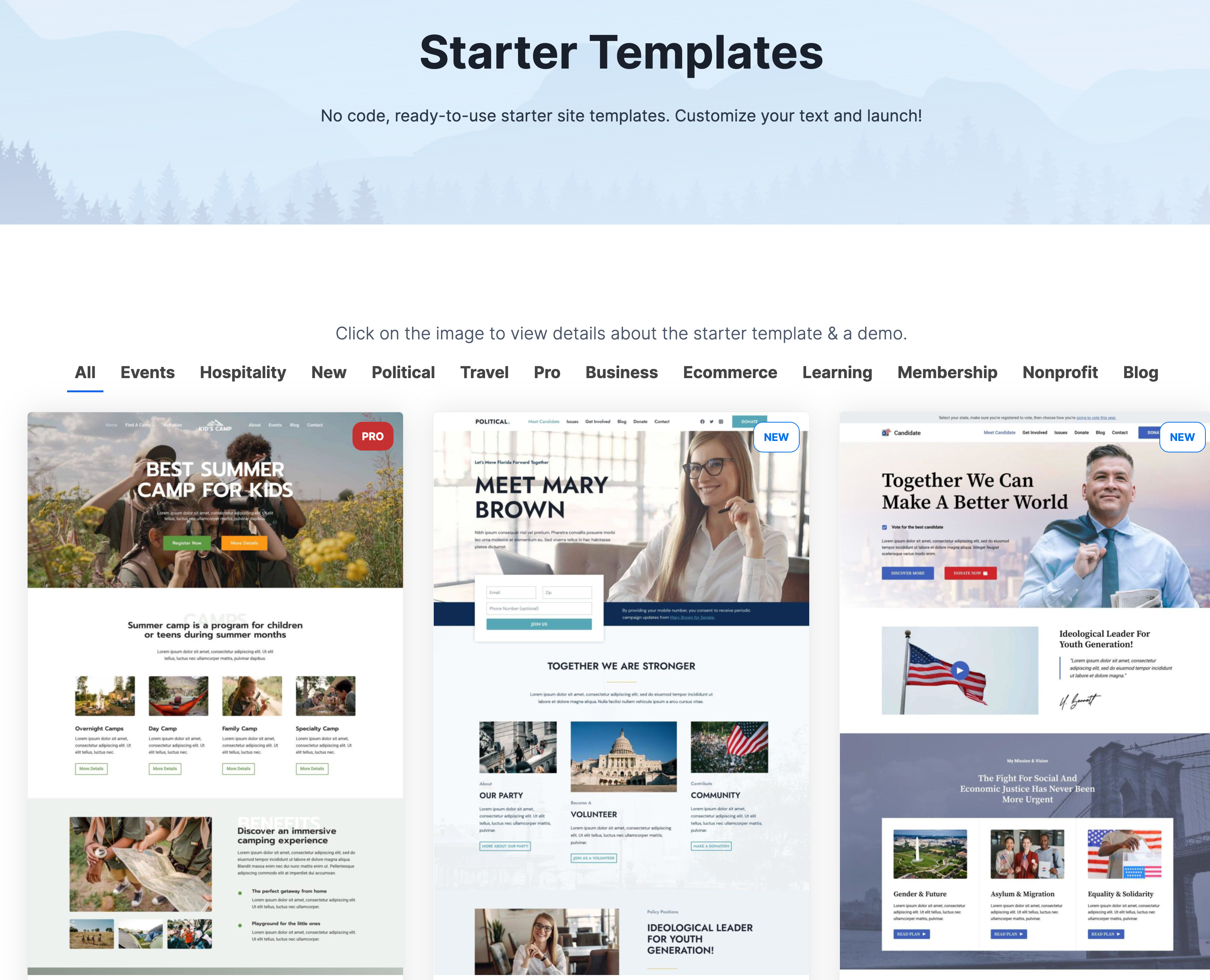
Learn more about Kadence AI Starter Templates.
Yes. For blog-style sites, I usually pair the theme with the free Kadence Blocks plugin. That gives me nicer post layouts, featured sections, call-to-action blocks, and an easy table of contents for long articles. With Kadence Pro, Elements add another layer—you can drop affiliate boxes, banners, or opt-ins into specific post types or categories without editing each post manually.
Overall, if you’re comfortable with the block editor, Kadence feels like a natural extension of WordPress rather than a separate page builder you have to learn from scratch
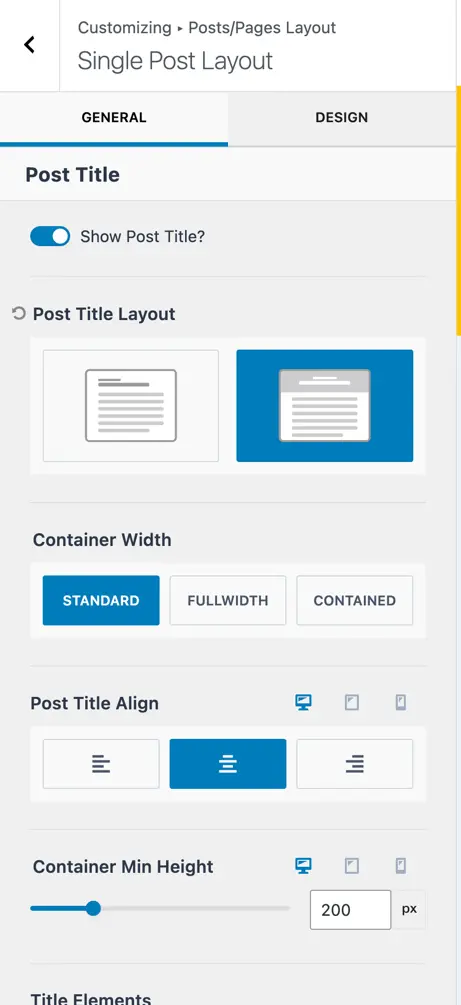
The free version of the Kadence theme offers a simple, clean design perfect for creating a professional website. The theme includes a powerful options panel that allows you to customize your site to your heart’s content. You also get access to all Google Fonts and color palettes, as well as a responsive design that looks great on all devices.
Kadence offers more design and customization choices than many free themes, and the free version includes many desirable features.
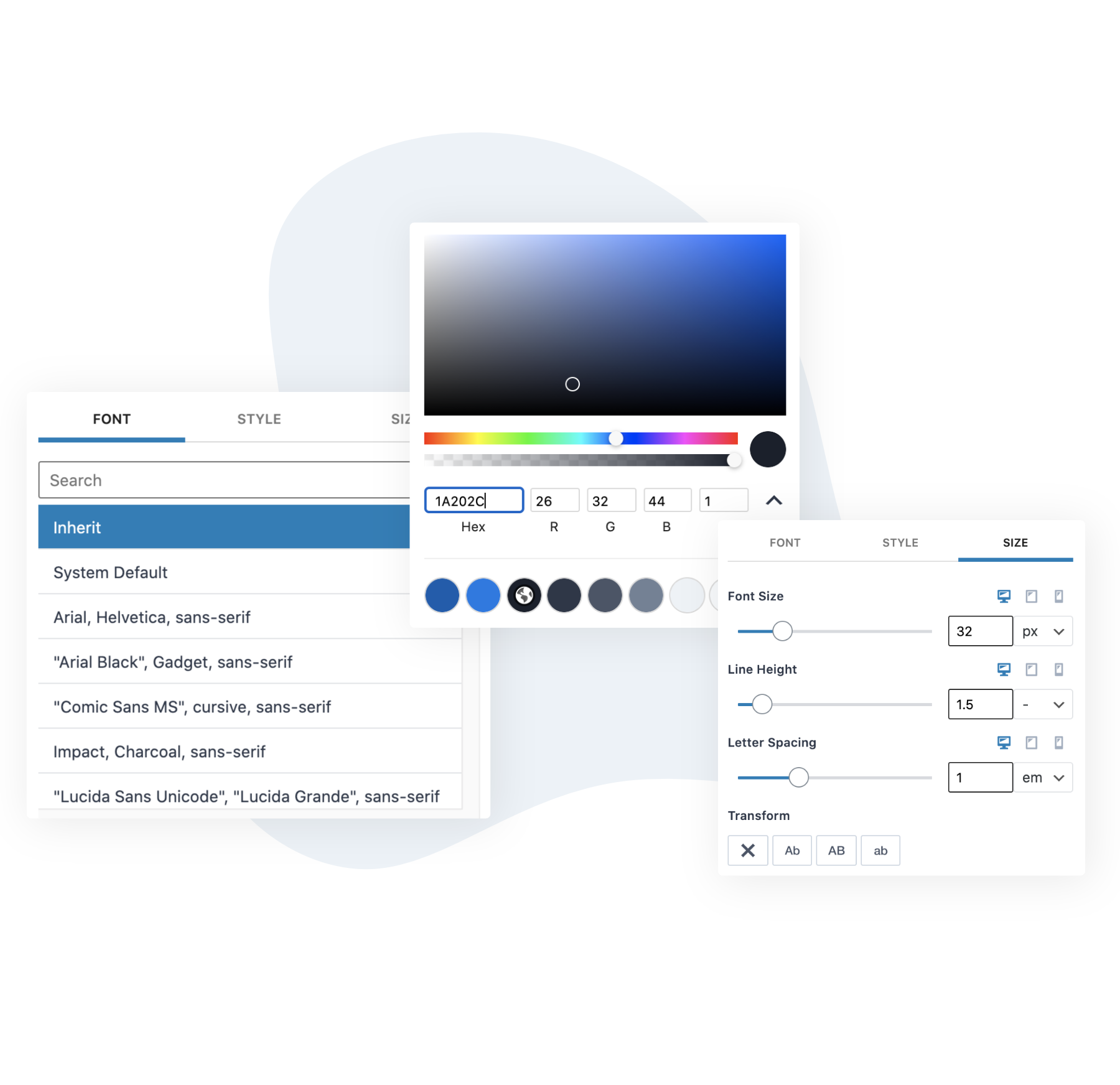
The Kadence Theme provides extensive typography settings that allow you to easily modify your website’s fonts, headings, buttons, links, and more. With the WordPress customizer, you can change the site-wide fonts, colors, and other typography settings. Kadence also allows you to change the fonts on specific pages and posts.
The typography system allows you to create a unique design for your website. If you want complete control over the typography on your website, then Kadence is an excellent theme for you.
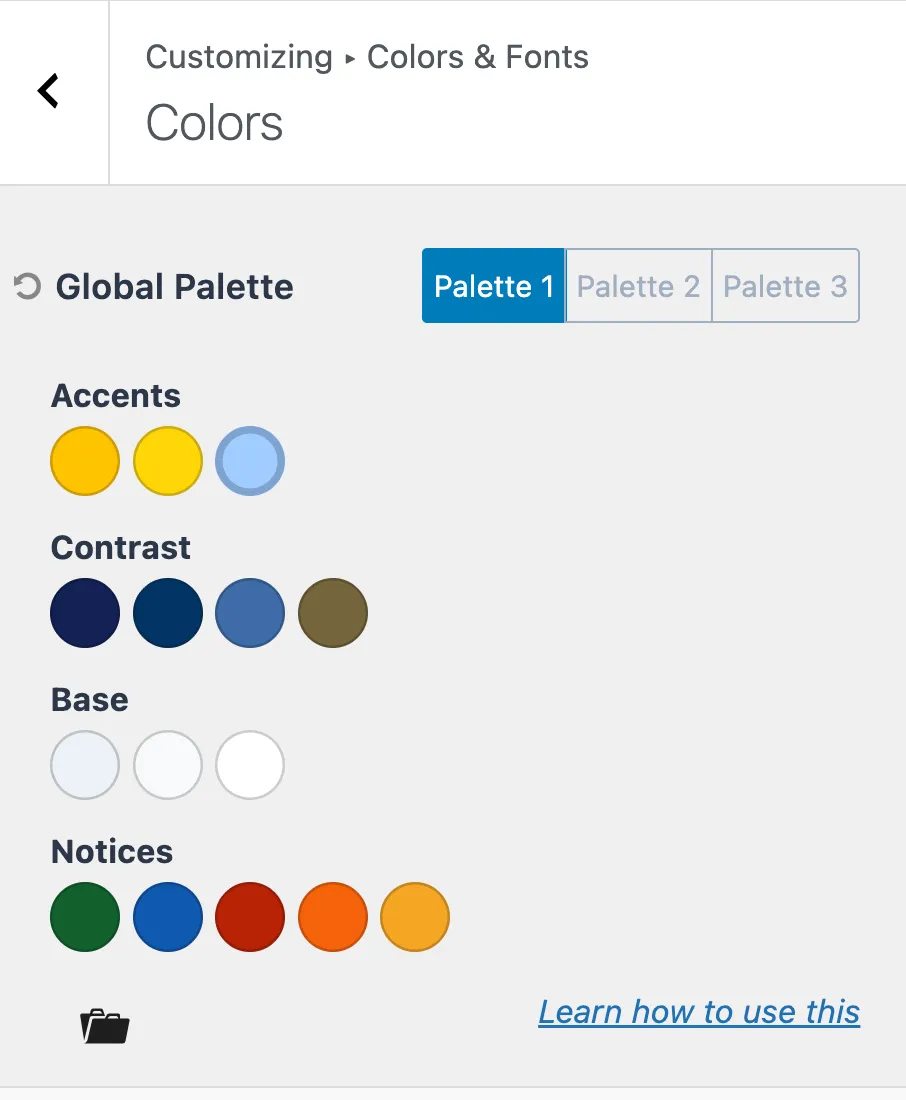
Kadence lets me define a global color palette for my whole site – accents, backgrounds, buttons, and links. When I change a color in the palette, headers, footers, and blocks update automatically, so I can keep everything on-brand without touching custom CSS.
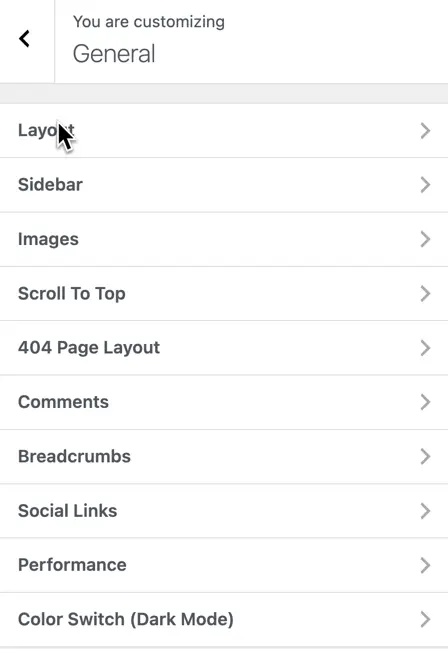
Kadence gives me a lot of control over the “small details” that make a site feel polished: layout, sidebar width, image handling, scroll-to-top, breadcrumbs, comments, and more – all from one General settings panel.
What I really like is the built-in color switch (dark mode). I can define light and dark color palettes in the customizer, and Kadence automatically adds a toggle so visitors can switch between them. No extra plugin is needed, and the switch respects my global colors, keeping everything consistent with the rest of the design.
With the Kadence layout settings panel, customizing your site header is a breeze, requiring no coding skills. One of this theme’s key highlights is its versatile header builder, which sets it apart from other free themes.
In addition to choosing between transparent and sticky headers, Kadence offers an intuitive mobile header option to ensure a seamless user experience on smaller screens. This flexibility elevates your site’s appearance, giving you additional features to enhance your brand identity.
You can go further and install Kadence Blocks Free to access additional elements, including the Advanced Header and Advanced Navigation Blocks, which are free with Kadence Blocks.
These powerful tools let you design custom headers directly from the WordPress Editor, giving you complete control without coding.

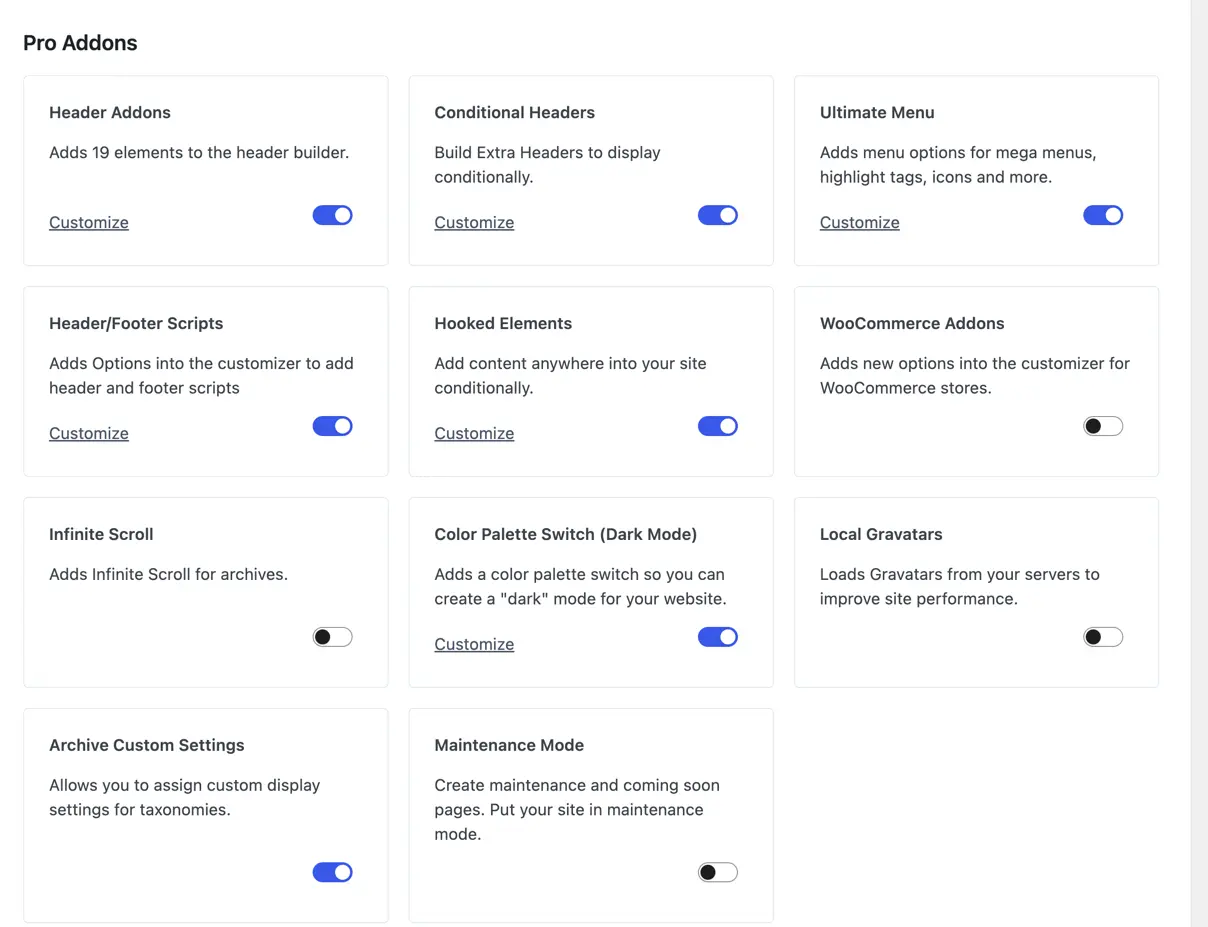
Some features are only available with the Theme Kit Pro plan, which includes Kadence Theme Pro. See the picture below with the Pro add-ons.
The most powerful features are the Header add-ons, including the Conditional Header, and the hooked elements. I have a separate article for the hooked elements.
Header builders are a great way to quickly and easily create high-quality headers for your site, including drop header options. With access to twenty new header elements, you can customize the position of your logo, search bar, social icons, and site title on any page, giving it a unique and stylish look. You can apply personalized colors to each element with an adjustable color wheel to get the desired shade. Header builders always make sure that your website looks its best!
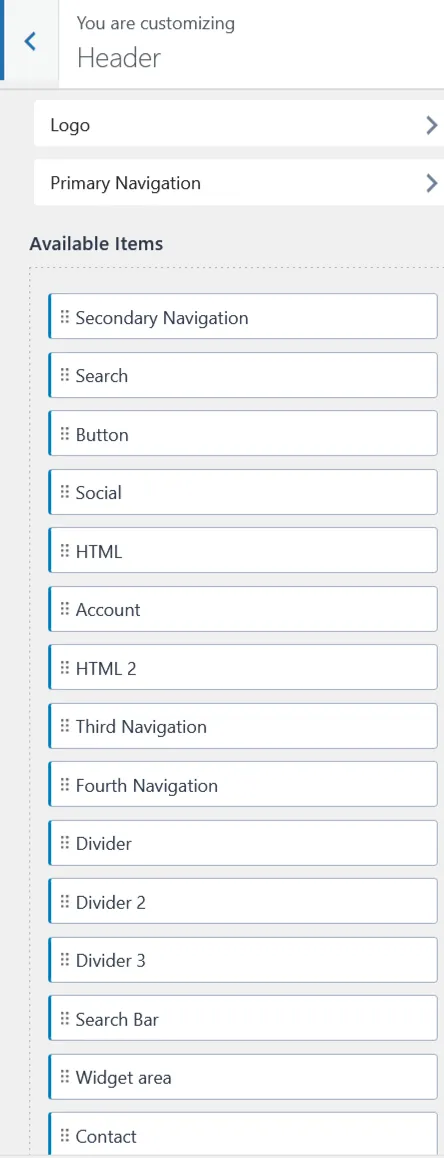
In today’s competitive digital landscape, capturing and retaining visitor attention is crucial for website success. One effective way to achieve this is through conditional headers, a powerful feature offered in Kadence Theme Pro. Conditional headers let you customize the header area of your website based on specific criteria, providing a tailored experience across different sections of your site.
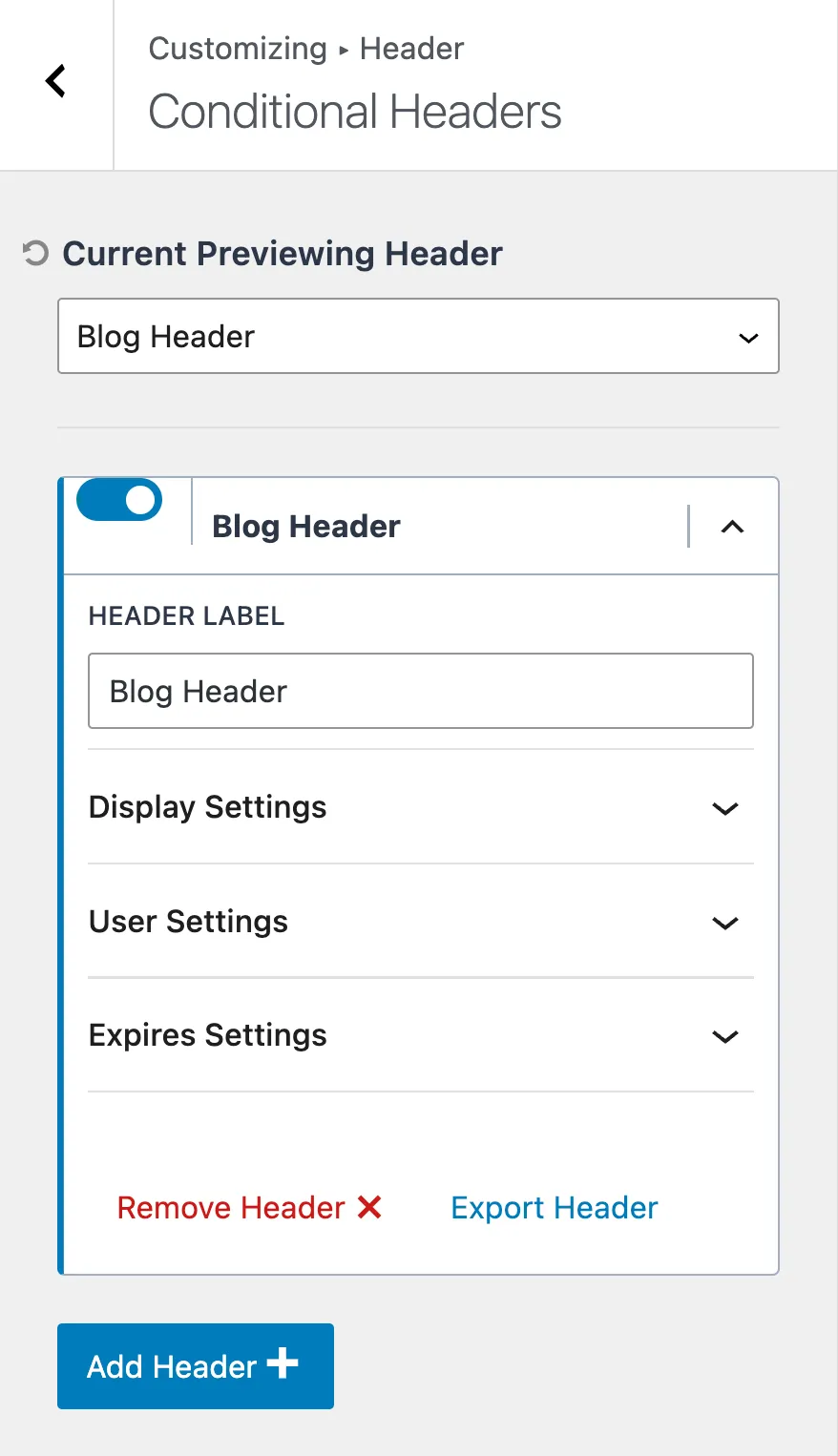
The conditional header feature enables you to display different headers on different pages or sections of your website. This capability is handy for focusing visitor attention, promoting specific actions, or providing contextually relevant information without cluttering the interface.
In the image below, you see targeting settings for conditional headers
Insert blocks and page builder content anywhere, conditionally, and within a timeframe. Hooked elements are set to display on specific dates and times. For example, show a text block with your contact information only during business hours (9 am-5 pm).
Kadence Elements is especially useful for affiliate blog websites to place your affiliate links where you want. It is best to place them within your text rather than in the sidebar. I’m getting more clicks when the CTAs are part of the article. The placement capabilities of Kadence Elements are huge. You can place it before the entry content or after the first, second, third, or fourth paragraph. A member from the Kadence FB community wrote a Javascript that enables placement later in the text, for example, after the tenth paragraph.
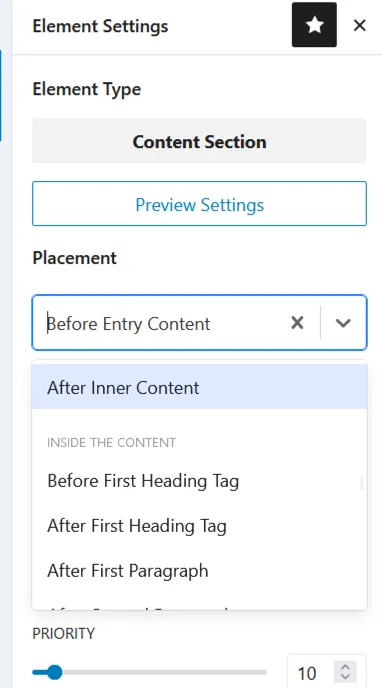
It is also possible – I do it sometimes when I find the design fits better- to use the Elementor template and integrate it with the Elementor Library block in Kadence Elements.
Instead of using hooked Elements, Kadence released a separate plugin (part of the Full Bundle) Kadence Conversions, with more options to raise conversion rates. Read my separate article here.
This feature is awesome for website admins who want an easy visitor experience. Curated content is made more accessible when mega sub-menus, highlight tags, and icons are used to draw attention. It allows viewers to identify the content they’re interested in quickly. Having menu links consciously highlighted through this feature makes each visit more likely to be seamless and successful for the viewer.
As an illustration, the image below exhibits a beautifully crafted contact page that appears when the Contacts link is clicked in the menu.
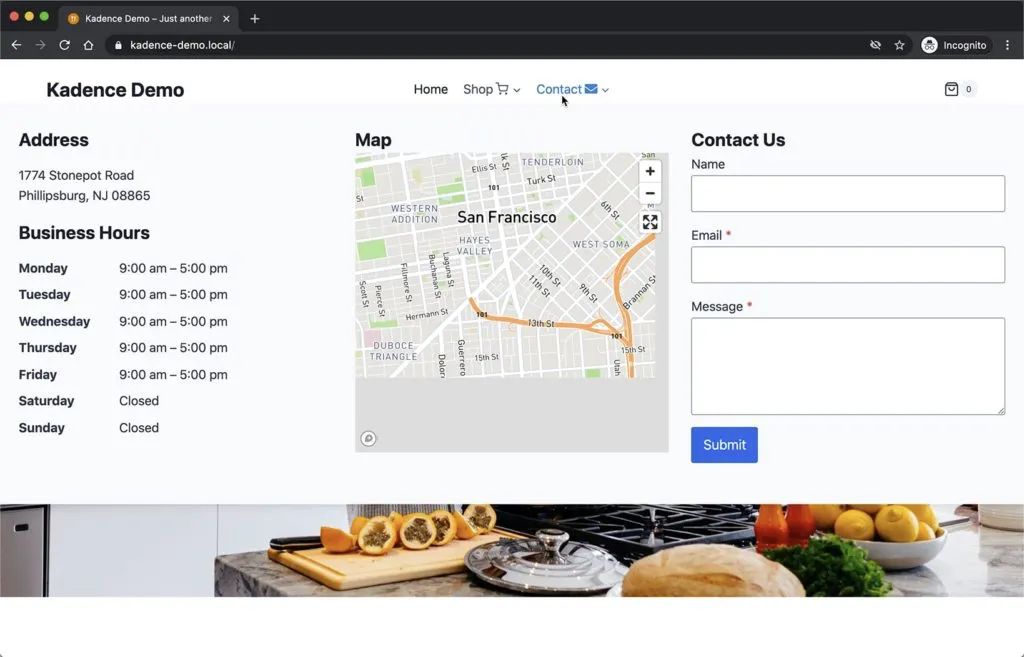
Enjoy design freedom with Kadence. This popular design tool is well-known for its extendable hooks, allowing for page-fixed content that fits any design you have in mind. Whether you’re a professional user or an amateur hobbyist, take advantage of pro features like fixed footers and banners and show-by-device design elements. Take your design to the next level with Kadence and make something truly special!
Kadence is an excellent theme for e-commerce shops, known for its ease of use and customization. It offers numerous features tailored specifically for WooCommerce. A standout feature of the Kadence theme is the Shop Kit add-on. This plugin enables Kadence to enhance and expand WooCommerce product functionality. I highly recommend the Shop Kit add-on for any WooCommerce shop using the Kadence theme.
| Freature | Free | Pro |
|---|---|---|
| Integrations with third-party plugin | ✅ | ✅ |
| Header Builder | ✅ | ✅ |
| Footer Builder | ✅ | ✅ |
| Custom Layouts | ✅ | ✅ |
| Custom Post Type Support | ✅ | ✅ |
| Global Color Palette | ✅ | ✅ |
| Color Options | ✅ | ✅ |
| Global Typography | ✅ | ✅ |
| Global Button Settings | ✅ | ✅ |
| Scroll To Top | ✅ | ✅ |
| Socal Links | ✅ | ✅ |
| CSS Pre-loading | ✅ | ✅ |
| Transparent Header | ✅ | ✅ |
| Sticky Header | ✅ | ✅ |
| Responsive Controls | ✅ | ✅ |
| Breadcrumbs | ✅ | ✅ |
| SEO Optimized | ✅ | ✅ |
| Hooked Elements | ❌ | ✅ |
| Header Addons | ❌ | ✅ |
| Ultimate Menu | ❌ | ✅ |
| Fixed Elements | ❌ | ✅ |
| Header/Footer Scripts | ❌ | ✅ |
| Woocommerce Addon | ❌ | ✅ |
Kadence Theme comes with some excellent features, but what about its speed?
The theme is lightweight and relatively fast. Kadence does not slow down and provides a remarkable UX. Speed, especially for a fast website, is essential nowadays, mainly if you use Kadence for an eCommerce or business site.
You can verify this using Gtmetrix or Google PageSpeed insights. Kadence performs well and scores points on both Kadence’s speed and optimization. Kadence theme almost earns 100 or A+ for page load times.
This is the Google page speed score on a freshly installed WordPress website with the Kadence Theme.
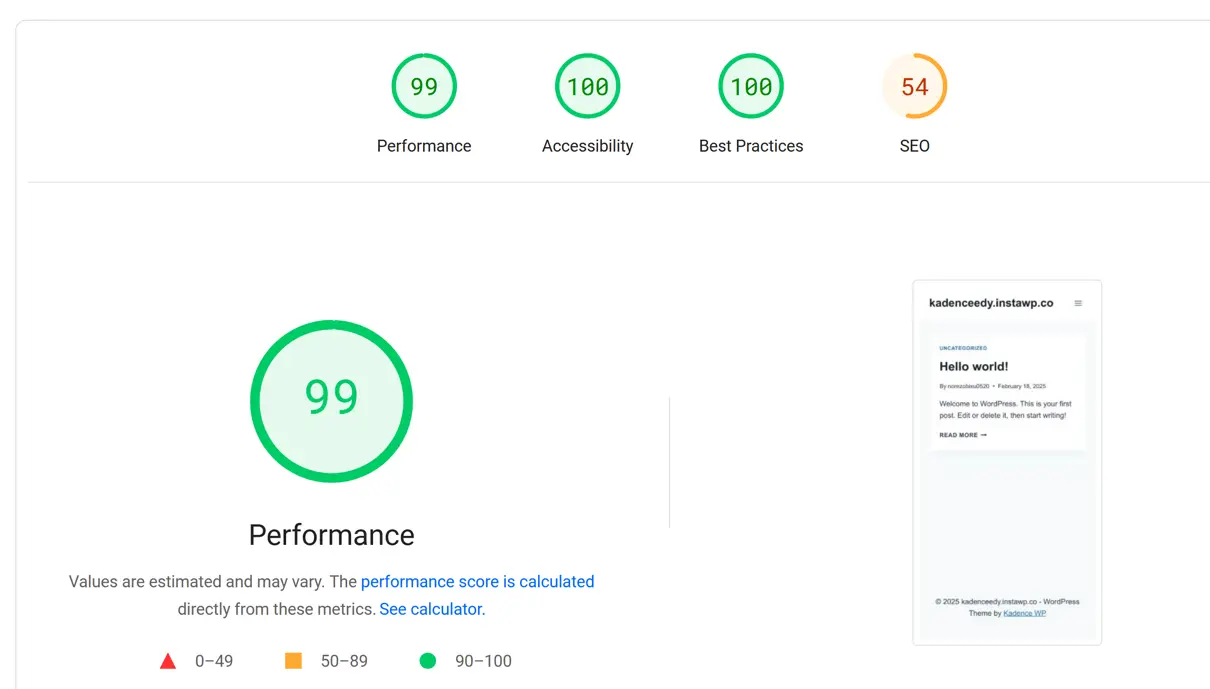
Kadence Theme is designed with SEO best practices and web accessibility in mind. It ensures your site performs well in search rankings while being inclusive for all users.
While Kadence provides a strong technical foundation, SEO success still depends on optimizing your content, images, and metadata. Likewise, accessibility requires thoughtful content creation to ensure a great user experience.
Kadence WordPress offers reliable, efficient customer support, ensuring you get help. Their website includes detailed documentation covering everything from setup to advanced customization. If you need additional assistance, you can visit the official WordPress forums or the Kadence support forum to get answers from the team or the community.
After purchasing the Ultimate plan, I’ve raised a few support tickets through their website. They usually reply with a short video explaining the solution, making it incredibly easy to follow. The response time is typically within 24 hours on weekdays, and their answers are always transparent and helpful, even when my question wasn’t perfectly articulated. The support team is knowledgeable and patient, making troubleshooting a smooth experience.
Overall, I’m delighted with Kadence’s support—it’s responsive and well-documented, and the video replies add a personal touch that makes solving issues effortless.
You can use a few other WordPress themes in place of Kadence. Some popular alternatives include:
Kadence offers users multiple purchase options for the theme.
Alternatively, you can buy the Plus Plan, which includes
and the third option is to purchase the Ultimate Plan
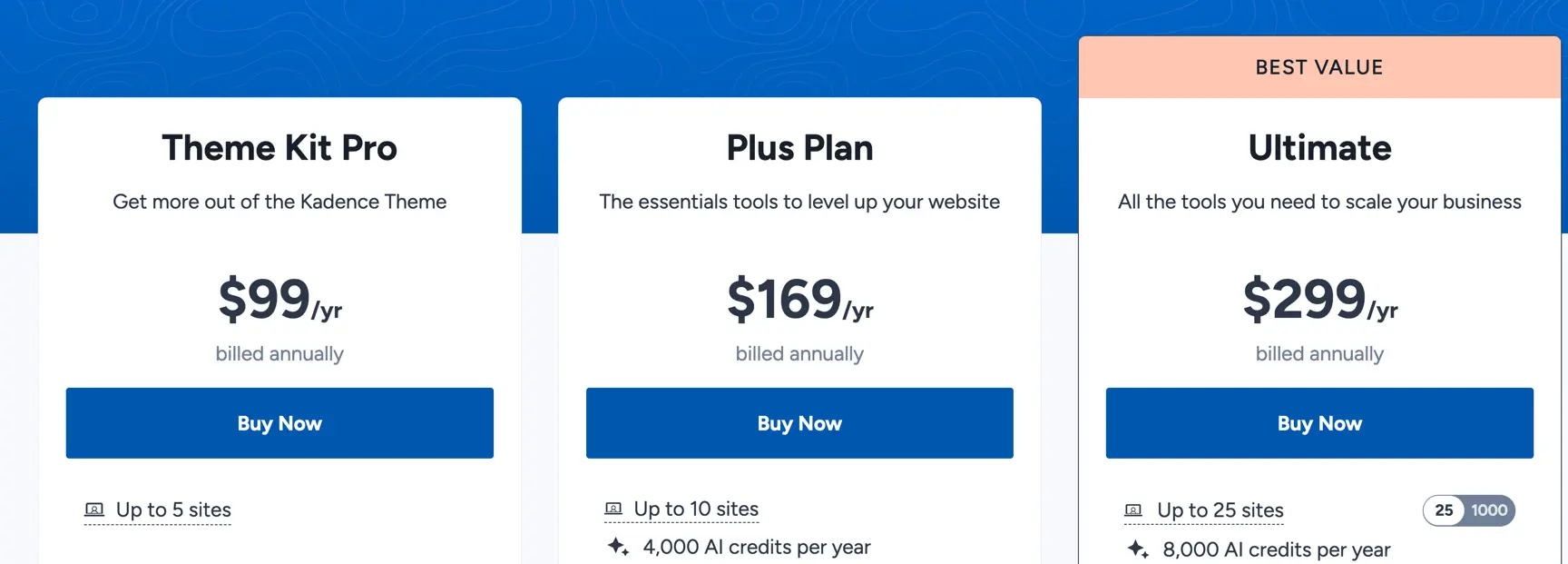
I recommend buying the Kadence Ultimate Plan. It is a perfect bundle to access Kadence’s full capability. Suppose you have several websites, and it is a must-have if you have an eCommerce website. The Kadence Shop Kit plugin enriches Woocommerce, and Kadence Conversions (see my separate article) helps you boost your conversion rate.
If you have only one website, you can choose the Essential Bundle. The Kadence Blocks plugin provides more Gutenberg Blocks for the design process.
Kadence Blocks is the perfect complement to the Kadence theme. As for the Theme, there is a Free and Pro version available. Kadence Blocks Pro gives you even more control over the look and feel of your site while still being easy to use. If you’re looking for a way to take your Kadence site to the next level, Kadence Blocks Pro is the way to go. Read my separate article for Kadence Blocks review.
There is no yes or no answer – it depends on your specific needs. Kadence works fine with Elementor but also alone. If you want more flexibility and control over your design, Elementor is a better choice.u003cbru003eu003cbru003eHowever, Kadence Theme and Gutenberg Blocks by Kadence are also good choices for building websites.
I use the Kadence theme with the Kadence Blocks plugin. This allows me to easily create custom page layouts and add new content blocks to my pages. It’s a very versatile and easy-to-use theme that lets you customize your site to look exactly how you want.
Both Astra and Kadence are great themes for WordPress. If you want the most mature, well-supported theme, go with Astra. However, Kadence has an equal feature set and is slightly less expensive. So it’s really up to you which one to choose!
Yes, Kadence is a reliable Woo theme. In combination with Shop Kit from Kadence, it provides a solid foundation.
I want to suggest another article that could be of great interest to you, especially if you found the review of the Kadence Theme helpful. Check out the Elementor Hosting Review.
This review dives into the specifics of hosting services optimized for Elementor, a famous WordPress page builder. Understanding the right hosting environment is crucial for ensuring optimal performance and security, especially if you consider integrating it with themes like Kadence. The article provides insights into features, performance metrics, and pricing, making it a valuable resource for anyone looking to enhance their WordPress experience.
Hi, I'm Edy Werder. I write hands-on guides about servers, virtualization, NAS and WordPress, based on setups I run in my own homelab. Real configs and real results, no fluff.
Enjoying the content?


This is a nice website. Very informative and easy to follow