

By Edy Werder, a tech blogger with 20 years of experience in IT infrastructure
Divi 5 is officially out. After more than three years of development, Elegant Themes removed the beta label on February 26, 2026, and Divi 5 is now the recommended version for new projects.
I have been following this release closely. Back when Divi 5 was still in Alpha, I wrote my first impressions and kept updating the article through the Beta phase. You can read that piece here: Divi 5 — My Honest Opinion & What You Need to Know.
This time, the situation is different. Divi 5 is no longer a preview. It is a stable version and Elegant Themes is positioning it as the future of Divi. So I installed it, tested it, and put together this Divi 5 review based on what I found.
If you are on Divi 4, upgrading to Divi 5 is a no-brainer for new projects. The Divi Builder is faster, the design system is more flexible, and the old shortcode foundation is gone. For existing sites, test on staging site first and use the built-in migrator. Elegant Themes will continue supporting Divi 4 for at least 12 months, so there is no rush.
If you use Elementor, Bricks, or another builder, Divi 5 is the most competitive version of Divi in years. I was skeptical during the beta, but I have now decided to rebuild my website itfachmann.ch with Divi 5 and eventually take it live. That says more than any feature list. If you are currently on a different builder, I think it is worth spending some time with Divi 5 to give it a proper test drive. You might be surprised.
If you are new to WordPress, Divi 5 is a solid starting point. The visual builder is intuitive, Divi AI and other ai tools are built in, and the $249 lifetime deal for unlimited sites is hard to beat. Just be aware that some third-party plugins are still catching up with Divi 5 compatibility.
Divi 5 is the latest version of the Divi Theme, developed by Elegant Themes. It is much more than just a feature update; it represents a complete rewrite of the entire foundation. After years of accumulating technical debt in Divi 4’s shortcode-based system, Elegant Themes completely reinvented Divi by replacing it with a modern HTML5 framework built from scratch. This drastic overhaul was necessary because the old codebase had reached its limits, making further meaningful development unrealistic. Divi 5 sets a new stage for the future of Divi with a fresh, modern architecture.
Historically, Divi has been available both as a full WordPress theme builder and as a standalone Divi Builder plugin that works with any theme. With Divi 5, the theme version shipped first. Elegant Themes confirmed that the standalone Divi Builder plugin will follow and that it will not require another lengthy beta phase.
The Divi 5 editor lets you design pages visually in real time, without writing code. For those who need finer control, custom CSS is fully supported.
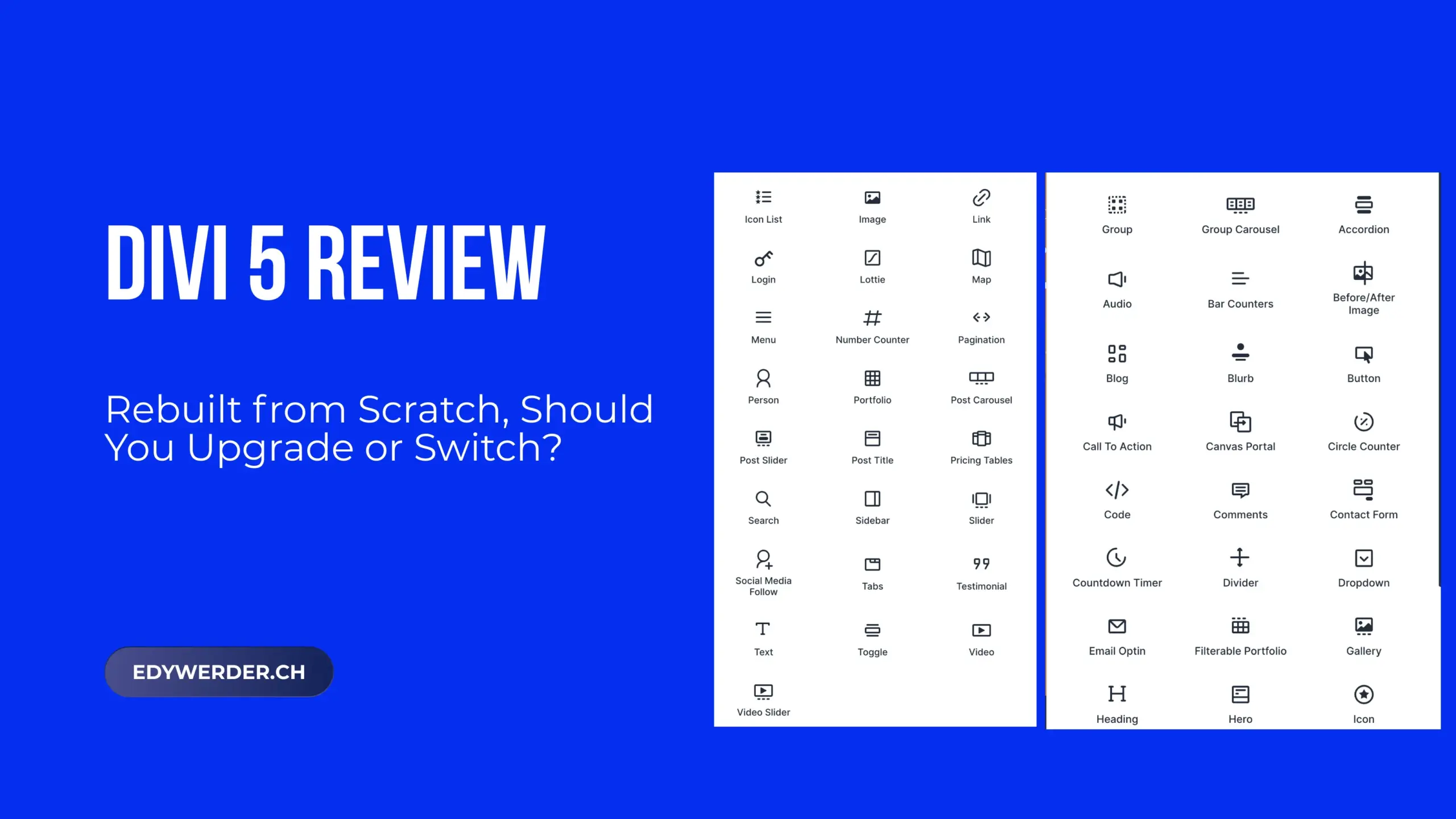
Under the hood, the ecosystem has grown significantly. Divi 5 ships with a rich set of Divi modules, an advanced design system built on reusable presets and variables, and built-in popup and loop builders that reduce the need for extra plugins. The Divi Library lets you save and reuse layouts across projects. Divi AI helps generate content and images directly inside the builder. And the Divi Role Editor gives you granular control over what each user role can access, which is especially useful for agencies handing off sites to clients.
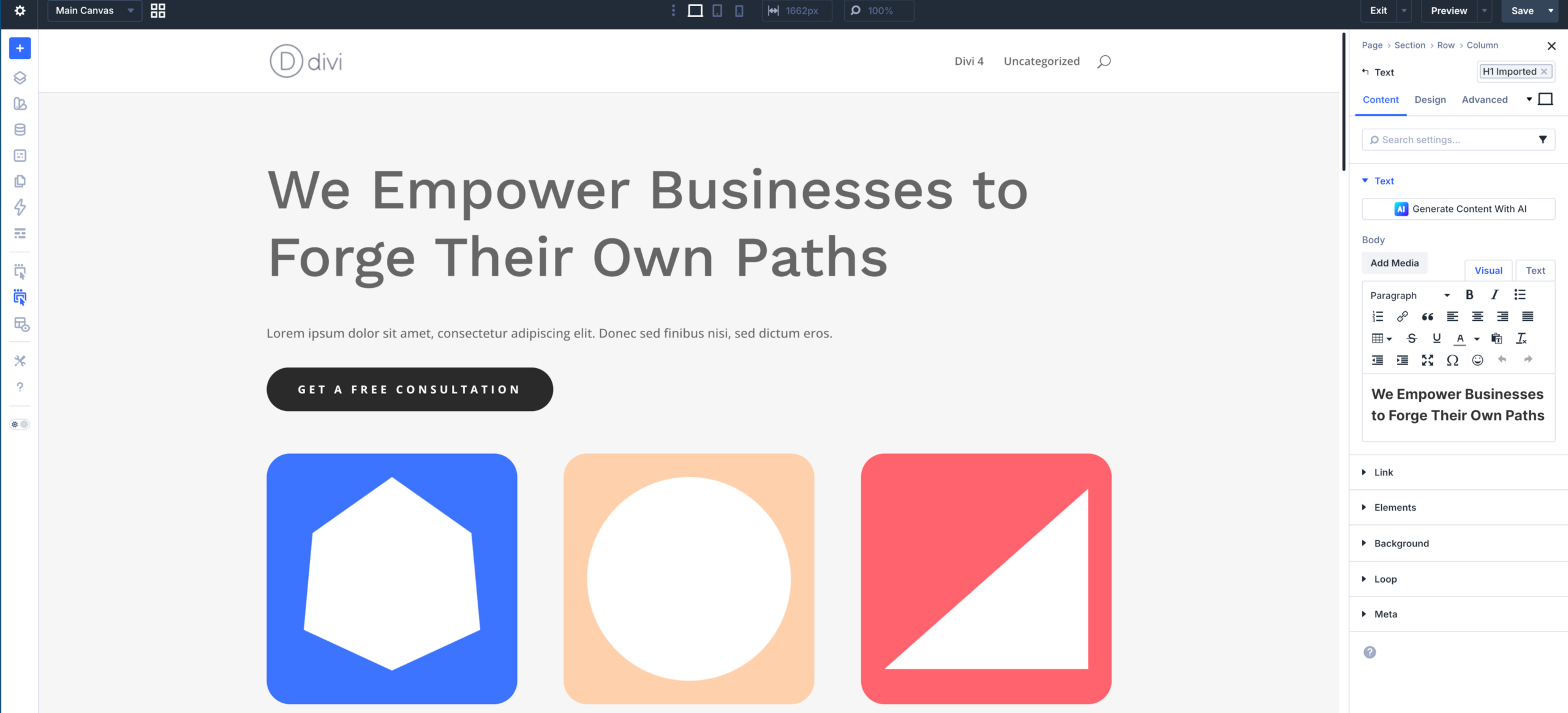
The first thing you notice in Divi 5 is the new interface. The old purple and green look is gone. The editor is now cleaner, more minimal, and closer in style to the native WordPress block editor.
Page settings sit on the right side of the screen. The toolbar with save, preview, undo, and redo moved to the top. You can dock, resize, and rearrange panels to fit your workflow. Editing feels less cluttered, especially on smaller screens.
Divi also introduces inline editing. You click directly on any module to access its settings, without hunting for icons or digging through tabs. Breadcrumb navigation shows you exactly where you are in the page structure, which is a real time saver when working with nested layouts.
While working with the visual editor, I keep discovering small things that aren’t documented or that don’t work as expected. I collect these findings in a separate article: Divi 5 Tips — Practical Tips from Real-World Use.
One of the more recent additions in Divi 5 is full site editing, introduced in version 5.0.3. You can now edit the header and footer directly on any page, without jumping to the Theme Builder. Click on the header or footer in the editor and it opens inline, just like any other module on the page.
It is a small change, but it removes a real friction point. In Divi 4, adjusting the header meant leaving your page, navigating to the Theme Builder, finding the right template, making the change, and coming back. Now it is one click from wherever you are.
This is where Divi 5 changes how you build from day one. The new design system introduces presets, variables, and groups that work together to keep your site visually consistent.
Presets are reusable styles you can apply to any module. In Divi 4, you could save presets for entire modules. In Divi 5, you can go much deeper. Backgrounds, borders, shadows, and headings can each have their own preset. Change a preset once, and every element using it updates automatically.
Variables work at an even more granular level. You define values for colors, fonts, and spacing in one place and reuse them across the entire site. Think of them as design tokens. If you decide to change your primary color, you update one variable instead of editing dozens of modules.
If you are starting a new project on Divi 5, I recommend setting up your presets and variables before building any pages. It takes a bit of planning upfront, but it saves a lot of time down the road and keeps your design system clean.
I am still exploring the full potential of presets and variables in a real project. Once I have more hands-on experience, I will expand this section with practical tips on how to structure a design system from day one.
Performance was the biggest criticism of Divi 4, and it is where Divi 5 improved the most. The old shortcode engine is gone. Every page now renders as clean HTML5, which makes a noticeable difference in both build speed and front-end load times.
Elegant Themes also added speculative prerendering to the builder. In practice, this means the editor preloads what it expects you to do next. The result is near-instant responses when you add or move Divi modules. It is not just marketing talk. I felt the difference immediately compared to Divi 4.
Flexbox is one of the most important additions in Divi 5. It gives you precise control over how elements are ordered, aligned, and wrapped inside columns and rows. If you have used Elementor’s Flexbox Containers, the concept is similar, but Divi implements it at the column and group level.
On top of that, Divi 5 supports nested rows. You can place rows inside other rows for more complex layouts without relying on workarounds or custom CSS. For anyone who struggled with layout limitations in Divi 4, this alone is a significant upgrade.
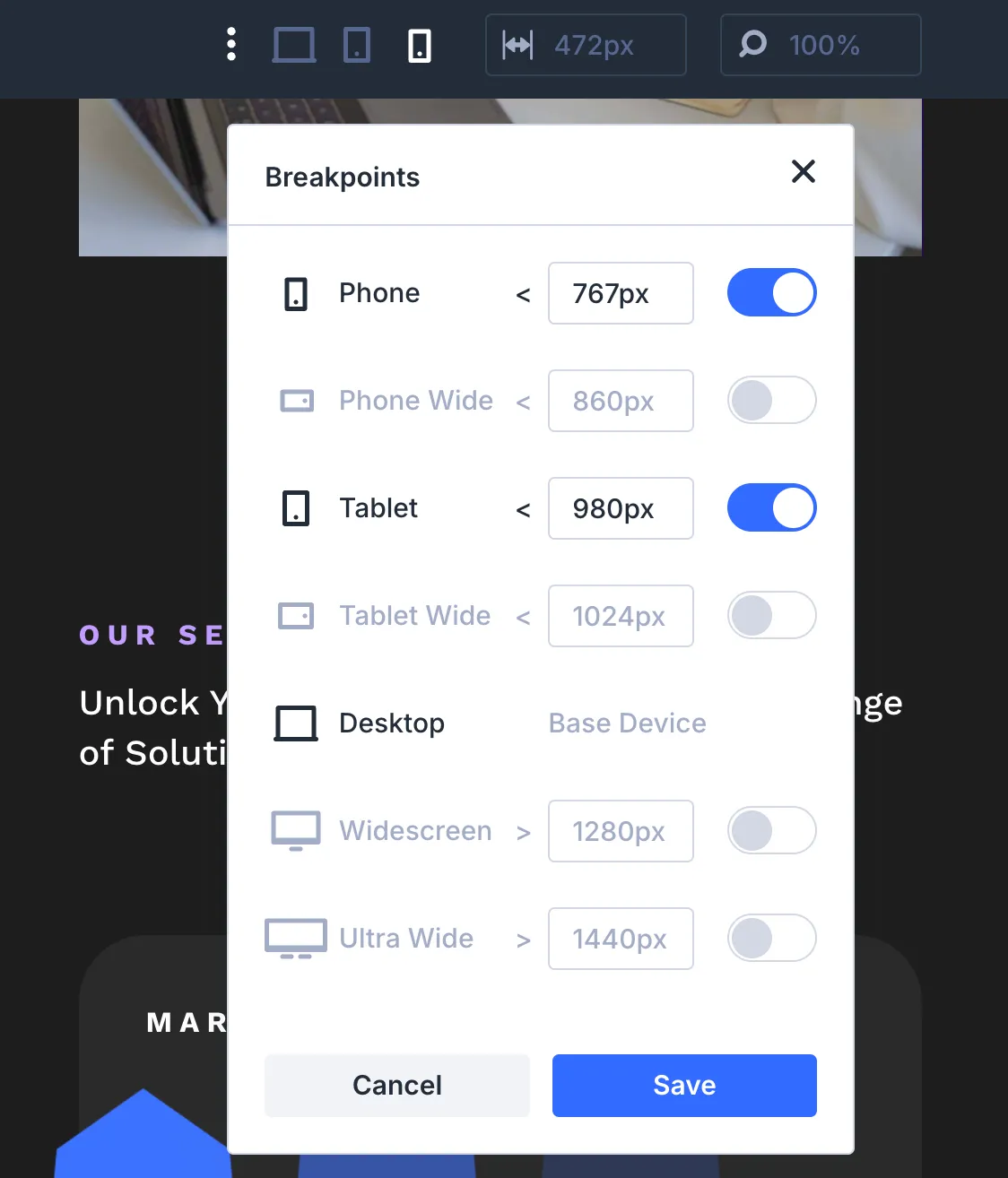
The responsive editor in Divi 5 is a clear step forward. Instead of switching between device views one at a time, you can now see the values for all breakpoints in a single panel. Divi 5 offers seven predefined breakpoints covering desktop, tablet, and mobile in various sizes.
That means fewer clicks and less guesswork when fine-tuning your layout for different screens. For anyone building sites that need to look right on every device, this is a welcome improvement.
Two modern features that used to require third-party plugins are now built into Divi 5.
The Loop Builder lets you display dynamic content from your WordPress database. Posts, products, categories, custom post types: you control the layout of each item using standard Divi modules. If you have used Elementor’s Loop Grid or the Posts widget, the concept is familiar. The difference is that Divi gives you full design control over every element inside the loop.
The Popup Builder works the same way. You design popups visually using the Divi Builder, with full access to all modules and styling options. No extra plugin needed.
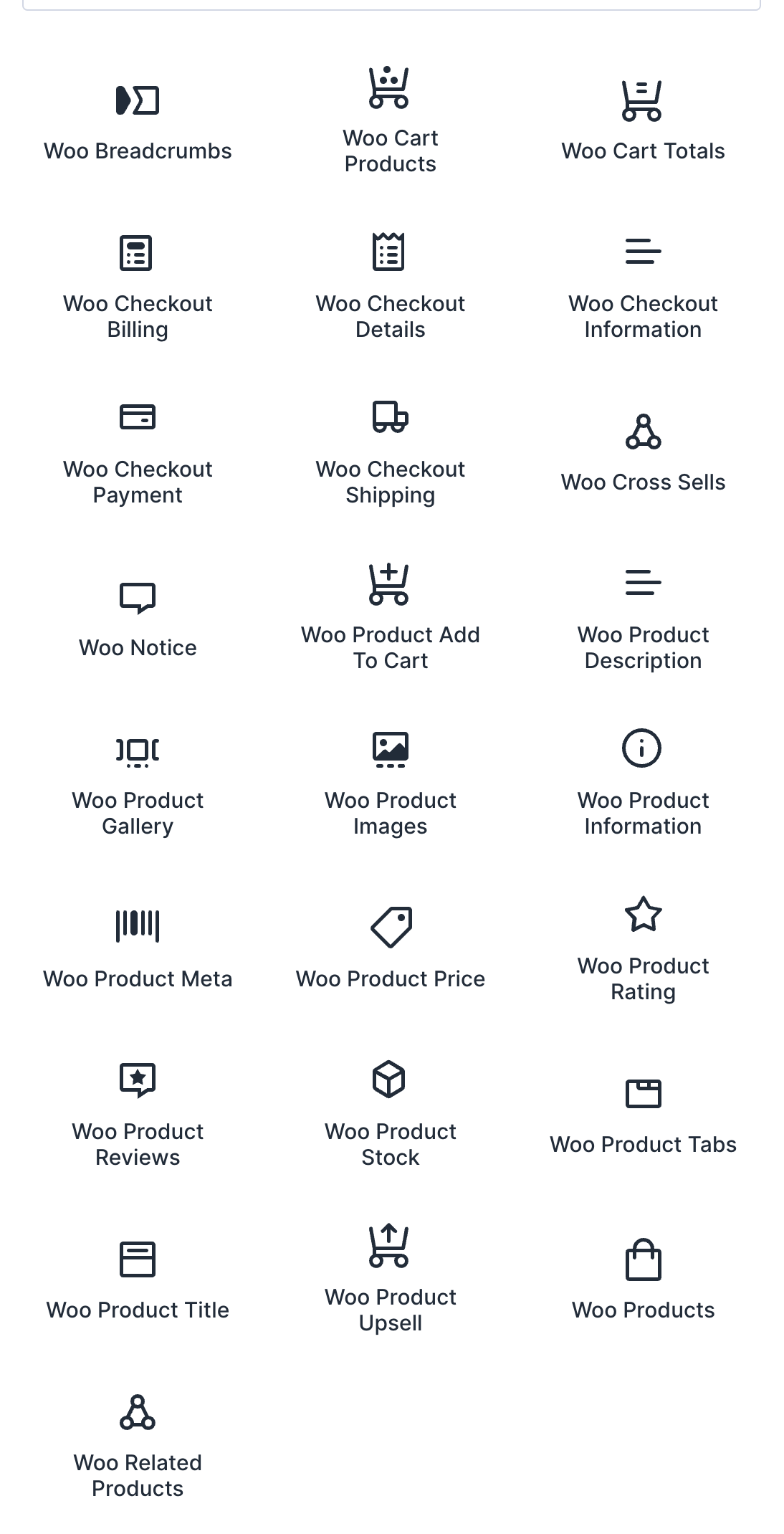
Divi 5 ships with a dedicated set of WooCommerce modules for building shop pages, product grids, carts, and checkout flows. These modules only appear in the builder when WooCommerce is installed and active. As the screenshot shows, the selection is impressive, covering everything from breadcrumbs and cart totals to product galleries, reviews, and upsells.
For simple product catalogs and standard shops, the native modules work well. For more advanced stores, a third-party developers like BodyCommerce from Divi Engine has traditionally been the go-to solution. It offers over 65 modules for custom product pages, Ajax filtering, and checkout customization. As of now, Divi Engine is actively working on full Divi 5 compatibility, but I would not consider it production-ready on Divi 5 just yet. If WooCommerce is central to your project, keep an eye on both the native modules and the BodyCommerce updates before committing.
Divi 5 includes 25WooCommerce product modules and 8 cart and checkout modules for building eCommerce sites.
Divi AI is Elegant Themes’ built-in set of ai tools. It can generate text, images, and even custom CSS directly inside the builder. You do not need to switch to an external tool or copy-paste from ChatGPT.
The text generation is useful for first drafts and placeholder content. Image generation can produce decent visuals if you need quick graphics. The CSS generation is a nice touch for users who want custom styling but are not comfortable writing code from scratch.
Divi AI is not included in the base plan. It is part of the Divi Pro subscription at $277/year. Whether it is worth the extra cost depends on how often you need AI-assisted content in your workflow.
I have not tested Divi AI myself yet, so this is based on what Elegant Themes offers.
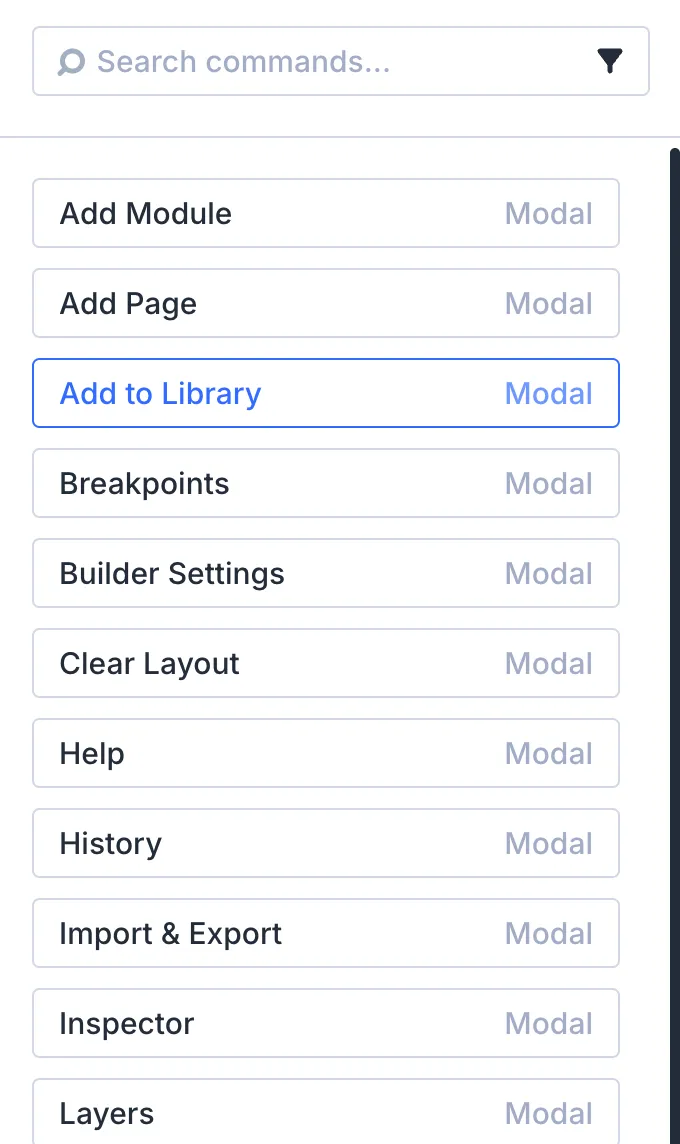
The Command Center is a keyboard-driven shortcut panel that lets you search for settings, add elements, navigate between pages, and execute actions without touching the mouse. Think of it as a spotlight search for the Divi Builder.
It is one of those features you do not think you need until you try it. For power users working on larger projects, it speeds up the workflow noticeably.
Canvases are one of the more creative additions in Divi 5. A Canvas is a detached workspace that lives separately from your main page content. You can use it to build off-canvas menus, slide-in sidebars, popups, or even stage layout changes without touching your live page.
Canvases can be local (tied to one page) or global (available site-wide). Combined with Divi’s Interaction Builder, you can trigger Canvas content based on clicks, scrolls, or hover actions. The new Canvas Portal module lets you inject that content into a specific spot on your page, for example a mega menu dropdown positioned directly below a navigation link.
For anyone who previously relied on third-party plugins or custom CSS for off-canvas elements, this is a welcome built-in solution.
Elegant Themes is shipping updates fast. Here is what landed after the official Divi 5 release on February 26, 2026. I will keep this table updated as new features roll out.
| Date | Feature | What it does |
|---|---|---|
| March 9, 2026 | Complete Site Editing | Edit header, footer, and page content in one view without switching to the Theme Builder. |
| March 30, 2026 | Composable Settings | Toggle any design option on or off for any module sub-element. Less need for custom CSS. |
| April 21, 2026 | Form Styling + CF7 Module | Overhauled form field options, focus/checked editing modes, and a new Contact Form 7 module. |
| April 24, 2026 | Nested Option Presets | Nest option presets inside other presets. Apply shared styles to sub-components like button borders. |
| April 30, 2026 | Variable Generator | Auto-generates fluid sizing variables with clamp() and color palette systems. Reduces manual setup time for design variables. |
| April 30, 2026 | Breadcrumbs Module | New module for styled, accessible breadcrumb navigation. |
| May 11, 2026 | Aspect Ratio, Framing & Image Presets | Built-in aspect ratio and image framing for all modules. Image presets for consistent styling site-wide. |
| May 22, 2026 | Five New Modules | Timeline, Instagram Feed, Table of Contents, and more. |
| May 22, 2026 | Color Scale & Color Harmony Generators | New variable generator modes for creating color systems. |
| June 5, 2026 | Gradient Editor & Gradient Variables - Text Fill Effects | New gradient picker panel, gradient field type, and gradient variables. Copy, paste, and extend gradients. Gradient and image text fill options for fonts. |
| June 12, 2026 | Customizable Workspaces | Save and switch between custom builder layouts with panel positioning, docking, and grouping. |
| June 25, 2026 | Advanced Text Styling & Drop Caps and variable Fonts | Text direction, columns, stroke, capitalization, hyphenation, wrapping, and drop cap styling for all body text. Support for flexible fonts with variable weight and additional font settings. |
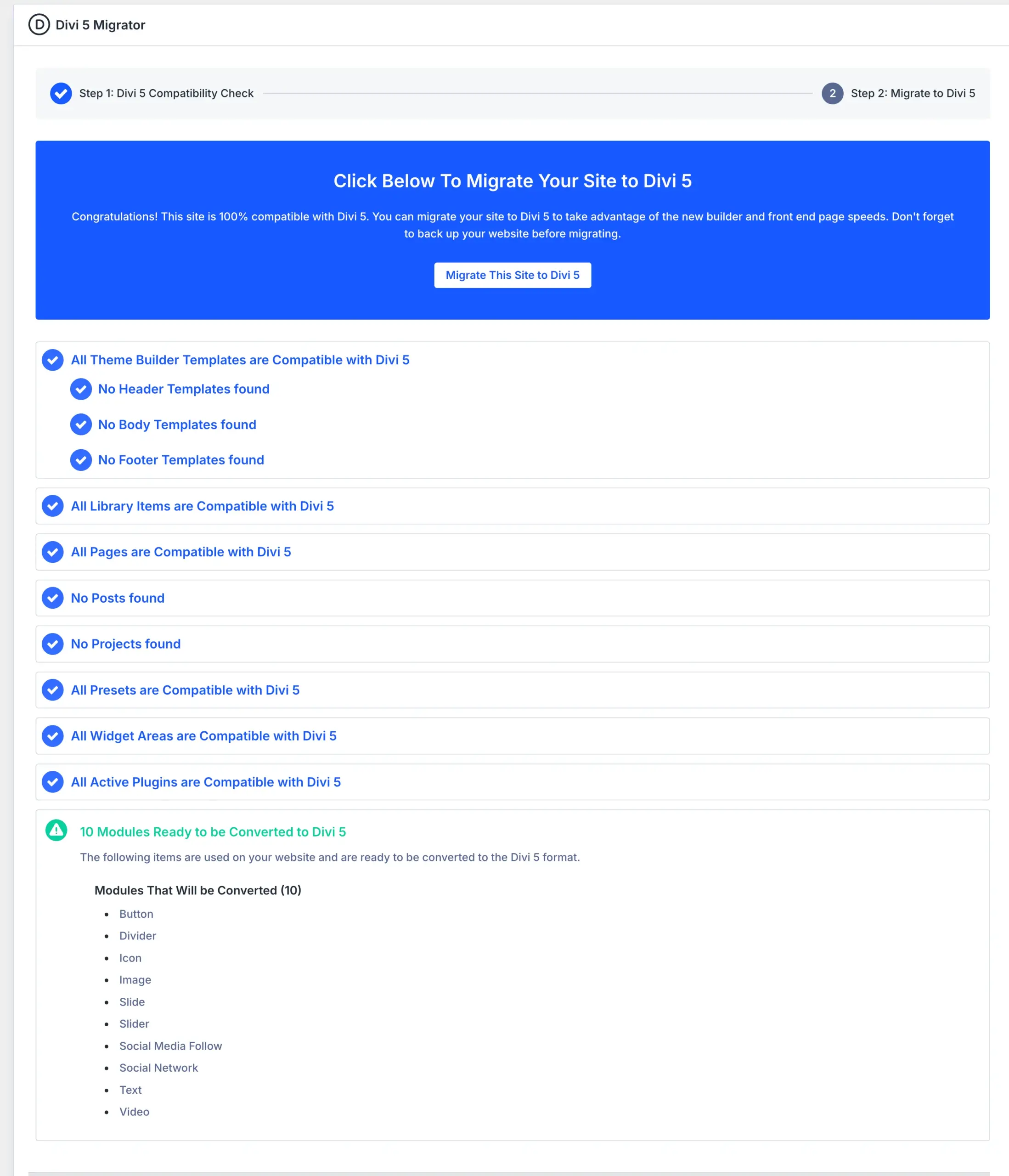
If you are running a Divi 4 site, migration is probably your biggest concern. Elegant Themes built a dedicated Divi 5 Migrator to handle the transition. Here is how it works in practice.
The migrator runs a pre-check on your site before anything changes. It scans your layouts, theme builder templates, and global presets, and flags potential issues. Once you review the report, you can start the migration with a single click. Existing layouts, saved items in your Divi Library, and Divi theme builder templates are converted to the new Divi 5 format.
If a module or third-party element is not yet fully supported, Divi 5 loads it in backward compatibility mode. That means your site stays functional even if not every component has been converted to native Divi 5 code. You also get a rollback option. If something goes wrong, you can revert to Divi 4 from the Divi Theme Options page.
Elegant Themes has extended Divi 4 support to at least 12 months after the official release. That gives you until early 2027 to migrate at your own pace. You can opt in to Divi 5 when you are ready or stay on the Divi 4 update path and continue receiving security and compatibility patches.
My recommendation: Do not migrate a production site without testing on staging first. Run the migrator, check your homepage, header, footer, key landing pages, and any WooCommerce templates. Pay attention to layouts that rely heavily on custom CSS, as some adjustments may be needed. If your site uses third-party Divi plugins, verify that they support Divi 5 before switching.
For new projects, there is no reason to start with Divi 4 at this point. Build on Divi 5 from the start and take advantage of the new design system, presets, and variables from day one.
Divi pricing is straightforward and, compared to many competitors, refreshingly simple. Every plan covers unlimited websites with no per-site restrictions.
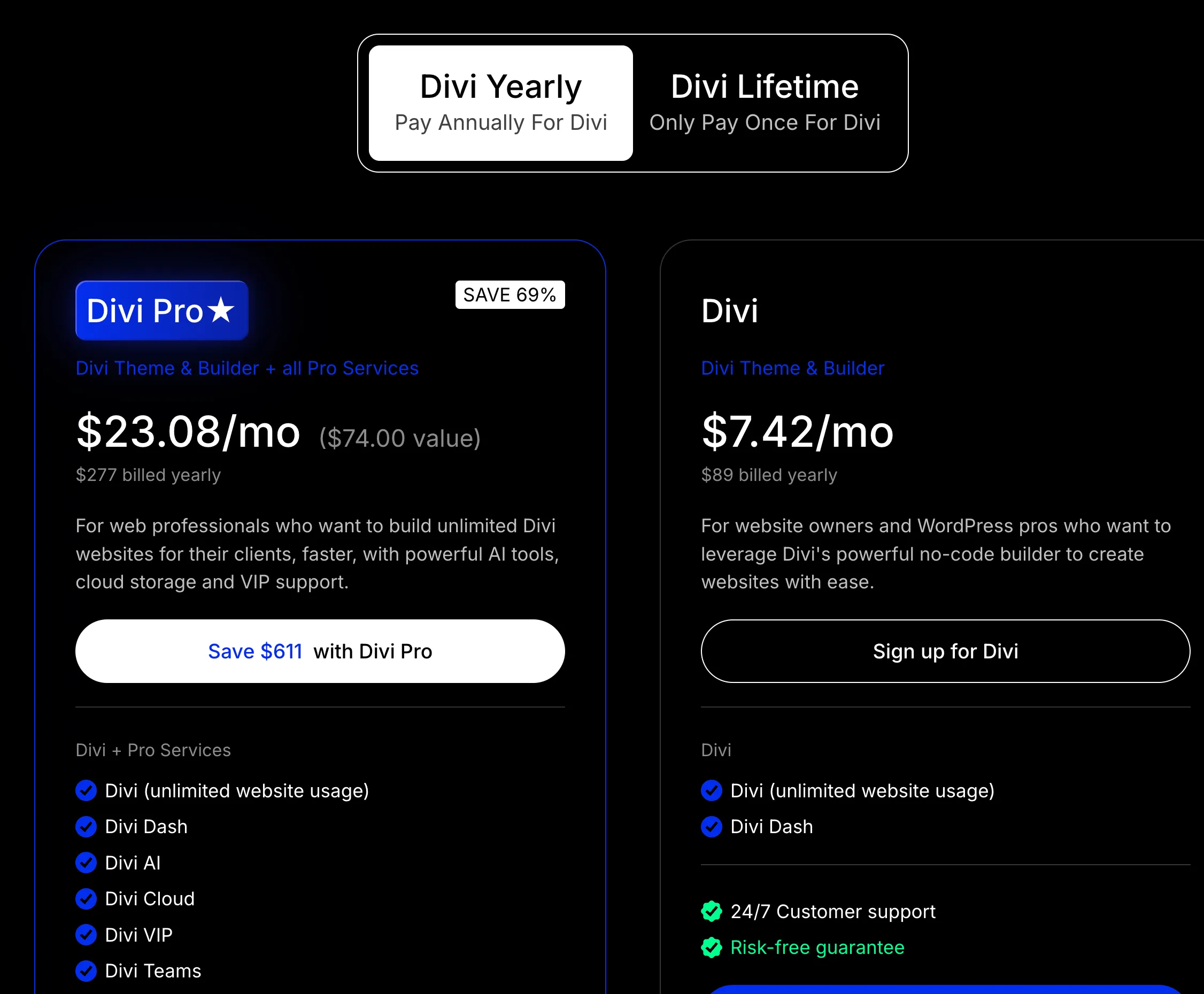
The Divi Yearly plan costs $89/year and includes the Divi Theme, the Divi Builder plugin, Divi Dash for central site management, and all updates and support for 1 year. This plan is best for users who want flexibility without long-term commitment.
The Divi Lifetime plan is a one-time payment of $249. It provides the same features as the yearly plan, but with lifetime access and lifetime updates. For users managing multiple sites, this may become cost-effective over time.
Divi Pro costs $277/year and adds Divi AI, Divi Cloud, Divi VIP support, and Divi Teams. If you rely heavily on AI tools for content creation or manage multiple client sites with a team, the Pro plan makes sense. If not, the base plan or lifetime deal covers everything you need to build with Divi 5.
One thing worth noting: Divi 5 does not require a separate license. If you already own Divi, you get Divi 5 included with your existing plan.
For individuals new to Divi, the yearly option offers an opportunity to evaluate the product, while the lifetime option may suit long-term users who prefer to avoid recurring payments.
Elegant Themes offers a 30-day money-back guarantee for Divi, ensuring a risk-free investment.
Elegant Themes honors the early Lifetime license, providing value and stability for long-term Divi users.
The WordPress page builder space is crowded, and Divi 5 does not exist in a vacuum. Here is how it compares to the builders I see used most often.
Elementor is what I use for most of my projects, so this comparison is personal. Elementor still has the larger ecosystem. Over 13 million sites run on it, the template library is massive, and third-party addon support is unmatched. For WooCommerce-heavy projects, Elementor’s integration is more mature, especially if you pair it with Elementor Hosting for an all-in-one setup.
Where Divi 5 pulls ahead is pricing and the design system. Elementor Pro starts at $59/year for a single site. Divi gives you unlimited sites for $89/year or $249 for life. The preset and variable system in Divi 5 is also more advanced than what Elementor offers out of the box. If you value global design consistency across multiple sites, Divi 5 has the edge.
Performance-wise, both builders have improved significantly. Divi 5 feels snappier inside the editor, but front-end performance depends heavily on how you build. Neither builder is lightweight by default.
Bricks Builder is the favorite among developers who want clean, lightweight code output. It generates less DOM bloat than both Divi and Elementor, and it consistently scores well on Core Web Vitals. If raw front-end performance is your top priority, Bricks is still hard to beat.
Where Divi 5 wins is ease of use and the breadth of built-in features. Bricks requires more technical knowledge and has a smaller community. It also lacks a lifetime deal comparable to Divi’s, costing $99/year after the first year.
There is no single best WordPress builder for everyone. Divi 5 is the strongest option if you want an all-in-one toolkit with unlimited site usage at a fair price. Elementor leads in ecosystem size and WooCommerce maturity, especially when paired with lightweight themes like Hello Elementor. Bricks wins on code output and speed. Breakdance offers a clean middle ground, while Elementor is expanding its theme lineup with options like Hello Biz for business sites.
What I can say is this: Divi 5 is back in the conversation. A year ago, I would not have recommended it over Elementor for a new project. Today, it depends on the project.
Already own Divi. If you have a Divi license, especially the Lifetime Deal, there is no reason not to explore Divi 5. The upgrade costs nothing, and the improvements over Divi 4 are significant across the board.
Build sites for clients. The unlimited site license, the Divi Role Editor for controlling client access, and the Divi Library for reusing layouts across projects make Divi 5 a practical choice for freelancers and agencies. Divi Dash adds centralized management on top.
Want a visual builder without writing code. Divi 5 is one of the most intuitive drag-and-drop builders available. If you are a beginner or a business owner maintaining your own site, the learning curve is manageable.
Value design consistency. The new design system with presets and variables makes it easy to maintain a consistent look across an entire site. If you have struggled with styling chaos in Divi 4 or other builders, this alone is worth the switch.
Need the cleanest possible code output. Divi 5 has improved significantly, but it still generates heavier markup than Bricks or Breakdance. If top Core Web Vitals scores are a hard requirement, test carefully before committing.
Depend on strict accessibility compliance. Divi has improved its semantic HTML, but it is not yet at the level of builders like Bricks that give you full control over HTML tags and ARIA attributes out of the box. If accessibility is a legal or contractual requirement for your projects, verify that Divi 5 meets your standards before building.
Run a complex WooCommerce store. For simple product catalogs and brochure-style shops, Divi 5 works fine. For stores with custom checkout flows, advanced filtering, or heavy use of dynamic fields, I would wait. The native WooCommerce modules are still maturing, and key third-party plugins like BodyCommerce are not fully Divi 5 compatible yet.
Rely on third-party Divi plugins. This is the biggest gotcha right now. Not all third-party plugins have been updated for Divi 5. Before committing to a production build, check that every plugin you depend on supports Divi 5. If it does not, you may need to wait or find alternatives.
I have been following Divi 5 since the early Alpha days. Back then, my verdict was cautious. Now that Divi 5 is officially out, my opinion has shifted. Here is what stood out after hands-on testing:
I bought the Divi Lifetime Deal years ago because I loved the builder. I created several websites with it. But over time, the limitations became hard to ignore, and development was not moving in the right direction. I moved to Elementor.
When I heard that Elegant Themes was rebuilding Divi from scratch, I paid attention. That is not a small decision. Throwing away a decade of code and starting over takes real courage. But the result is a huge improvement.
Divi 5 is a game changer. The foundation is about right. I am not switching all my projects overnight. But Divi 5 has earned a serious spot in my toolkit, and I will keep updating this review as I continue testing.
No. Divi 5 is included in every existing Divi plan. If you own the Lifetime Deal, a yearly subscription, or Divi Pro, you get Divi 5 at no additional cost. There is no separate license.
The biggest one right now is third-party plugin compatibility. Not all Divi plugins have been updated for Divi 5 yet. Before migrating or starting a new build, check that every plugin you rely on supports Divi 5. Beyond that, complex WooCommerce setups and sites using advanced dynamic fields may run into limitations. For brochure sites and standard business pages, Divi 5 is production-ready.
Not yet. At launch, Divi 5 only ships as the full Divi Theme. Elegant Themes confirmed that the standalone Divi Builder plugin will follow and that it will not require a lengthy beta phase.
Currently, no. Divi 5 is available only as part of the Divi Theme. The standalone Divi Builder plugin, which works with any WordPress theme, has not been updated to Divi 5 yet. Once Elegant Themes releases it, you will be able to use the Divi 5 builder with other themes.
I’d love to hear from you. Was this article helpful? Share your thoughts in the comments below. If you prefer, you can also reach me by email or connect with me on Reddit at Navigatetech.
Hi, I'm Edy Werder. I write hands-on guides about servers, virtualization, NAS and WordPress, based on setups I run in my own homelab. Real configs and real results, no fluff.
Enjoying the content?


Divi 5 is a mess and early adopters know they are basically bug testers. All sorts of issues with bugs with modules and massive conflicts with caching / optimization plugins. One Divi 5 site in and I’m going to wait like a year before I touch it again.
Beyond that the crazy granual control of everything is impressive, but no basic web client will ever be able to use Divi 5. It is overwhemling and they will just be clicking on all sorts of options trying to figure out the basics that were so logical in Divi 4.
Thanks for sharing your experience. The caching and plugin conflicts are real, and I mentioned third-party compatibility as the biggest gap right now. But I think it is a matter of time. Divi 5 is essentially a new product, and third-party developers need to catch up. On the interface, I actually miss the colorful Divi 4 look too. But the Divi 5 interface is clean and modern, and once you get used to it, the workflow is faster. I think giving it six months is a fair approach.