

By Edy Werder — IT Consultant & Tech Blogger
If you are building a homelab, power consumption matters more than most people expect. Not because a server cannot handle the workload, but because it sits there 24 7. A few watts’ difference at idle can add up to real money over a year.
In this post, I compare three very different “home server” types from my own lab: a Dell PowerEdge T360, a Minisforum MS-01, and an Intel NUC. I am not using manufacturer specs. I am using real measurements from my setup, with Home Assistant smart plug data for the mini PCs and iDRAC 9 power monitoring for the PowerEdge. The goal is simple: show the power draw differences between these computer types, so you can pick what fits your homelab and your electricity bill.
If you want the cheapest 24/7 home server, the Intel NUC wins. In my 7-day measurements, it averaged 8.7W, which is roughly CHF 19 per year at CHF 0.25 per kWh.
If you want a middle ground with more headroom for Proxmox, the Minisforum MS-01 is the most interesting category. It averaged 52.8W in my lab, or about CHF 116 per year, while offering much more performance than a typical mini PC.
If you want server features and expandability, the Dell PowerEdge T360 is the “set it and forget it” option. In iDRAC 9, it averaged 106W, which is about CHF 232 per year. You get iDRAC management and a platform built for always-on operation, with a higher baseline power cost.
What “low power” really means in a 24 7 homelab
When people say “low power”, they often think about peak wattage. In a homelab, that’s rarely the most important number. Your server spends most of its life idling or doing light work, so idle power and the long-term average are what drive your electricity bill.
The simple math (CHF 0.25 per kWh)
With CHF 0.25 per kWh in Switzerland, a device running 24/7 costs roughly:
- 1 watt → CHF 2.19 per year
- 10 watts → CHF 21.90 per year
- 50 watts → CHF 109.50 per year
- 100 watts → CHF 219.00 per year
That’s why saving 10 to 20 watts at idle can make a real difference over a year.
Every watt becomes heat
Power turns into heat in your room. More watts often means more fan noise, and sometimes extra ventilation in summer. Low power consumption is not only about cost, it’s also about comfort.
The hidden power consumers
CPU choice matters, but “low power” is often decided by everything around it:
- Hard drives add steady baseline power draw, and more drives means more watts.
- Cooling is not free. Extra fans and aggressive fan curves add consumption and noise.
- Add-on hardware such as 10GbE, HBAs, and peripherals can add up quickly.
The “power tax” of extra machines
Every powered-on box has a baseline draw even when it does almost nothing. That’s why one efficient host running several services can be cheaper to run than multiple half-idle machines.
My definition of low power: idle power consumption , low average, and spikes that are explainable (backups, updates, scrubs, transcoding).
How I measured power draw in my lab
Minisforum MS-01 power consumption
I measured the Minisforum MS-01 using a myStrom smart plug and tracked the power draw in Home Assistant.
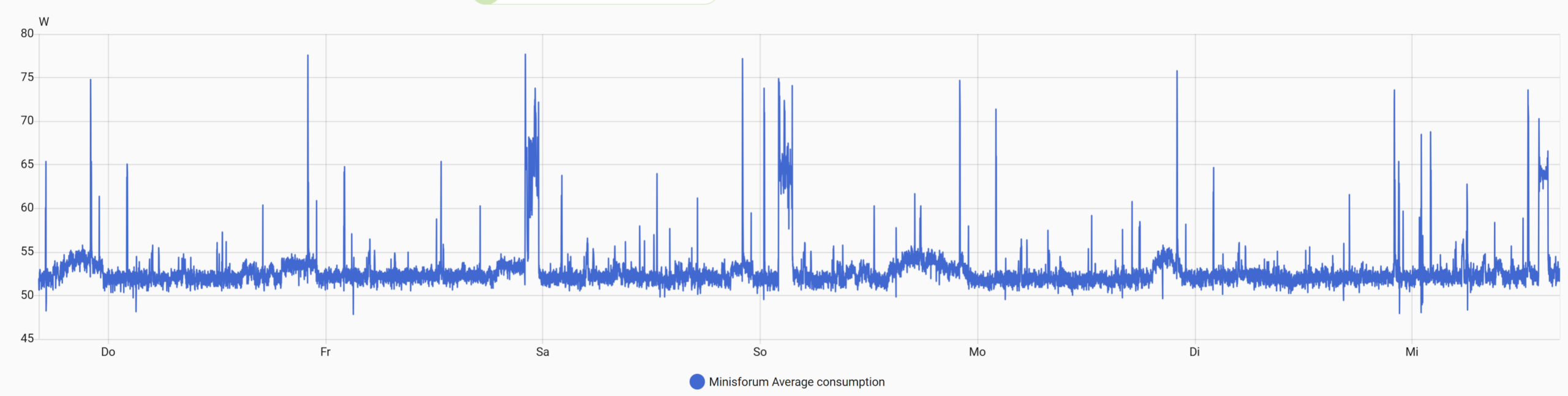
The chart is a 7-day view. It shows a fairly stable baseline with short spikes during the week. Those spikes are normal in a homelab and usually come from background activity like updates, backups, or short bursts of CPU usage.
Intel NUC power consumption
I measured the Intel NUC the same way as the Minisforum: myStrom smart plug, data captured in Home Assistant, and displayed as a 7-day view.
Even when you aim for a low power server, you will still see spikes like this. The important part is the baseline and the weekly average, because that is what drives the yearly electricity cost.
Dell PowerEdge T360 power consumption (iDRAC 9)
For the PowerEdge T360 I used iDRAC 9 power monitoring. This server has two power supplies, and in my setup one PSU is connected to a UPS and the other PSU is connected directly to the wall. As a result, measuring total wall power would require metering both feeds.
Smart plugs I recommend for power measurements
If you want reliable power measurements in Home Assistant, these smart plugs are good options. myStrom is easiest to find in Europe, but TP-Link and Shelly are great choices worldwide.


Minisforum MS-01 power consumption
I measured the Minisforum MS-01 with a myStrom smart plug and tracked the readings in Home Assistant. This is wall power.
7-day power numbers from CSV
- Average (7 days): 52.8W
- Typical range: 51.5W to 54.0W
- Peak: 77.7W (Jan 9, 22:04 CET)
- Lowest reading: 47.8W (Jan 9, 03:04 CET)
Cost estimates: 52.8W 24/7 is about 463 kWh per year, which is roughly CHF 115.7 per year at CHF 0.25 per kWh.
Short verdict for this device type
Based on 7 days of measurements, the MS-01 sits in the low 50W range on average with short spikes. It’s not in “NUC idle territory”, but it looks like a strong option when you want a compact box that can run heavier homelab workloads.
Intel NUC Mini PC power consumption
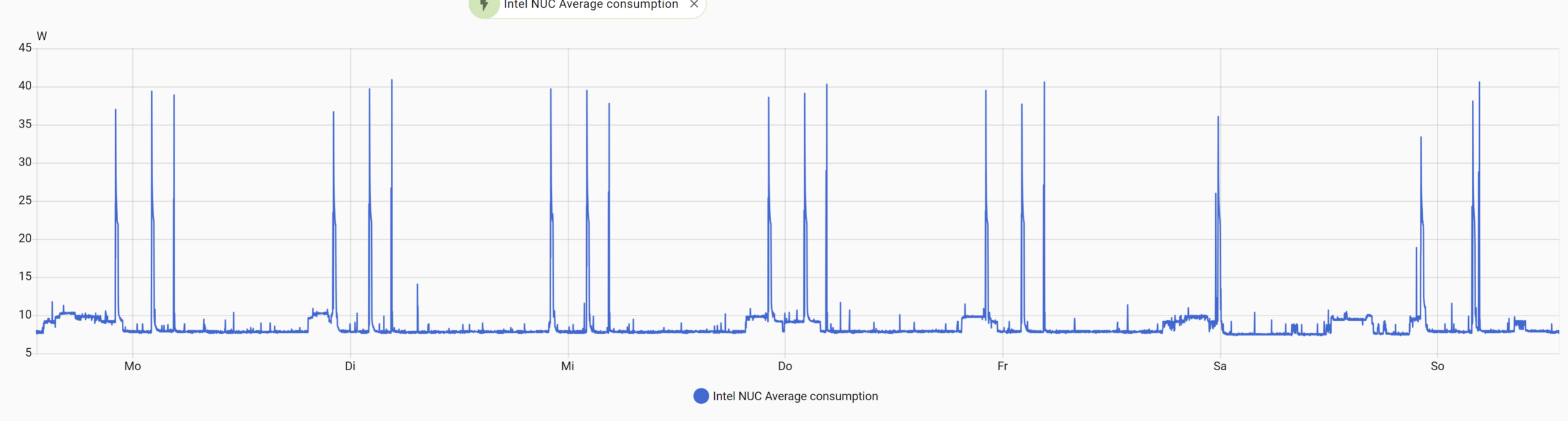
I measured the Intel NUC with a myStrom smart plug and exported the 7-day readings from Home Assistant. This is wall power.
7-day power numbers from CSV
- Average (mean): 8.7W
Home Assistant showing “9W” makes sense as a rounded value. - Typical range: 7.7W to 9.8W (10th to 90th percentile)
- Peak: 40.9W (Tue Jan 13, 04:35 CET)
- Lowest reading: 7.3W (Sat Jan 17, 01:28 CET)
Cost estimate (CHF 0.25 per kWh)
At 8.7W average running 24/7, that’s roughly:
- 75.9 kWh per year
- CHF 19.0 per year
Short verdict for this device type
The NUC sits in a true low-power class: single-digit watts most of the time, with short spikes when something happens.
Note: Intel has stopped selling NUCs and the line continues under ASUS. I’m using “Intel NUC” as shorthand for a compact mini PC, and the measured watts are representative for similar systems with comparable CPUs and hardware.
Dell PowerEdge T360 power consumption

7-day power numbers (from iDRAC)
- Average (Verbrauch): 106W
- Peak (Maximaler Spitzenwert): 179W (Tue Jan 13 13:27:00 2026)
- Minimum (Minimaler Spitzenwert): 90W (Wed Jan 14 09:30:34 2026)
Cost estimate (CHF 0.25 per kWh)
If the server averaged 106W 24/7, that’s about:
- 928.6 kWh per year
- CHF 232.1 per year
In my T360 I also have a 10GbE add-in card installed that I’m currently not using, which likely adds some baseline power draw.
Short verdict for this device type
At roughly 106W average in this 7-day view, the T360 clearly sits in a different power class than a mini PC. In return, you get “real server” traits
Dell documentation on reporting server power consumption
Power consumption summary table
The charts are useful to see spikes, but the number that matters for a 24/7 homelab is the long-term average. Here is a side-by-side comparison using my 7-day measurements and an electricity price of CHF 0.25 per kWh. The “wow” column shows how much more each system costs per year compared to the Intel NUC.
This table makes it easy to compare each system against a realistic power budget for a 24/7 homelab.
System | 7-day average | Typical range | Peak | Measurement | Est. kWh per year | Est. CHF per year | WOW vs Intel NUC |
|---|---|---|---|---|---|---|---|
Intel NUC | 8.7 W | 7.7–9.8 W (P10–P90) | 40.9 W | myStrom smart plug (wall power) + HA CSV | 75.9 | 19.0 | CHF 0.0 |
Minisforum MS-01 | 52.8 W | 51.5–54.0 W (P10–P90) | 77.7 W | myStrom smart plug (wall power) + HA CSV | 462.8 | 115.7 | CHF 96.7 |
Dell PowerEdge T360 | 106 W | n/a | 179 W | iDRAC 9 power monitoring | 928.6 | 232.1 | CHF 213.1 |
Choosing the MS-01 over the NUC costs about CHF 97 more per year, and the T360 about CHF 213 more per year, at CHF 0.25 per kWh.
How to improve power efficiency in a homelab
If you want real power savings, focus on idle draw and background load. Here are the power considerations that made the biggest difference in my lab.
CPU choice and BIOS power settings
- nable CPU C-states if available.
- Pick a Balanced or Power Efficient profile instead of maximum performance.
- Measure again after changes. What matters is the 7-day average, not a momentary reading.
Tuning the CPU governor can help optimize power efficiency in server setups. Low-power CPU families like Intel Atom class chips are designed for efficiency and often idle very low, but the final result still depends on the platform and BIOS settings. My Intel NUC results show what a power-efficient mini PC class system can look like in practice.
Power supply efficiency at low load
Many power supplies are most efficient at mid-load. If your homelab runs at low loads most of the day, a high-efficiency PSU (80 PLUS Gold or better) can reduce wasted power and heat. Power supplies are typically most efficient at mid-load (often around 50%), while many home servers run at much lower loads for most of the day, which can reduce efficiency.
Storage choices (drives add baseline watts)
- Hard drives (“spinning rust”) add steady power usage, and all the disks plus cooling can turn a low power box into a power hungry machine.
- Power consumption can vary significantly between different types of hard drives, with 2.5″ drives generally consuming less power than 3.5″ drives.
- Getting hard disks to go to sleep can save a significant amount of power, but may cause wear and tear.
Add-in cards and networking (easy to forget)
- 10GbE NICs and other PCIe devices can add idle consumption even when you are not using the bandwidth.
- If you are not using a card, removing it is one of the simplest ways to reduce wasted watts.
VM and container hygiene (software can keep hardware busy)
- A “high idle” host often has something running in the background: backups, scrubs, metrics, log spam, or a misbehaving container.
- Consolidate small always-on services when it makes sense, so you do not pay the baseline power tax of extra machines.
- If you want to go deeper, you can also check that the host is not forced into a permanent “performance” profile.
My take: Which one I would choose for home server setup
After measuring all three systems, the result is pretty clear. The power cost difference between a mini PC and real server hardware is not subtle. The Intel NUC is the cheapest to run by far. The PowerEdge is in a different league in terms of baseline watts. And the Minisforum MS-01 sits right in the middle, which makes it an interesting “best of both worlds” option for many homelabs.
My recommendation matrix
Cheapest to run (24/7 idle and average)
- Intel NUC
With an average of roughly 8.7W, it’s in the “leave it on and forget about the power bill” category.
Best virtualization headroom per watt
- Minisforum MS-01
At around 52.8W average, it uses more power than a NUC, but it also gives you much more room for real Proxmox fun. For me, this is the sweet spot when you want a capable host without jumping straight to full server consumption.
Best for storage and expandability
- Dell PowerEdge T360
This is where server hardware wins. Expandability, proper platform features, and flexibility for storage-focused setups. You pay for it in watts, but you get a system that’s designed for this job.
Best “set it and forget it” reliability
- Dell PowerEdge T360
Dual PSU, iDRAC, and a platform built for always-on operation. If I want maximum peace of mind and easier remote management, this is the one.
I’d love to hear from you — was this article helpful? Share your thoughts in the comments below. If you prefer, you can also reach me by email or connect with me on Reddit at Navigatetech.
Before you go …
f you’re thinking about building your own low-power home server, the next step is deciding how to manage your virtual machines efficiently. A solid hypervisor can make all the difference in optimizing performance and resource use. I’ve covered some of the top options in detail to help you choose what fits best with your setup.
Before you go, check out Best Hypervisor for Home Lab for a closer look at the platforms worth considering. It’s a natural next read if you’re aiming to get the most out of your home server.
About the author
Hi, I’m Edy Werder. I write hands-on guides about Proxmox, homelab servers, NAS, and WordPress, based on real setups I run and document.
No sponsors, no fluff—just real configs and results.
Enjoying the content?
