By Edy Werder — IT Consultant & Tech Blogger
Hey, are you stuck deciding between Proxmox Ceph and ZFS? Well, you’re not alone. Let’s look at both closely and see which suits your needs best.
Alright, first up is Ceph. Think of Ceph as a Swiss Army knife for your storage needs. It’s an open-source, software-defined storage platform that scales from a single drive to a full-on data center. You can store files, get block storage for your virtual machines, or use object storage for backups, all in one place.
ZFS, on the other hand, is more like a specialized tool. It’s a nifty file system and logical volume manager that’s excellent for safeguarding your data.

| Feature | Proxmox Ceph | Proxmox ZFS |
| Scalability | High | Limited |
| Complexity | Moderate to High | Low to Moderate |
| Performance | High | High |
| Cost | Variable | Variable |
Proxmox Ceph is an open-source, distributed storage system with high availability and scalability. ZFS is a proprietary file system developed by Sun Microsystems for use in their Solaris operating system.
Here’s the scoop if you’re running a Proxmox Virtual Environment and wondering why Ceph could be your golden ticket. Ceph brings a high level of scalability that’s a godsend for growing infrastructures—got more data? Just plug in more nodes, no hassle. The beauty of Ceph is that it can handle a massive amount of data across many nodes, distributing the workload and avoiding any single point of failure.
But that’s not all. Ceph is super flexible. It covers you whether you need object, block, or file storage. Plus, Ceph’s RADOS provides excellent data replication, which means your data is secure and accessible even when hardware fails. If your Proxmox setup is part of a large, dynamic ecosystem, Ceph can adapt with you, making it a fantastic long-term partner.
So, you’re new to Proxmox and scratching your head over ZFS and Ceph? Don’t worry, we’ve all been there. Imagine ZFS as your dependable home safe. It’s designed to protect your valuable data right where it’s stored, using awesome features like checksums to prevent data corruption. It’s easy to set up but is generally better for smaller, more static storage needs.
Ceph, on the other hand, is like having an entire bank vault. It’s designed to manage huge amounts of data across a large network. Unlike ZFS, which focuses on a single system, Ceph spreads your data across multiple systems, giving you a ton of room to grow. It also offers different types of storage—block, file, and object—so it’s a bit of a jack-of-all-trades.
In simpler terms, ZFS is a fantastic option if you want a simple, secure way to store and manage data on a single system. Ceph is your go-to if you’re thinking big, need room to grow, or require different types of storage solutions.
Thinking Ceph sounds too good to be true? Well, it might be—if you’re running a smaller operation. Ceph is like a race car: fast and impressive but needs a pit crew to keep it running smoothly. If you don’t have the technical expertise or manpower to manage it, you could be in a tangle. Also, if your storage needs are modest and static, using Ceph might be like using a sledgehammer to crack a nut.
We encountered an infrastructure issue at one of our data centers, where a few switches unexpectedly crashed. Consequently, we had to replace and re-configure them promptly. The incident also affected our Proxmox nodes, which were connected to Ceph. As Ceph relies on IP networks, configuring the network ports for Ceph took longer than anticipated. It’s important to note this when utilizing Ceph to ensure smooth operations.
Ceph is an extremely reliable platform that is designed to survive hardware failures. Thanks to its self-healing and fault-tolerant design, Ceph automatically replicates your data. So, if one part of your system goes belly-up, Ceph redirects the data flow to keep things running.
renewed Servers
The products are refurbished, fully functional, and in excellent condition.
Nah, Ceph and ZFS are more like neighbors than roommates. They can exist in the same Proxmox environment but serve different purposes. Ceph is all about scalable, networked storage, while ZFS is focused on data integrity within a single system. They can work together—for example, you could technically use ZFS as the underlying storage for a Ceph cluster—but it’s like using a bike to power a car; doable, but not what they were designed for.
Did you get a Proxmox cluster and can’t decide between Ceph and ZFS? Well, consider your needs. If you’ve got a growing setup with diverse storage requirements and a team to manage it, Ceph is your pick. On the flip side, if you want a more straightforward, set-it-and-forget-it solution that guarantees data integrity, then ZFS has your back.
So, why go for Ceph with Proxmox? It’s your go-to when you need to scale and require different types of storage. And ZFS? If you’re after data integrity and simpler management, ZFS is your buddy.
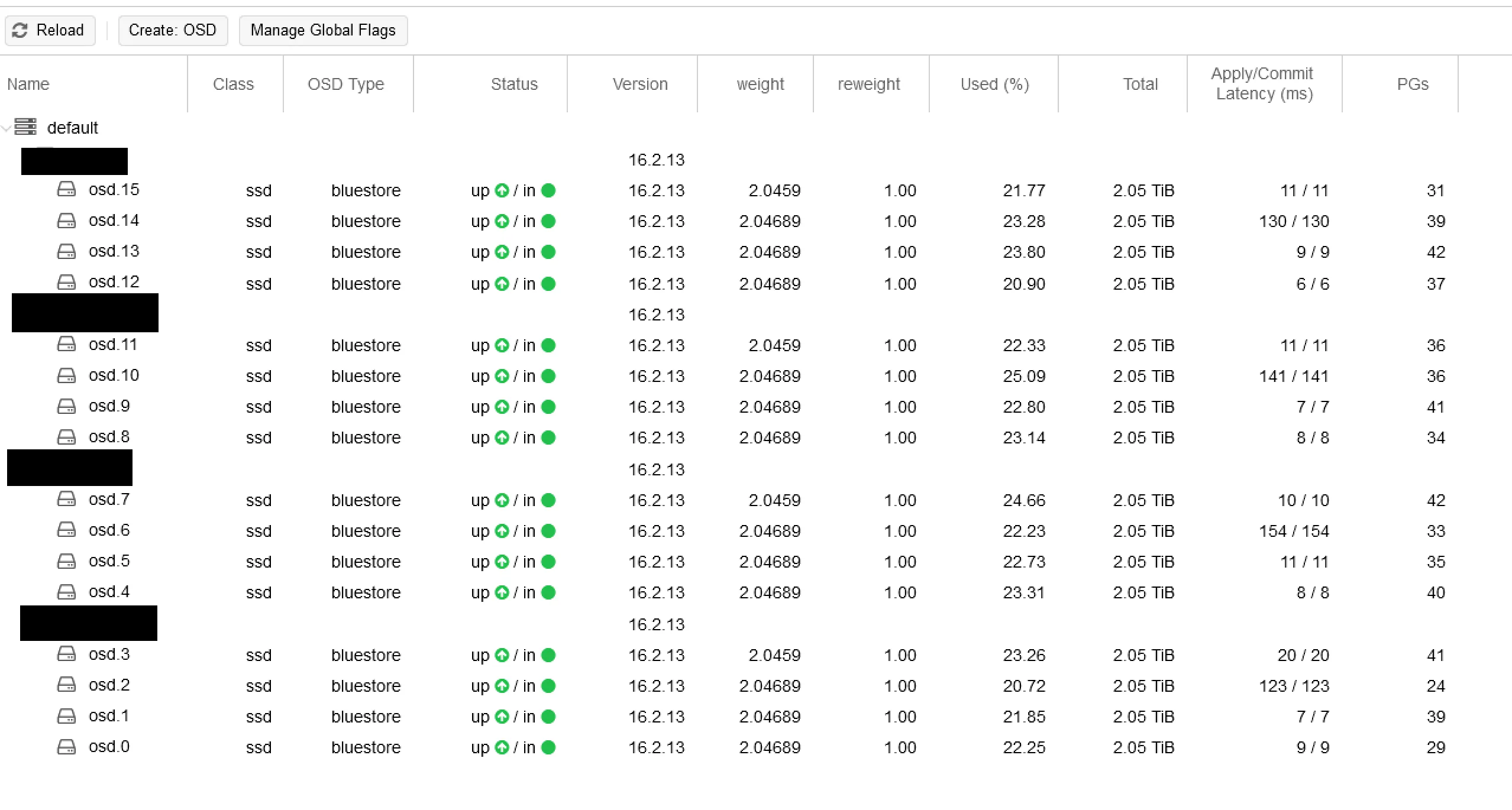
Regarding Ceph clusters and IP networks, the devil’s in the details. Ceph clusters typically employ regular IP-based networks to link their many nodes and services. The traffic gets divided, usually into at least two types: public and cluster networks.
ceph.conf file, specifying the IPs for both the cluster and public networks.Private IPs vs Public IPs: When connecting Ceph nodes within the cluster, it’s generally a good idea to go with private IPs. They add an extra layer of security since they aren’t publicly exposed. Plus, you get the benefit of less latency and usually no extra data transfer costs. So, for internal cluster operations, private IPs win the day.
How to master a Proxmox Ceph Cluster – A tutorial
I want to tell you about another insightful article I’ve written. If you found the comparison between Proxmox Ceph and ZFS intriguing, you might find my blog post on homelab networking equally informative.
I delve into various aspects of setting up and managing a homelab network in that piece. You’ll learn about best practices, common challenges, and some tips and tricks I’ve picked up over the years. Whether you’re just starting out with your first homelab or looking to optimize an existing setup, plenty of valuable information is waiting for you.
Hi, I’m Edy Werder. I write hands-on guides about Proxmox, homelab servers, NAS, and WordPress, based on real setups I run and document.
No sponsors, no fluff—just real configs and results.
Enjoying the content?