

By Edy Werder — IT Consultant & Tech Blogger
Short answer: backup software for your VMs, LXC containers, and physical hosts. Proxmox Backup Server handles incremental backups, data deduplication, compression, and encryption. Proxmox Server Solutions GmbH built it for the Proxmox ecosystem, but the Proxmox backup client also works on any Debian-based Linux system.
If you run a homelab or manage a few servers for a small business, Proxmox Backup Server is the solution for data protection. Without a dedicated backup server, your virtual machines live on a single node. One disk failure and you rebuild everything from scratch.
Yes. Proxmox Backup Server is free software, licensed under the GNU AGPLv3. Download the ISO image, install it, run it. No license key, no activation.
Proxmox Server Solutions GmbH offers enterprise subscriptions starting at EUR 560 per server per year for access to the stable Enterprise Repository and certified support. The first public beta of Proxmox Backup Server shipped in July 2020. The current version is PBS 4.2, released April 2026 on Debian 13 “Trixie” with ZFS 2.4.
No. Proxmox Backup Server itself costs nothing. The subscription is optional and only gives you access to the Enterprise Repository and priority support. For homelab and small business use, the no-subscription repository provides the same software installed from the same ISO image. The backup system works identically with or without a subscription.
For homelabbers and IT freelancers, PBS is the obvious solution. You get enterprise-grade backup software with easy management tools and keep your budget for hardware and storage instead.
.Proxmox VE includes vzdump out of the box. You can back up your VMs and containers to an NFS share, a CIFS mount, or local storage without nstalling anything extra. It works, but every backup is a full copy. Five VMs backed up daily eat through backup storage fast. A simple file dump has no way to verify data integrity either.
Proxmox Backup Server uses a different method. The first backup is a full backup. Subsequent backups send only changed chunks using qemu dirty bitmaps. Daily incremental backups take 5 to 10 minutes. PBS checks SHA-256 checksums on every run, so corrupted backup data gets caught immediately.
PBS splits backup data into variable-length chunks. Each chunk gets a SHA-256 hash. The server stores each unique chunk exactly once. This data deduplication method means incremental backups only transmit changes since the last backup.
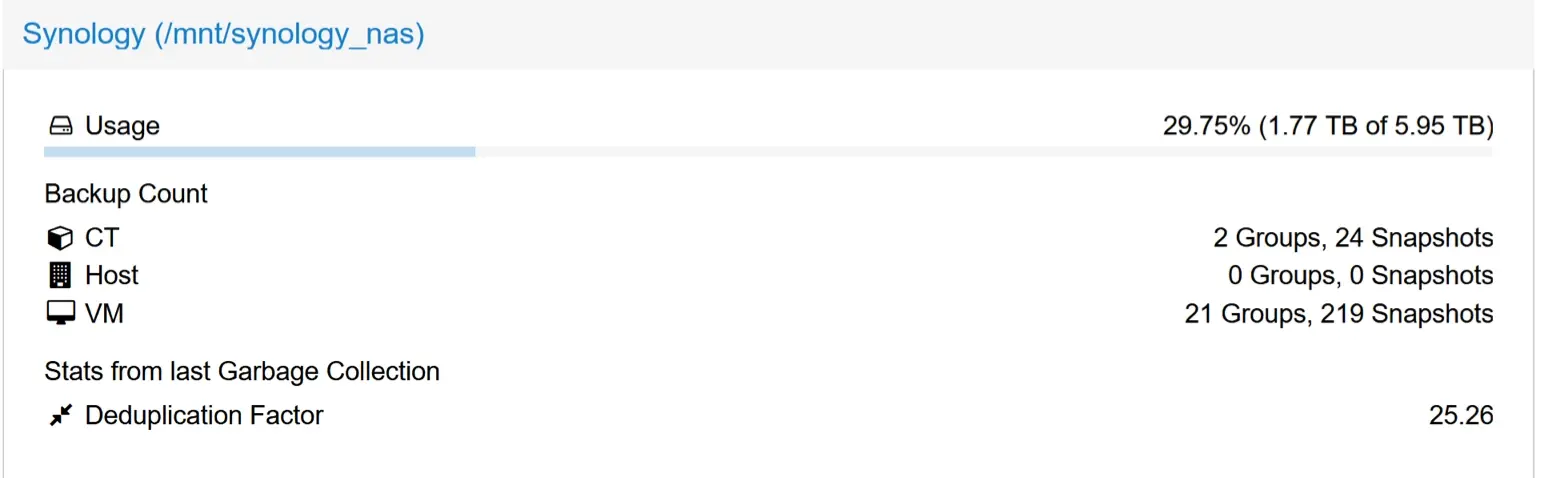
Compression via Zstandard reduces chunk sizes further. Combined with deduplicated backups, the storage savings are massive. In my setup, 21 VMs and 2 containers with 243 snapshots fit in 1.77TB on a 6TB Synology share. That is a deduplication factor of 25.26, meaning PBS stores 25 times less data than without dedup.
The installation medium for Proxmox Backup Server is a complete operating system that includes everything needed to install and run the server in just a few minutes.
The ISO image installer walks you through the Proxmox Backup Server installation process. Pick your target disk, choose between ext4, XFS, or ZFS, assign a network address, and you are done. You can also install Proxmox Backup Server on top of an existing Debian system.
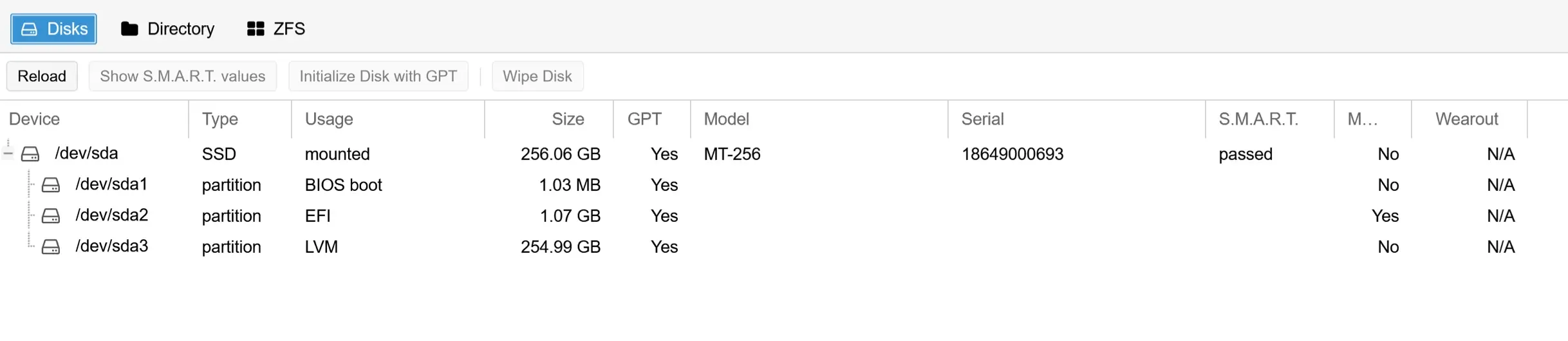
That depends on your scale. For a homelab, a mini-PC with a single SSD and 8 to 16GB RAM is enough. If the drive fails, you reinstall and point PBS back at your datastore.
For a small business, I recommend mirrored SSDs. Drives are the part that fails first, and a mirror means your backup server keeps running when one drive dies. That peace of mind is worth the extra SSD. Pair that with 16 to 32GB RAM, and you handle a Proxmox cluster with 20 to 50 virtual machines at a fraction of commercial appliance costs.
You can run a PBS VM for testing. For production, install Proxmox Backup Server on bare metal. If the PBS VM runs on the same Proxmox cluster you back up, a node failure takes down both your VMs and your backup server.
Installed bare metal on a separate box, Proxmox Backup Server stays available even when your PVE nodes go down. For setups where downtime means lost revenue, a dedicated installed bare metal PBS is the safe choice.
The Proxmox Backup Server stores backup data in datastores. A datastore can sit on ext4, XFS, or ZFS. You can run multiple datastores on different storage targets. For example, one datastore on a local SSD for fast backups and a second on a Synology NFS share for additional redundancy. Each datastore maintains an index of chunked snapshots. The server stores only unique chunks, which makes deduplicated backups space-efficient. When retention policies expire old snapshots, PBS runs garbage collection to remove orphaned data chunks. Expired data gets cleaned up in two phases: prune removes snapshot references, then the garbage collector deletes the orphaned data chunks.
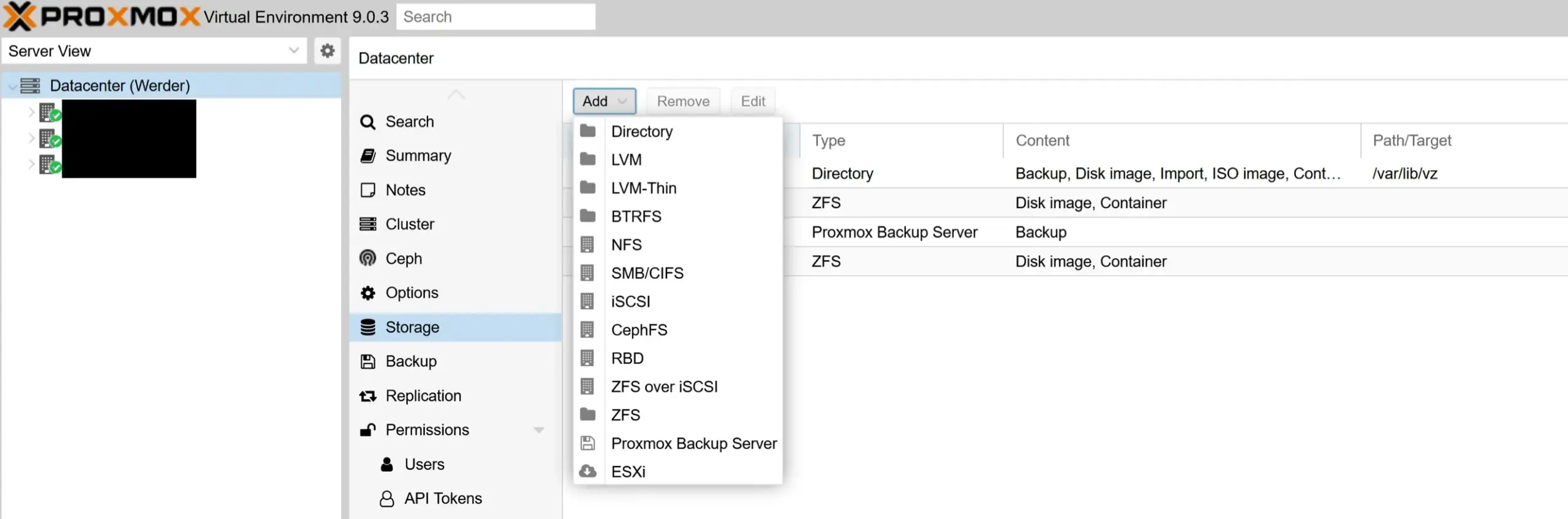
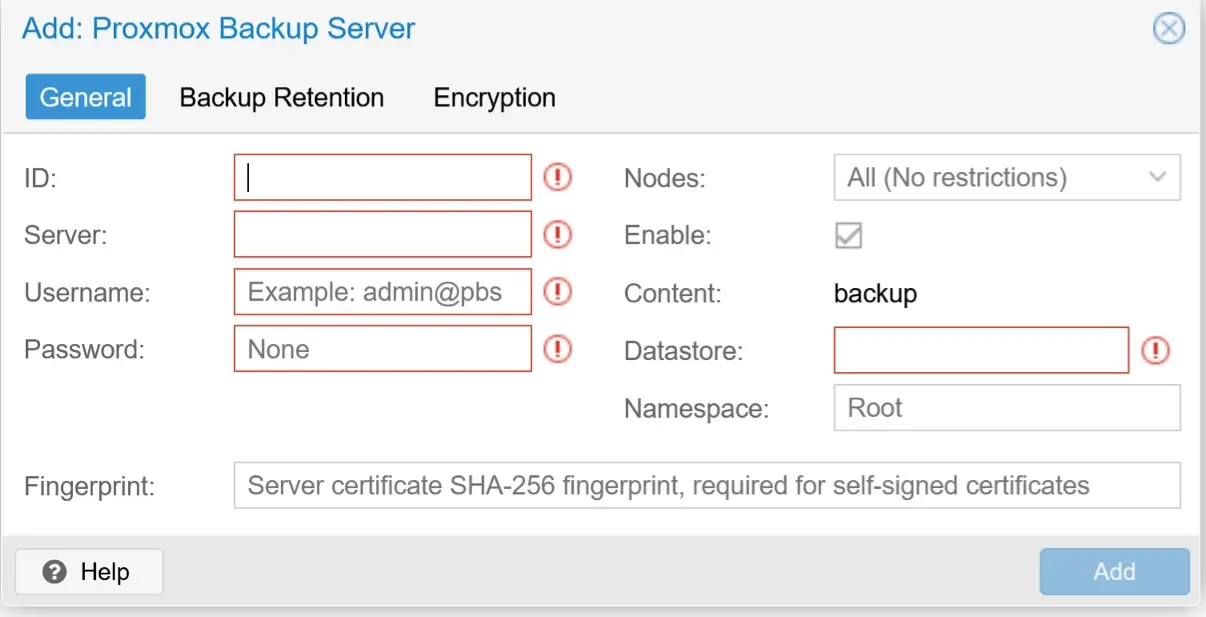
Proxmox Backup Server is tightly integrated with Proxmox VE. Go to Datacenter, Storage, Add, Proxmox Backup Server. Enter the IP address, port 8007, your datastore name, and the server fingerprint. Once connected, any user with the right permissions can browse and restore backups through the Proxmox VE web GUI.
Proxmox Backup Server is not limited to Proxmox VE. Install the proxmox backup client on any Debian or Ubuntu server to back up physical hosts. The client tool runs from the command line interface. Proxmox Server Solutions GmbH designed the software solution to handle incremental backups for containers and physical hosts the same way it handles VMs. Any user can manage backups for containers and physical hosts in the same datastore.
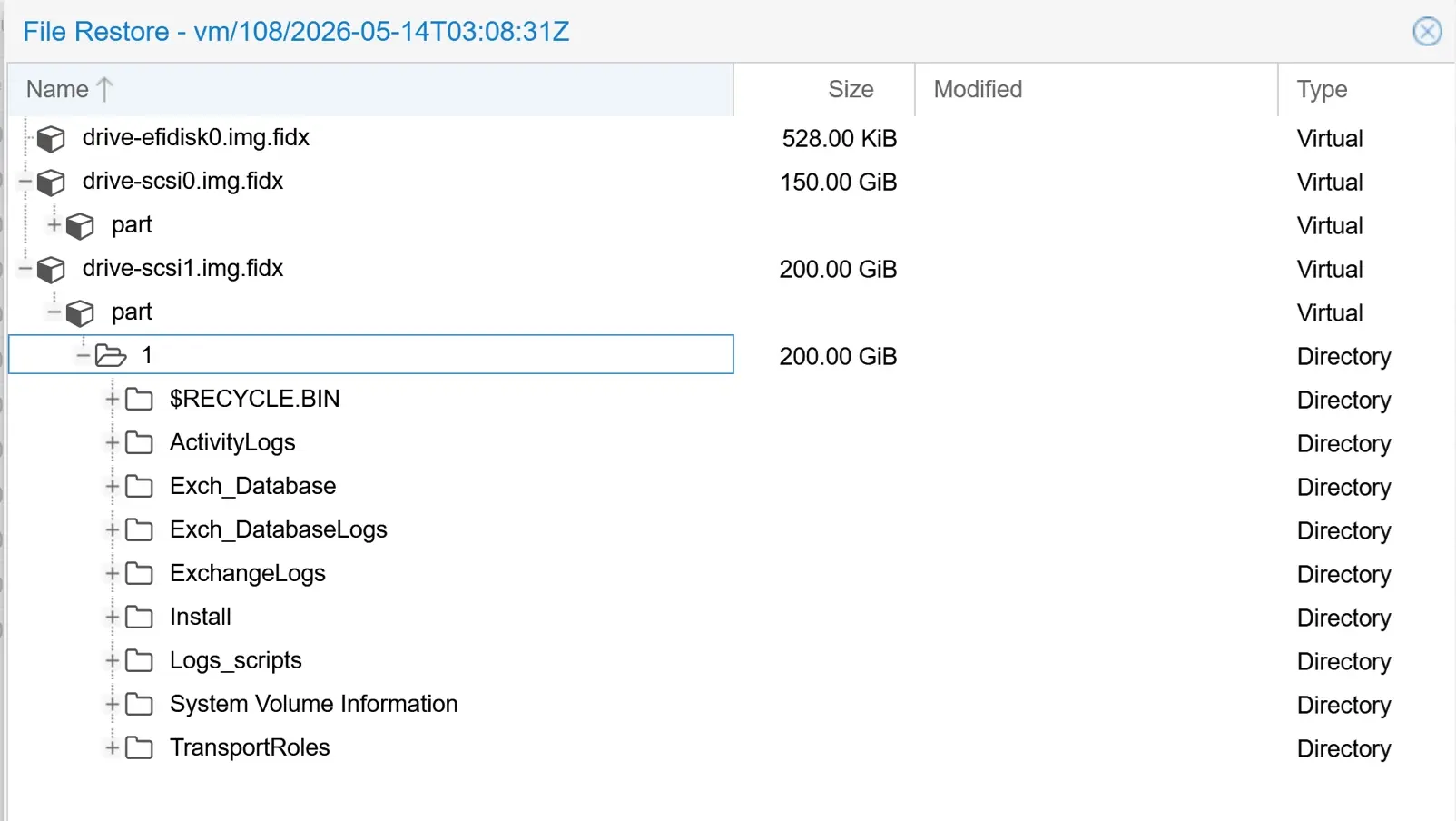
PBS provides block-level, image-level, and file-level recovery. This enables fast disaster recovery compared to full backup tarball methods. The web-based management tools let administrators search and download individual files and directories directly from the backup archive. File-level restore lets you browse and download individual files. To get them back into the VM, you copy them manually. There is no functionality to restore individual files directly back to the VM.
Need to recover a full VM after a node failure? Proxmox Backup Server supports live restore. The VM starts almost instantly while the remaining backup chunks copy in the background. This cuts downtime from hours to minutes.
Proxmox Backup Server uses AES-256 encryption in Galois/Counter Mode. Encryption happens client-side, meaning the backup server never sees your files unencrypted. This method enables user security even when the backup target is not fully trusted. PBS offers fine-grained access control and automated verification for ransomware mitigation.
Proxmox Backup Server supports server-side encryption for sync jobs, with snapshots encrypted before being sent to remote datastores. Proxmox Backup Server allows centralized management of encryption keys for tape and sync jobs.
For local backup storage, a mirrored ZFS pool on SSDs gives you checksumming, compression, and redundancy. Since PBS 4.2, S3-compatible object storage is officially supported as a backup storage backend. Send backups to AWS S3, MinIO, Wasabi, or Backblaze B2. User files and VM images get stored as deduplicated chunks regardless of the storage target.
One limitation: PBS does not support S3 Object Lock. Enabling Object Lock can corrupt your datastore. Security-conscious administrators should rely on PBS client-side encryption and access control instead.
Can you use a second Proxmox Backup Server and pull backups from the first? Yes. Pull sync jobs connect via HTTPS using an API token and pull incremental changes on a schedule. The primary Proxmox Backup Server needs no extra configuration.
Push sync jobs work too. Since PBS 4.2, push sync jobs encrypt snapshots before sending them to remote locations.
Create an API token on PBS1, add it as a remote on PBS2, and set up pull sync jobs on a nightly schedule. PBS2 pulls incremental changes from PBS1 over HTTPS. PBS1 has no idea PBS2 exists. If PBS1 gets compromised, the attacker finds no reference to your offsite backup. That is an added security layer at zero extra cost.
Production backups on Proxmox VE, local PBS in your office, remote Proxmox Backup Server at a second location. Fast backups locally, secure replication to remote locations.
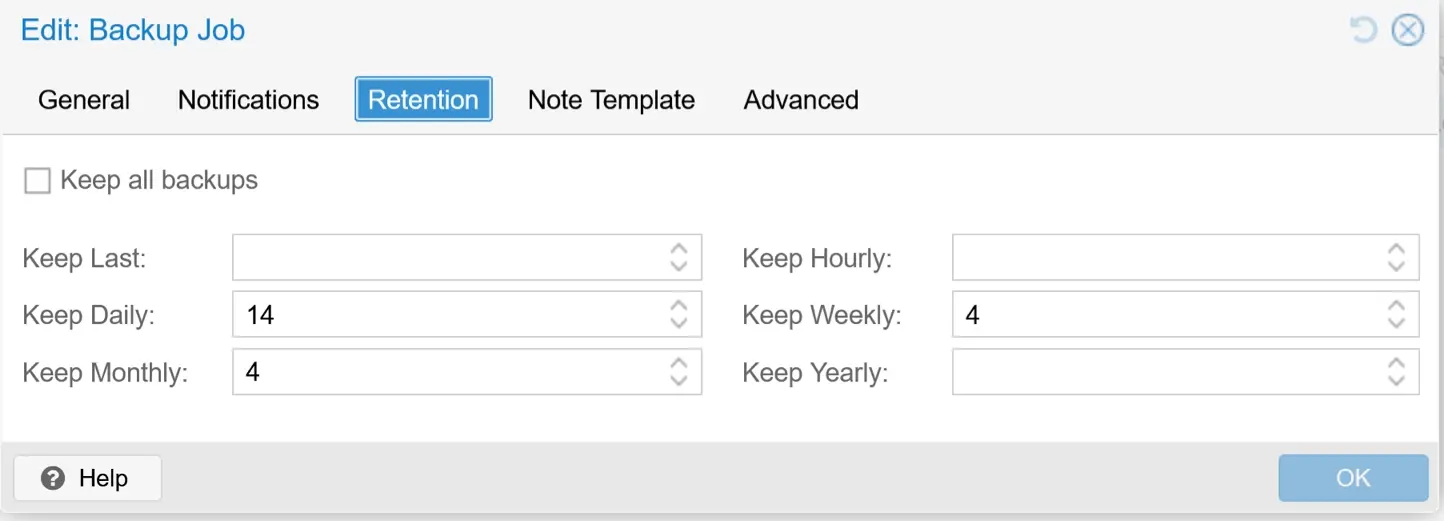
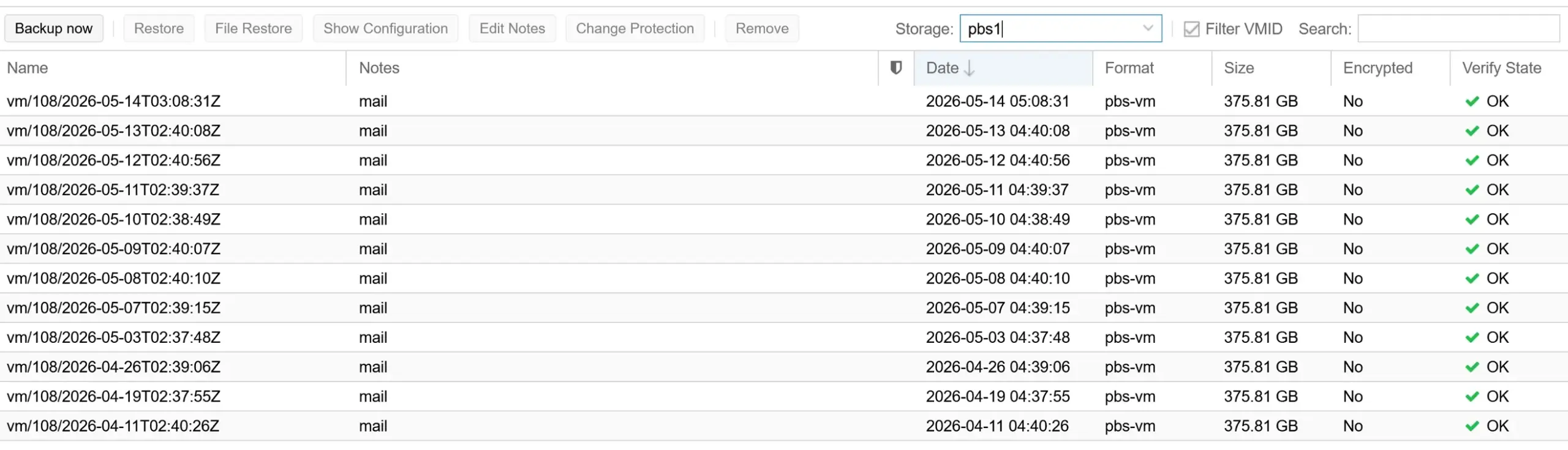
Configure retention policies per datastore or per backup group. I keep 14 daily, 4 weekly, and 4 monthly in the Proxmox VE backup job. But watch out: if a prune job exists on the PBS datastore, those settings take priority. In my case, the PBS prune job keeps 7 daily and 4 weekly, which overrides the PVE values. As you can see in the screenshots below, that is exactly what happened in my setup. Check both places to make sure they match what you actually want.
Enable email notifications for failed backup and verification jobs. Each Proxmox VE node sends a notification when a backup job finishes, so you catch failures early

Verify jobs check the SHA-256 checksums of stored chunks against the datastore index. This catches silent corruption before you actually need to restore. Schedule verify jobs regularly and enable the ignore-verified option with an outdated-after value of 7 or 30 days. PBS then skips chunks it has already verified recently.
Prune jobs remove snapshot indices based on your retention policies. Pruning alone does not free disk space. After prune runs, the garbage collector deletes the orphaned data chunks from the datastore. Configure prune and GC schedules in the web GUI, and this automation process runs on its own.
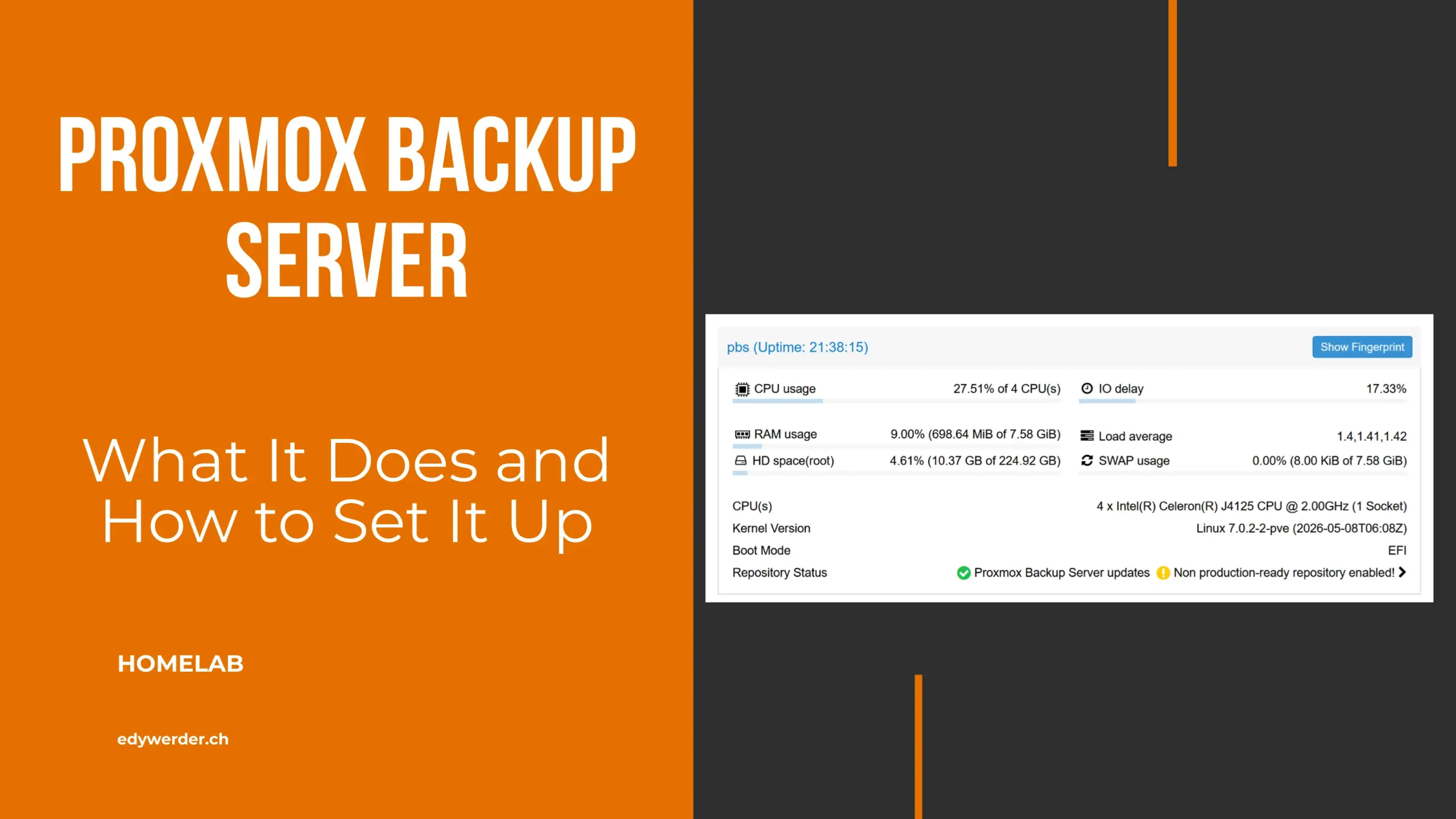
I run Proxmox Backup Server installed bare metal on an XCY Firewall Appliance mini-PC with an Intel Celeron J4125 and 8GB RAM. I bought it on AliExpress for about $150. The box runs 24/7, is fanless, and draws minimal power. The backup storage is a Synology NAS mounted via NFS share. I do not sync to a second Proxmox Backup Server. The Synology handles storage redundancy with its own RAID.
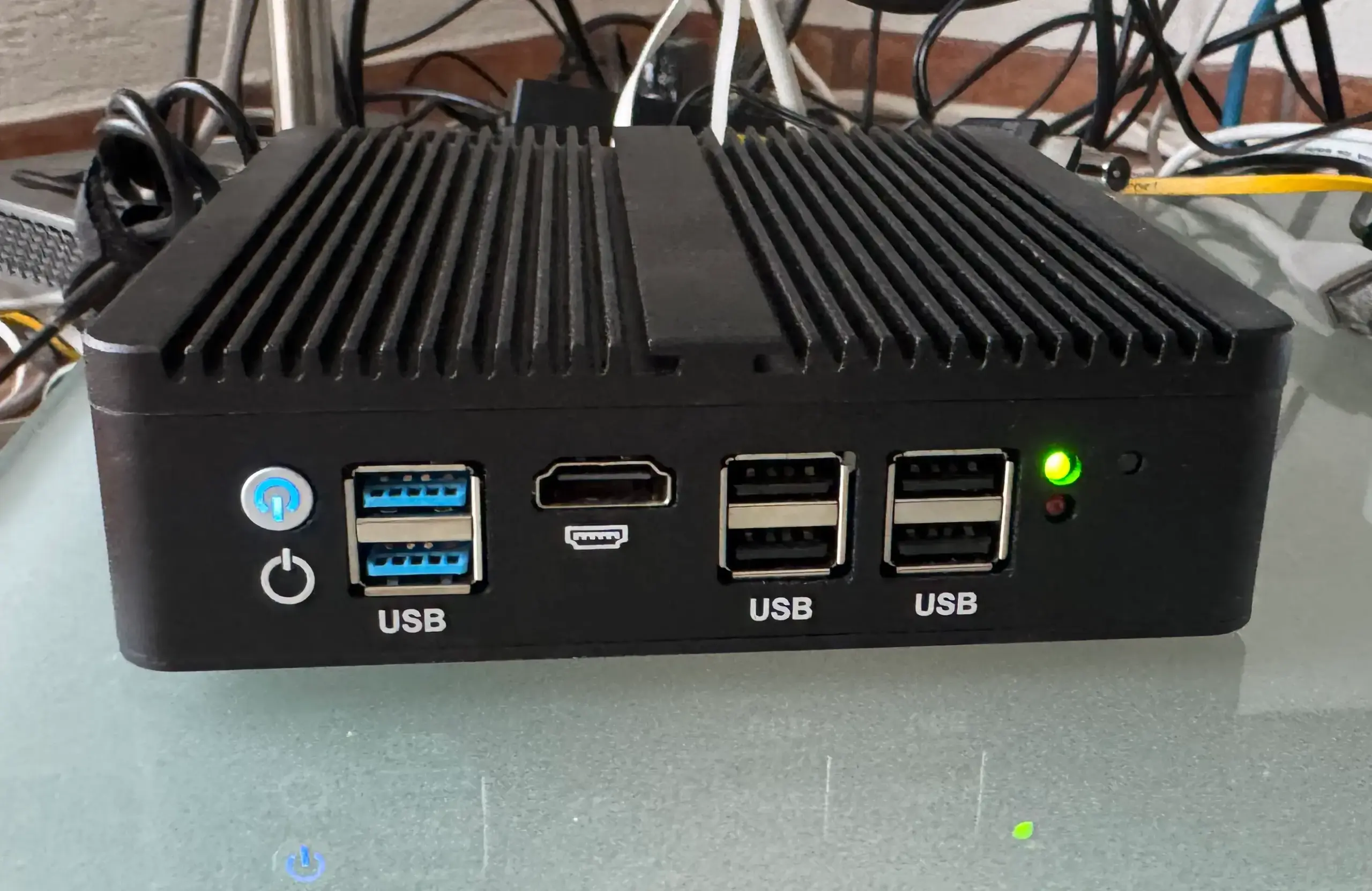
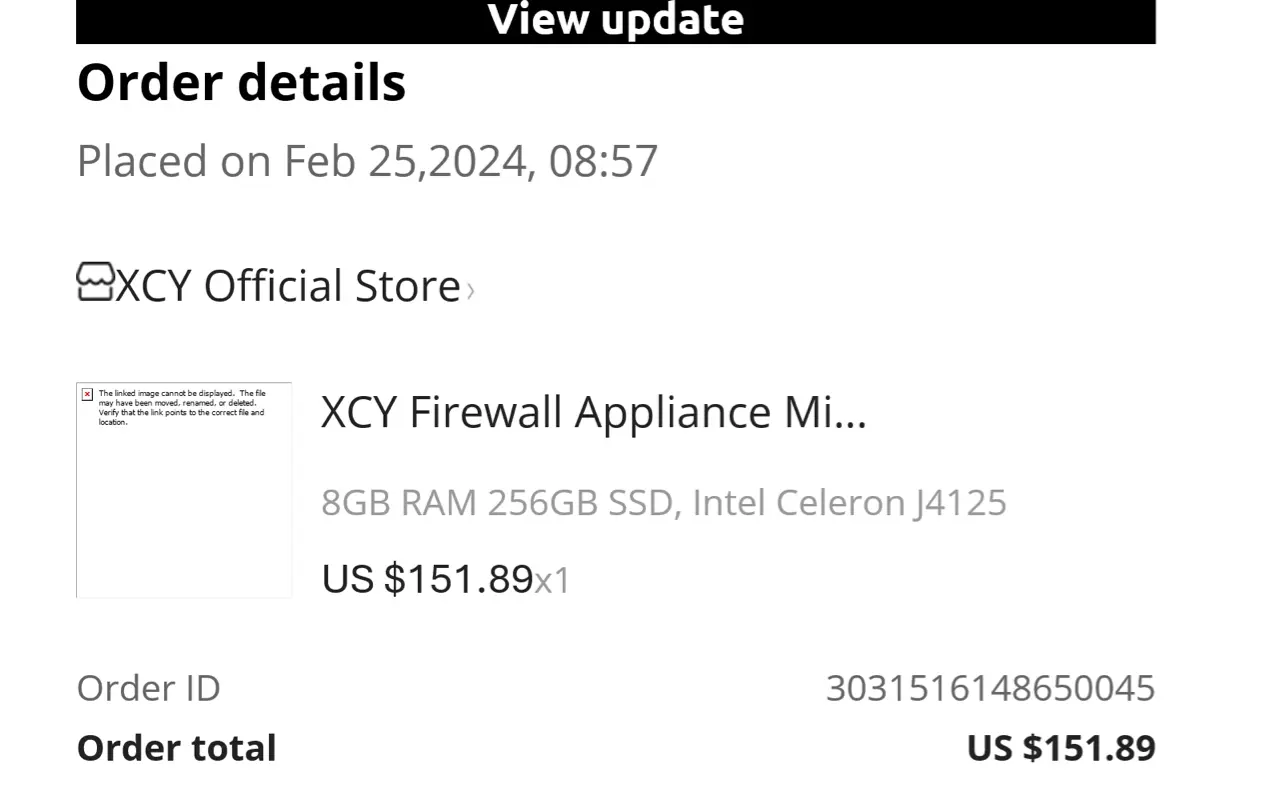

You can find similar mini-PCs on eBay.
A Proxmox Backup Server does not need much resources. During daily operation, RAM usage sits around 8% and CPU stays low. Even during a verify job running against 1.77TB over NFS, CPU only hits about 27%. For a homelab PBS, you do not need more than this.
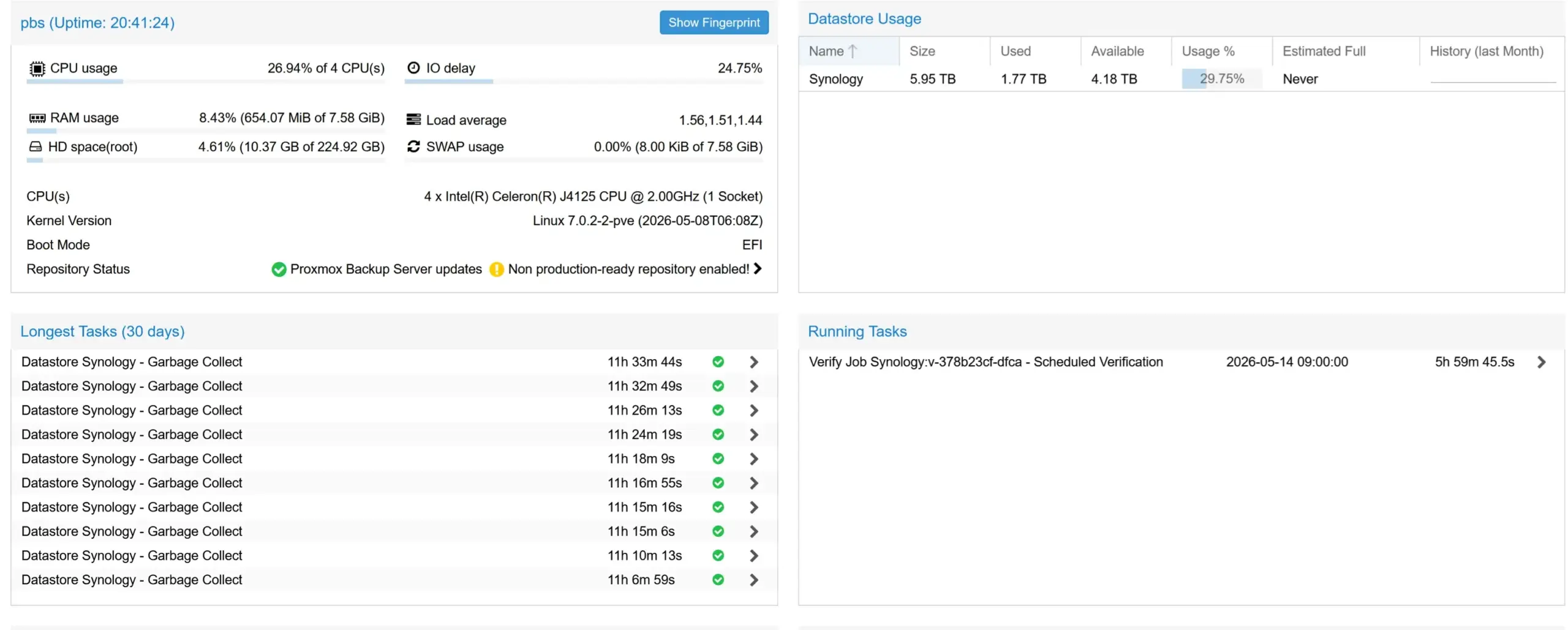
I use daily verify and prune jobs. Verify runs a long time when you check everything daily on an NFS-mounted datastore. With 1 to 3TB of backup data, PBS reads every chunk over the network. Switching to ignore-verified with outdated-after set to 30 days helps. After the first full pass, daily verify only checks new and outdated chunks.
This setup is not a textbook 3-2-1 solution, but it separates backup data from the Proxmox VE node. If the mini-PC dies, the backups still sit safely on the Synology. For a homelab, that is a practical trade-off between cost and security.
On top of that, I use Veeam Backup & Replication to back up the Proxmox VMs separately. Veeam sends offsite backups to an Ubuntu server with immutable storage. Even if PBS or the Synology gets compromised, the Veeam copy cannot be modified or deleted.
After publishing this article, I asked r/Proxmox about my 8.5-hour verify times. The community confirmed it: SATA HDDs in the Synology are the bottleneck, not the network. I bought a Lexar SL300 2TB USB SSD for $175 and set it up as a second datastore with a daily sync job from the Synology.
Full verify dropped from 8h 35m to 1h 54m.
With Skip Verified enabled, daily verify now takes 2 seconds. A $175 SSD solved what I thought was an NFS problem.
I documented the full benchmark, including read thread tests and HDD vs SSD verify times, in my guide on why Proxmox Backup Server verify is slow.
Veeam added native Proxmox VE support in version 12.2 (August 2024) with agentless backup for Proxmox virtual machines. The v13 plugin introduced application-aware processing for Windows VSS applications.
That said, Veeam still requires a Windows-based console for Proxmox backup jobs. Veeam v13 introduced a Linux-based Software Appliance, but its Web UI does not support Proxmox yet. Veeam VUL starts at $250 per workload per year. Protect 20 virtual machines and you pay $5,000 annually. The Proxmox Backup Server solution costs zero.
PBS wins for pure Proxmox environments where you want a lightweight, tightly integrated solution with easy management. The software tools are simpler to deploy for a single-hypervisor setup. Veeam makes sense if you run a mixed environment with VMware, Hyper-V, and Proxmox across multiple infrastructures.
I run both. PBS handles the daily Proxmox backups, Veeam handles offsite with immutable storage. They solve different problems.
Start with a dedicated bare-metal Proxmox Backup Server. For a homelab, a mini-PC with a single SSD is enough. For a small business, mirrored SSDs give you peace of mind. Deploy it in the same network as your Proxmox VE cluster for fast backups. Test restores monthly. Encrypt all backup files before leaving your office. Run verification jobs regularly to check integrity. This applies to VMs, containers, and physical host backups equally.
Place your Proxmox Backup Server in a separate room from your Proxmox VE nodes. If both sit in the same rack or room, a single event like a fire, flood, or theft takes out production and backups at once.
Before running any backup job, make sure your Proxmox node is up to date. Here is how to update Proxmox manually.
A pattern confirmed by other homelab users: back up and verify to fast local SSD, then sync to a NAS for longer retention. The SSD handles the IOPS-heavy verify jobs, the NAS provides the storage depth. Even an old laptop with an NVMe drive works well as a dedicated PBS box. It works on older or budget hardware.
I’d love to hear from you. Was this article helpful? Share your thoughts in the comments below. If you prefer, you can also reach me by email or connect with me on Reddit at Navigatetech.
Hi, I’m Edy Werder. I write hands-on guides about Proxmox, homelab servers, NAS, and WordPress, based on real setups I run and document.
No sponsors, no fluff—just real configs and results.
Enjoying the content?

